ModulesGarden Documentation
Back Home Home

Access Control Tool

  • Navigation
    • Main Page
    • ModulesGarden Website
    • Help
  • WHMCS Modules
    • Abandoned Cart
    • Account Synchronization
    • AdminBolt Licenses
    • Advanced Billing
    • Alibaba Cloud Virtual Machines
    • Amazon EC2
    • Amazon Lightsail
    • Anti-Fraud And Email Verification
    • Client Area Designer
    • Client Area Popup
    • Client Profile Viewer
    • Cloud Billing
    • cPanel Extended
    • cPanel Manage2
    • CRM
    • DigitalOcean Droplets
    • DirectAdmin Extended
    • DirectAdmin Licenses
    • Discount Center
    • DNS Manager
    • Domain Allocator
    • Domain & Email Forwarding
    • Domain Orders Extended
    • Domains Reseller
    • EasyDCIM Colocation
    • EasyDCIM Dedicated Servers
    • Email Notifications Organizer
    • Emoji Picker
    • EURid Registrar
    • Expense Tracker
    • Freshdesk
    • Freshservice
    • Geolocation Hook
    • GoDaddy Domain Registrar
    • GoGetSSL
    • Google Analytics
    • Google Cloud Virtual Machines
    • Google Workspace
    • Hetzner Cloud Servers
    • Hosting Quota Notifications
    • Hosting Renewals
    • IBM Cloud Virtual Servers
    • IP Manager
    • Lagom Smart Order Form
    • Login-Free Payments
    • Marketing Triggers Automation
    • MetricsCube Business Analytics
    • MikroTik WireGuard VPN
    • Multibrand
    • NIC IT Registrar
    • Office 365
    • OpenStack Projects
    • OpenStack VPS & Cloud
    • OVHcloud VPS & Dedicated Servers
    • Password Manager
    • Payment Gateway Allocator
    • Payment Gateway Charges
    • Plesk Extended
    • Plesk Key Administrator
    • Portainer Docker Containers
    • Premium Support Tickets
    • Product Cross-Selling
    • Product Feedback Center
    • Product Free Trial Manager
    • Product Linker
    • Products Reseller
    • Proxmox Mail Gateway
    • Proxmox VE Cloud VPS (Legacy)
    • Proxmox VE VPS & Cloud
    • QuickBooks Desktop
    • QuickBooks Online
    • QuickBooks Online Survey
    • Quotes Automation
    • R1Soft Backups
    • Rackspace Email Extended
    • Recurring Contract Billing
    • Report Generator
    • Resellers Center
    • Server Allocator
    • Secure Support Messages
    • Server Monitoring
    • SMS Center
    • Social Media Login
    • SolusVM 2 VPS & Cloud
    • SolusVM Extended VPS
    • SolusVM Extended Cloud
    • SolusVM Extended Reseller
    • Stripe SEPA Payments
    • Support PIN
    • Support Tickets Allocator
    • Time & Task Manager
    • Unban Center
    • Virtuozzo Hybrid Infrastructure S3
    • Virtuozzo Hybrid Server
    • Vultr VPS
    • WithoutDNS
    • WordPress Manager
    • Zendesk
    • Zimbra & Carbonio Email
  • Legacy Versions
    • Advanced Billing 3.X
    • Domain Orders Extended 2.X
    • Domains Reseller 1.X
    • EasyDCIM Colocation V1.X
    • EasyDCIM Dedicated Servers V1.X
    • EasyDCIM Dedicated Servers V2.X
    • Hosting Quota Notifications 1.X
    • Hosting Renewals 2.X
    • IP Manager 2.5.X
    • Lagom One Step Order Form 1.2.X
    • Multibrand 1.X
    • Office 365 1.0.0
    • Payment Gateway Charges 1.X
    • Proxmox Cloud 2.X
    • Proxmox VPS 2.X
    • Quotes Automation 1.X
    • Recurring Contract Billing 1.5.X
    • Report Generator 3.X
    • Resellers Center 2.X
    • SMS Center 2.X
    • Unban Center 1.X
    • Zimbra Email For WHMCS
    • Zimbra Email 1.X
  • WHMCS Module Bundles
    • Accounting
    • Commerce
    • CRM
    • Customer Experience
    • Domain Reseller
    • Hosting Accounts Provisioning
    • IaaS VPS And Cloud Provisioning
    • On-Premises VPS And Cloud Provisioning
  • WHMCS Widgets
    • Freshdesk Customer Widget
    • ModulesGarden Widget
    • WHMCS Widget For Zendesk
  • Tools And Applications
    • Access Control Tool
    • App Templates Tool
    • Automations Tool
    • Logs
    • Proxmox Proxy Application
    • Task Queue Tool
    • Theme Management Tool
  • Translations
    • Translations Tool
    • Translations
    • Polish Language Translation
    • Polska Wersja Językowa (PL)
  • General
    • 7-Day Free Access
    • How To Change WHMCS Module Language
    • How To Debug Module
    • How To Solve Problems With Module License
    • How To Change WHMCS Module Design
    • How To Update WHMCS Module
    • How To Upgrade WHMCS Module
    • How To Use Configurable Options
  • FAQ
    • Common Questions
    • WHMCS Module Bundles
  • Community
    • Forums
    • Blog
    • Facebook
    • X
    • LinkedIn
    • Instagram
    • Reddit
    About Access Control Tool Management

# Access Control Tool

  • About Access Control Tool
  • Management
    • Rules
    • Resources
    • Access Control Logs

# About Access Control Tool

The Access Control tool lets you define which sections and features of the module can be accessed by specific administrators.
It also maintains detailed logs of admin activities, providing a clear record for accountability.

With this tool, you can easily manage permissions and ensure that access is tailored to your team’s needs.

# Management

The Access Control Tool allows easy management of permissions that will restrict your personnel to view resources and perform specified module actions.
It can be located in one of two places, depending on the layout of the addon module menu. It may either appear directly in the main menu or be grouped under the "Other" section alongside additional features.
This setup is illustrated below using the WordPress Manager For WHMCS module as an example.
Note: This arrangement is commonly used when the addon has a significant number of menu entries. 'Rules', 'Resources', and 'Logs' are the three sections that build the Access Control tool. Please refer to the below sections to learn all the details.

# Rules

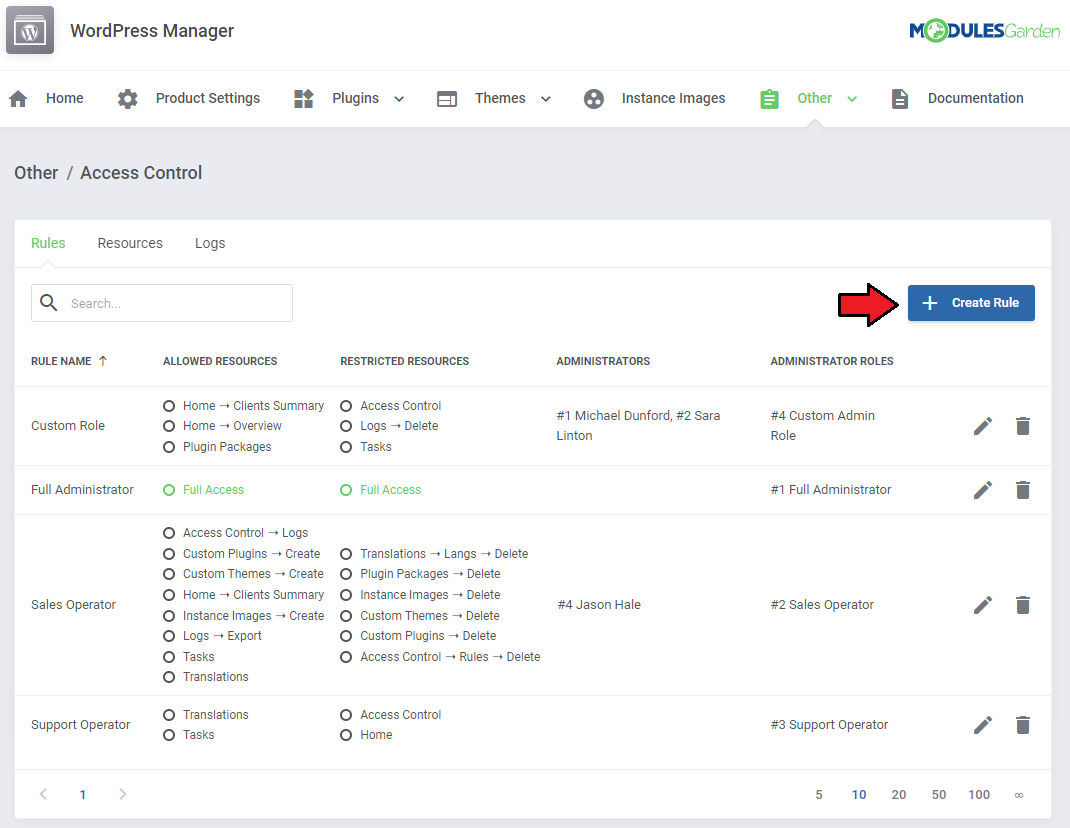
Start with creating a new rule, click on the 'Create Rule' button and a dedicated form will appear. Below you will find a description of every field required in the form.
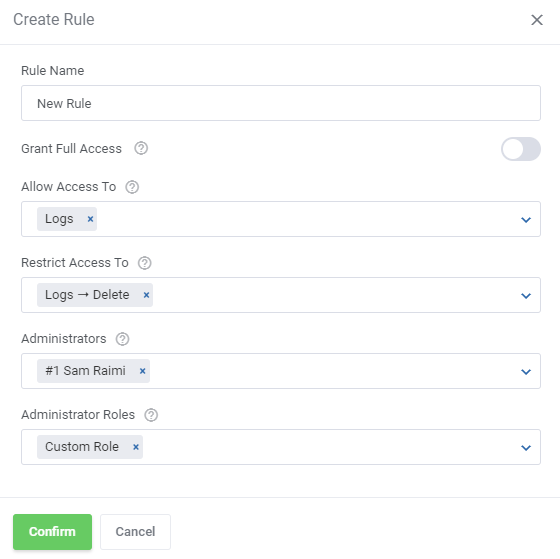
Fill out the following fields to create resources access rule:

  • Rule Name - pick a name for your rule.
  • Grant Full Access - enable to grant full access to all sections of the module to the specified personnel. Disable to specify in two additional fields below, to which resources access will be granted, and to which it will be denied.
  • Allow Access To - designate the resources that the specified personnel will have access to.
  • Restrict Access To - specify the resources that the specified personnel will not have access to.
  • Administrators - specify which singular administrators will be subject to the new rule. If the specific administrator is already included in the group you have picked, you do not need to add them separately.
    Note: All restrictions for specific administrators are summed with the restrictions on their role groups, across all rules.
  • Administrator Roles - specify which administrator role groups will be subject to the new rule.
    Important: When picking specific sections, keep in mind that allowing a parent section will also allow all of its children.
    For example by allowing 'Logs' you allow 'Logs → Export,' 'Logs → Delete' etc.'
    If you would like to give access to everything about logs, but the ability to delete them, you can pick 'Logs' in 'Allow Access To' and then 'Logs → Delete' in 'Restrict Access To.'
    Restrict takes precedence over Allow, so if a specific section is included in both, it will be restricted.
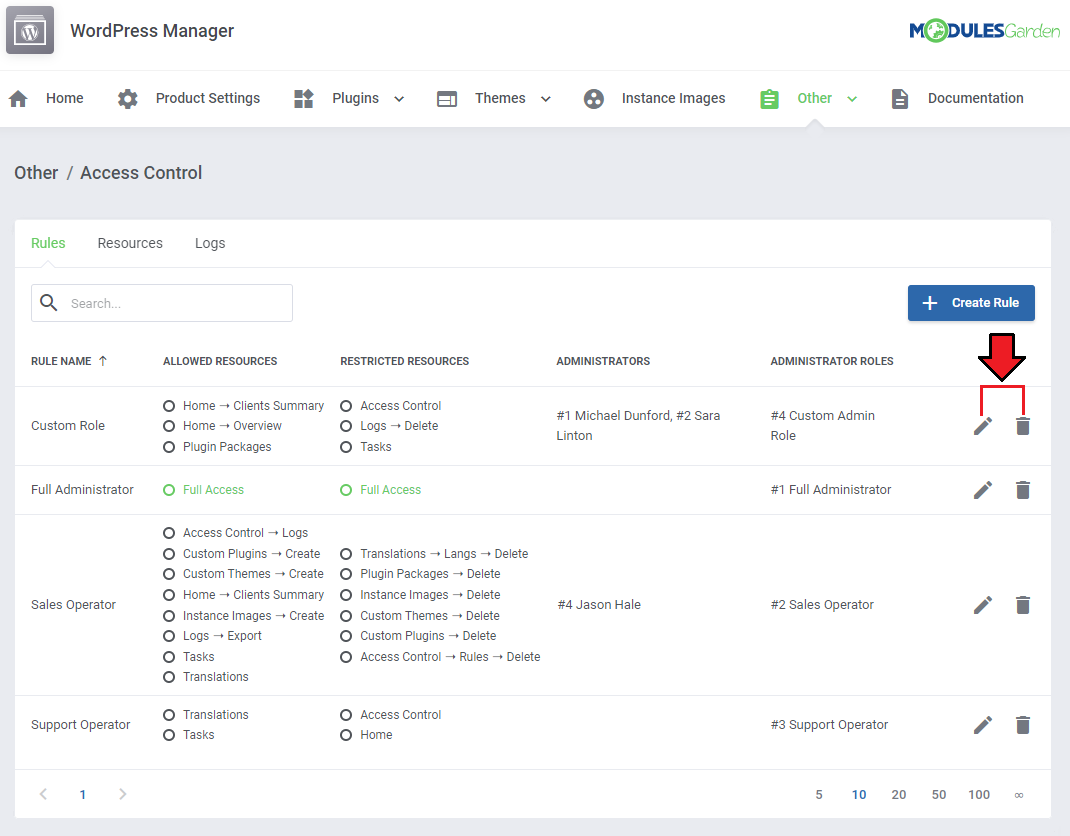
To edit or delete existing rules, use the icons to the right.
# Resources

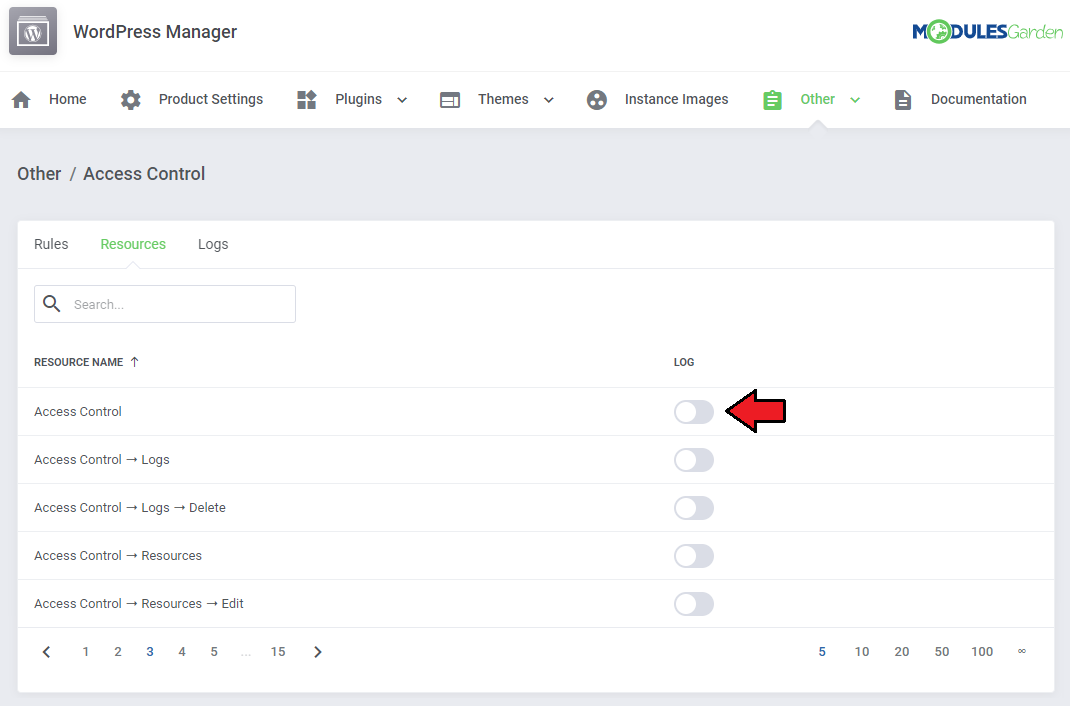
Use the toggles in the 'Resources' section to specify which of them should be subject to logging.
Every time an administrator requests a toggled resource, it will be recorded in the 'Logs' section.
# Access Control Logs

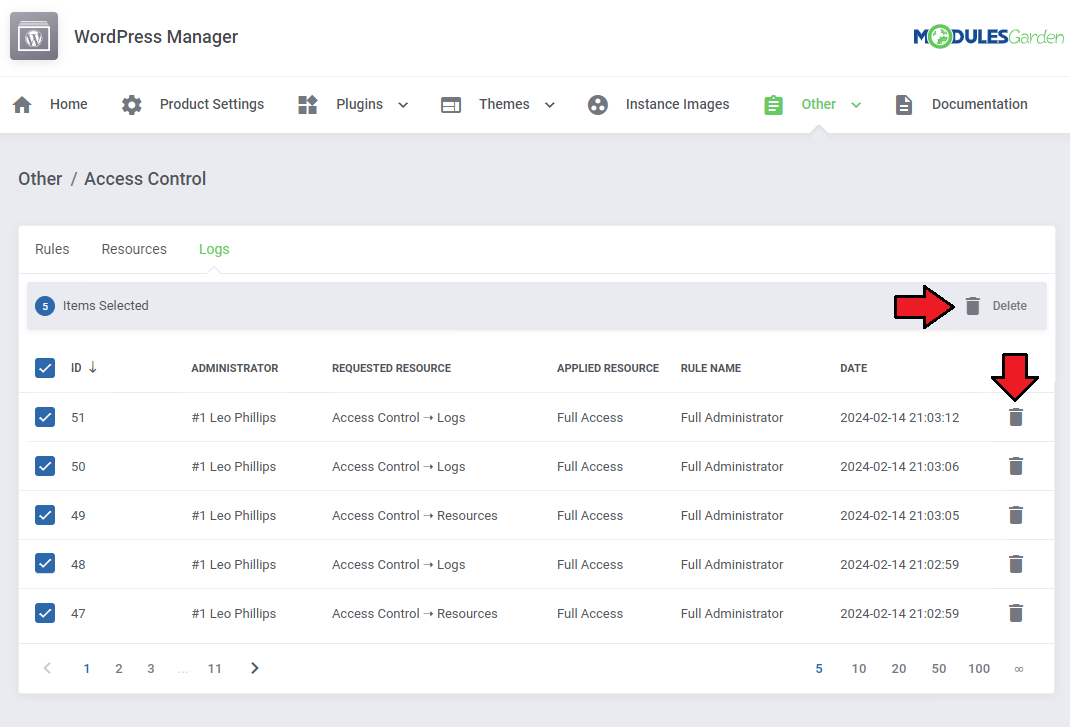
The logs entries include:

  • Log ID
  • Name of the administrator
  • Requested resource
  • Applied Resource
  • Rule Name
  • Date
    Use the trash bin icons to delete specific logs, or utilize the mass action function to delete multiple logs at once.