
ModulesGarden Documentation
Back Home Home

Customer Experience WHMCS Module Bundle

  • Navigation
    • Main Page
    • ModulesGarden Website
    • Help
  • WHMCS Modules
    • Abandoned Cart
    • Account Synchronization
    • AdminBolt Licenses
    • Advanced Billing
    • Alibaba Cloud Virtual Machines
    • Amazon EC2
    • Amazon Lightsail
    • Anti-Fraud And Email Verification
    • Client Area Designer
    • Client Area Popup
    • Client Profile Viewer
    • Cloud Billing
    • cPanel Extended
    • cPanel Manage2
    • CRM
    • DigitalOcean Droplets
    • DirectAdmin Extended
    • DirectAdmin Licenses
    • Discount Center
    • DNS Manager
    • Domain Allocator
    • Domain & Email Forwarding
    • Domain Orders Extended
    • Domains Reseller
    • EasyDCIM Colocation
    • EasyDCIM Dedicated Servers
    • Email Notifications Organizer
    • Emoji Picker
    • EURid Registrar
    • Expense Tracker
    • Freshdesk
    • Freshservice
    • Geolocation Hook
    • GoDaddy Domain Registrar
    • GoGetSSL
    • Google Analytics
    • Google Cloud Virtual Machines
    • Google Workspace
    • Hetzner Cloud Servers
    • Hosting Quota Notifications
    • Hosting Renewals
    • IBM Cloud Virtual Servers
    • IP Manager
    • Lagom Smart Order Form
    • Login-Free Payments
    • Marketing Triggers Automation
    • MetricsCube Business Analytics
    • MikroTik WireGuard VPN
    • Multibrand
    • NIC IT Registrar
    • Office 365
    • OpenStack Projects
    • OpenStack VPS & Cloud
    • OVHcloud VPS & Dedicated Servers
    • Password Manager
    • Payment Gateway Allocator
    • Payment Gateway Charges
    • Plesk Extended
    • Plesk Key Administrator
    • Portainer Docker Containers
    • Premium Support Tickets
    • Product Cross-Selling
    • Product Feedback Center
    • Product Free Trial Manager
    • Product Linker
    • Products Reseller
    • Proxmox Mail Gateway
    • Proxmox VE Cloud VPS (Legacy)
    • Proxmox VE VPS & Cloud
    • QuickBooks Desktop
    • QuickBooks Online
    • QuickBooks Online Survey
    • Quotes Automation
    • R1Soft Backups
    • Rackspace Email Extended
    • Recurring Contract Billing
    • Report Generator
    • Resellers Center
    • Server Allocator
    • Secure Support Messages
    • Server Monitoring
    • SMS Center
    • Social Media Login
    • SolusVM 2 VPS & Cloud
    • SolusVM Extended VPS
    • SolusVM Extended Cloud
    • SolusVM Extended Reseller
    • Stripe SEPA Payments
    • Support PIN
    • Support Tickets Allocator
    • Time & Task Manager
    • Unban Center
    • Virtuozzo Hybrid Infrastructure S3
    • Virtuozzo Hybrid Server
    • Vultr VPS
    • WithoutDNS
    • WordPress Manager
    • Zendesk
    • Zimbra & Carbonio Email
  • Legacy Versions
    • Advanced Billing 3.X
    • Domain Orders Extended 2.X
    • Domains Reseller 1.X
    • EasyDCIM Colocation V1.X
    • EasyDCIM Dedicated Servers V1.X
    • EasyDCIM Dedicated Servers V2.X
    • Hosting Quota Notifications 1.X
    • Hosting Renewals 2.X
    • IP Manager 2.5.X
    • Lagom One Step Order Form 1.2.X
    • Multibrand 1.X
    • Office 365 1.0.0
    • Payment Gateway Charges 1.X
    • Proxmox Cloud 2.X
    • Proxmox VPS 2.X
    • Quotes Automation 1.X
    • Recurring Contract Billing 1.5.X
    • Report Generator 3.X
    • Resellers Center 2.X
    • SMS Center 2.X
    • Unban Center 1.X
    • Zimbra Email For WHMCS
    • Zimbra Email 1.X
  • WHMCS Module Bundles
    • Accounting
    • Commerce
    • CRM
    • Customer Experience
    • Domain Reseller
    • Hosting Accounts Provisioning
    • IaaS VPS And Cloud Provisioning
    • On-Premises VPS And Cloud Provisioning
  • WHMCS Widgets
    • Freshdesk Customer Widget
    • ModulesGarden Widget
    • WHMCS Widget For Zendesk
  • Tools And Applications
    • Access Control Tool
    • App Templates Tool
    • Automations Tool
    • Logs
    • Proxmox Proxy Application
    • Task Queue Tool
    • Theme Management Tool
  • Translations
    • Translations Tool
    • Translations
    • Polish Language Translation
    • Polska Wersja Językowa (PL)
  • General
    • 7-Day Free Access
    • How To Change WHMCS Module Language
    • How To Debug Module
    • How To Solve Problems With Module License
    • How To Change WHMCS Module Design
    • How To Update WHMCS Module
    • How To Upgrade WHMCS Module
    • How To Use Configurable Options
  • FAQ
    • Common Questions
    • WHMCS Module Bundles
  • Community
    • Forums
    • Blog
    • Facebook
    • X
    • LinkedIn
    • Instagram
    • Reddit
    About Customer Experience Bundle

# Customer Experience WHMCS Module Bundle

  • About Customer Experience Bundle
    • What You Can Achieve
    • Included Modules
    • Quick Start Guide
    • Practical Notes
    • Use Case: Improving Post-Sale Client Engagement
    • Useful Links

# (opens new window) About Customer Experience Bundle (opens new window)

The Customer Experience module bundle is tailored for hosting providers and service vendors who want to enhance communication, engagement, and satisfaction of their clients.
It combines key WHMCS modules that optimize how your clients interact with your brand, from login to renewal.
Whether you aim to reduce churn, improve service clarity, or collect actionable feedback, this bundle provides the tools to manage it all within WHMCS. Not sure how monthly module bundles work? See our FAQ - WHMCS Module Bundles for answers to common questions about subscriptions, updates, and usage.

# What You Can Achieve

This bundle enables you to:

  • Notify clients about important service changes via email or SMS
  • Warn clients before resource usage limits are exceeded
  • Offer quick login options via social media accounts
  • Let clients unblock their own IP addresses without contacting support
  • Display pop-up announcements or onboarding tips in the client area
  • Automate communication based on specific actions or behaviors
  • Collect feedback on services directly from WHMCS
  • Allow clients to securely store and autofill service credentials
    All features work together to help you deliver a smooth, transparent, and responsive user experience.
# Included Modules

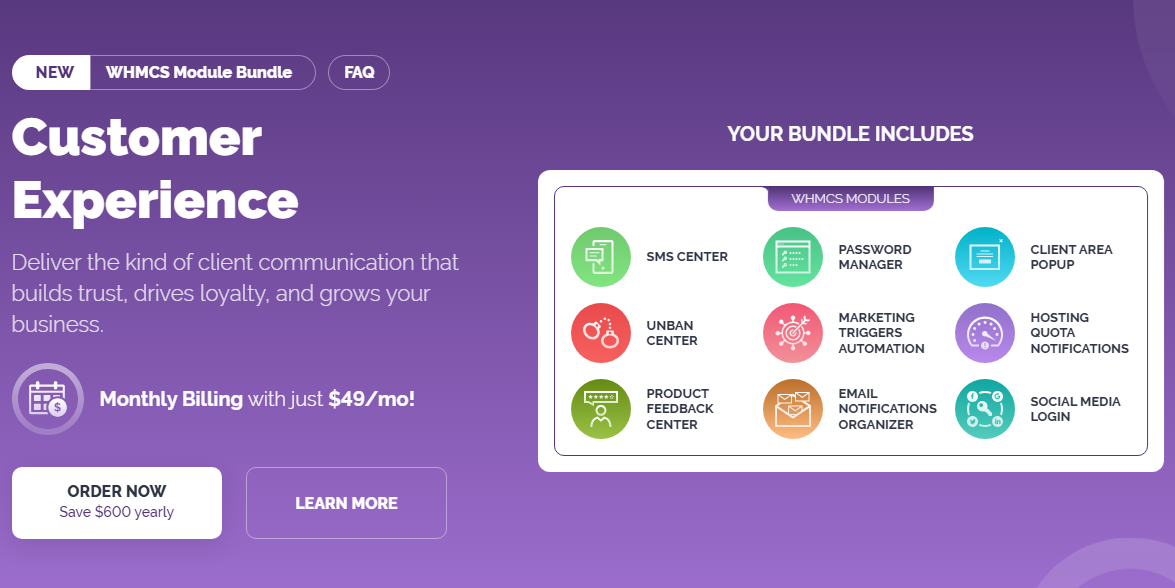
This bundle includes the following ModulesGarden products:

  • SMS Center For WHMCS (opens new window) - Send automated or manual SMS messages for billing, service events, or marketing
  • Password Manager For WHMCS (opens new window) - Let clients store and manage passwords securely in their client area
  • Client Area Popup For WHMCS (opens new window) - Display pop-up announcements and tips based on configurable rules
  • Unban Center For WHMCS (opens new window) - Allow clients to unblock their own IPs from the firewall
  • Marketing Triggers Automation For WHMCS (opens new window) - Define and automate actions like email sending or service updates based on specific events
  • Hosting Quota Notifications For WHMCS (opens new window) - Warn clients when they approach resource limits such as disk space or bandwidth
  • Product Feedback Center For WHMCS (opens new window) - Collect structured product reviews and ratings directly from customers
  • Email Notifications Organizer For WHMCS (opens new window) - Customize and categorize all outgoing email notifications in one place
  • Social Media Login For WHMCS (opens new window) - Enable single sign-on via Facebook, Google, X (Twitter), or Discord
    All modules are licensed under one monthly subscription, and can be activated individually based on your business needs.

# Quick Start Guide

You can install each module independently and configure it to match your client communication strategy. There is no required order or dependency between the modules.

  1. Order the bundle from the ModulesGarden Marketplace (opens new window)
  2. Download the module packages from your client area (opens new window)
  3. Install the selected modules using official documentation:
    • SMS Center For WHMCS (opens new window)
    • Password Manager For WHMCS (opens new window)
    • Client Area Popup For WHMCS (opens new window)
    • Unban Center For WHMCS (opens new window)
    • Marketing Triggers Automation For WHMCS (opens new window)
    • Hosting Quota Notifications For WHMCS (opens new window)
    • Product Feedback Center For WHMCS (opens new window)
    • Email Notifications Organizer For WHMCS (opens new window)
    • Social Media Login For WHMCS (opens new window)
  4. Activate and configure the modules in the WHMCS admin area
  5. Define rules, messages, thresholds, or templates based on your user experience strategy

# Practical Notes

  • Modules work independently but contribute collectively to client satisfaction
  • Ideal for hosting companies aiming to increase retention and reduce support load
  • Many features (like notifications and popups) require no coding - use built-in configuration options
  • You can add or remove modules without affecting others

# Use Case: Improving Post-Sale Client Engagement

Scenario Overview:
A hosting company wants to reduce customer churn and provide a more responsive experience after initial product purchase.
The company deploys this bundle to introduce proactive communication, client self-service, and simplified interactions.

  • Example Setup

    • Clients log in using Social Media Login and are greeted with a Client Area Popup explaining how to manage their hosting service.
    • As disk usage increases, Hosting Quota Notifications sends alerts via both email and ticket.
    • The support team configures Unban Center so blocked IP addresses can be lifted by clients instantly, cutting tickets.
    • Feedback is collected regularly with Product Feedback Center, and results are reviewed monthly.
  • Email Notifications Organizer ensures messages are relevant and delivered on time.

  • Password Manager lets clients store login credentials for various systems (e.g., FTP, WordPress) directly in their panel.

  • Key Benefits

    • Fewer support requests thanks to self-service and proactive notifications
    • Increased clarity of communication through well-organized alerts and popups
    • Structured feedback flow to identify pain points or missing features
    • Flexible experience that adapts to the client’s preferences and platform usage

# Useful Links

  • WHMCS Module Bundles Overview (opens new window)
  • Customer Experience Module Bundle Page (opens new window)
  • Blog Article - Customer Experience Bundle Spotlight (opens new window)
  • FAQ - WHMCS Module Bundles (opens new window)