ModulesGarden Documentation
Back Home Home

Logs

  • Navigation
    • Main Page
    • ModulesGarden Website
    • Help
  • WHMCS Modules
    • Abandoned Cart
    • Account Synchronization
    • AdminBolt Licenses
    • Advanced Billing
    • Alibaba Cloud Virtual Machines
    • Amazon EC2
    • Amazon Lightsail
    • Anti-Fraud And Email Verification
    • Client Area Designer
    • Client Area Popup
    • Client Profile Viewer
    • Cloud Billing
    • cPanel Extended
    • cPanel Manage2
    • CRM
    • DigitalOcean Droplets
    • DirectAdmin Extended
    • DirectAdmin Licenses
    • Discount Center
    • DNS Manager
    • Domain Allocator
    • Domain & Email Forwarding
    • Domain Orders Extended
    • Domains Reseller
    • EasyDCIM Colocation
    • EasyDCIM Dedicated Servers
    • Email Notifications Organizer
    • Emoji Picker
    • EURid Registrar
    • Expense Tracker
    • Freshdesk
    • Freshservice
    • Geolocation Hook
    • GoDaddy Domain Registrar
    • GoGetSSL
    • Google Analytics
    • Google Cloud Virtual Machines
    • Google Workspace
    • Hetzner Cloud Servers
    • Hosting Quota Notifications
    • Hosting Renewals
    • IBM Cloud Virtual Servers
    • IP Manager
    • Lagom Smart Order Form
    • Login-Free Payments
    • Marketing Triggers Automation
    • MetricsCube Business Analytics
    • MikroTik WireGuard VPN
    • Multibrand
    • NIC IT Registrar
    • Office 365
    • OpenStack Projects
    • OpenStack VPS & Cloud
    • OVHcloud VPS & Dedicated Servers
    • Password Manager
    • Payment Gateway Allocator
    • Payment Gateway Charges
    • Plesk Extended
    • Plesk Key Administrator
    • Portainer Docker Containers
    • Premium Support Tickets
    • Product Cross-Selling
    • Product Feedback Center
    • Product Free Trial Manager
    • Product Linker
    • Products Reseller
    • Proxmox Mail Gateway
    • Proxmox VE Cloud VPS (Legacy)
    • Proxmox VE VPS & Cloud
    • QuickBooks Desktop
    • QuickBooks Online
    • QuickBooks Online Survey
    • Quotes Automation
    • R1Soft Backups
    • Rackspace Email Extended
    • Recurring Contract Billing
    • Report Generator
    • Resellers Center
    • Server Allocator
    • Secure Support Messages
    • Server Monitoring
    • SMS Center
    • Social Media Login
    • SolusVM 2 VPS & Cloud
    • SolusVM Extended VPS
    • SolusVM Extended Cloud
    • SolusVM Extended Reseller
    • Stripe SEPA Payments
    • Support PIN
    • Support Tickets Allocator
    • Time & Task Manager
    • Unban Center
    • Virtuozzo Hybrid Infrastructure S3
    • Virtuozzo Hybrid Server
    • Vultr VPS
    • WithoutDNS
    • WordPress Manager
    • Zendesk
    • Zimbra & Carbonio Email
  • Legacy Versions
    • Advanced Billing 3.X
    • Domain Orders Extended 2.X
    • Domains Reseller 1.X
    • EasyDCIM Colocation V1.X
    • EasyDCIM Dedicated Servers V1.X
    • EasyDCIM Dedicated Servers V2.X
    • Hosting Quota Notifications 1.X
    • Hosting Renewals 2.X
    • IP Manager 2.5.X
    • Lagom One Step Order Form 1.2.X
    • Multibrand 1.X
    • Office 365 1.0.0
    • Payment Gateway Charges 1.X
    • Proxmox Cloud 2.X
    • Proxmox VPS 2.X
    • Quotes Automation 1.X
    • Recurring Contract Billing 1.5.X
    • Report Generator 3.X
    • Resellers Center 2.X
    • SMS Center 2.X
    • Unban Center 1.X
    • Zimbra Email For WHMCS
    • Zimbra Email 1.X
  • WHMCS Module Bundles
    • Accounting
    • Commerce
    • CRM
    • Customer Experience
    • Domain Reseller
    • Hosting Accounts Provisioning
    • IaaS VPS And Cloud Provisioning
    • On-Premises VPS And Cloud Provisioning
  • WHMCS Widgets
    • Freshdesk Customer Widget
    • ModulesGarden Widget
    • WHMCS Widget For Zendesk
  • Tools And Applications
    • Access Control Tool
    • App Templates Tool
    • Automations Tool
    • Logs
    • Proxmox Proxy Application
    • Task Queue Tool
    • Theme Management Tool
  • Translations
    • Translations Tool
    • Translations
    • Polish Language Translation
    • Polska Wersja JÄ™zykowa (PL)
  • General
    • 7-Day Free Access
    • How To Change WHMCS Module Language
    • How To Debug Module
    • How To Solve Problems With Module License
    • How To Change WHMCS Module Design
    • How To Update WHMCS Module
    • How To Upgrade WHMCS Module
    • How To Use Configurable Options
  • FAQ
    • Common Questions
    • WHMCS Module Bundles
  • Community
    • Forums
    • Blog
    • Facebook
    • X
    • LinkedIn
    • Instagram
    • Reddit
    About Logs Tool Management

# Logs

  • About Logs Tool
  • Management
    • Log Details
    • Additional Actions
      • Settings
      • Exporting Logs
      • Rule Based Deletion

# About Logs Tool

The Logs tool is an integral feature of ModulesGarden addons, designed to monitor and manage module activity records.
With categorized log types, filters, and detailed views, the review process of module activities is simplified. Administrators can adjust logging settings, export logs, or automate log deletion using configurable rules.

Utilize the rule-based deletion feature or bulk delete option to help keep logs organized and manageable.

# Management

The Logs section can be found in one of two locations, depending on the layout of the addon module menu.
It may appear directly in the main menu, or, it can be located under the "Other" section, grouped with a few additional features, this solution is visualized on the exemplary Vultr For WHMCS module below.
Note: This placement is typically used when the addon includes a large number of menu entries.
Important: Certain modules may not yet include the latest version of this tool, but upcoming updates will ensure access to the most current features.

# Log Details

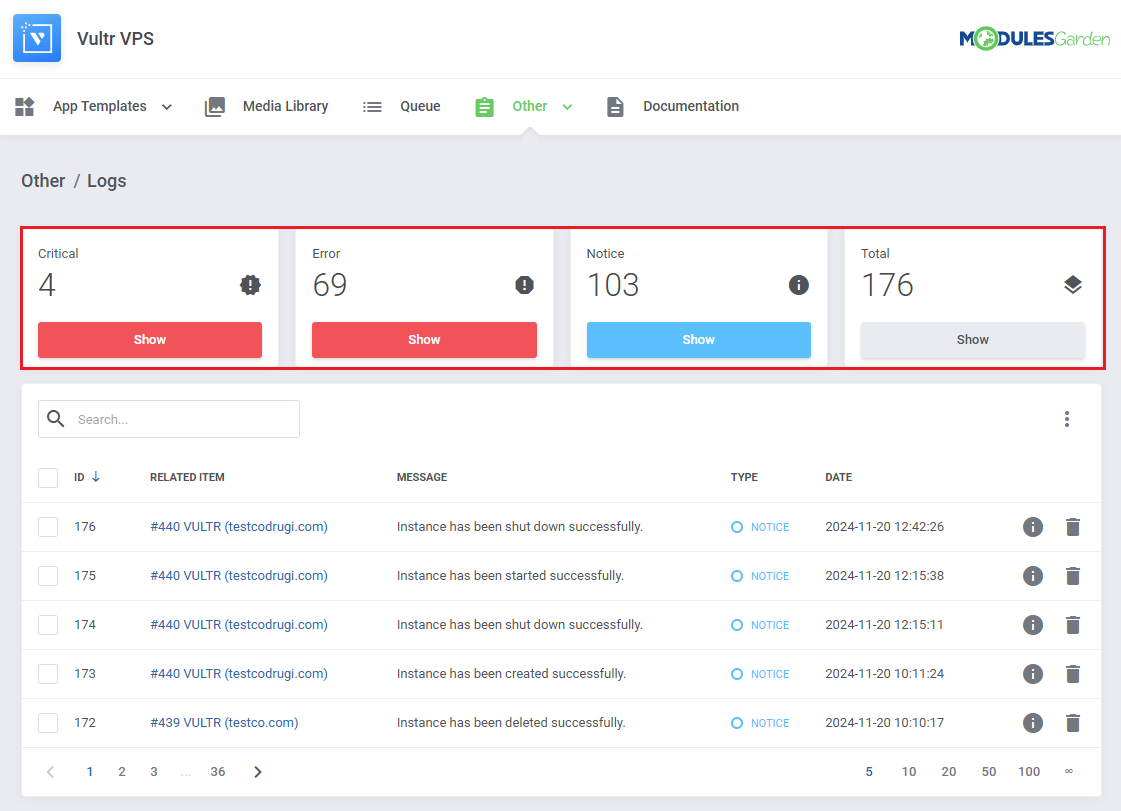
Depending on the module, logs can be categorized into several types.
You can filter the module logs by type with the 'Show' buttons:
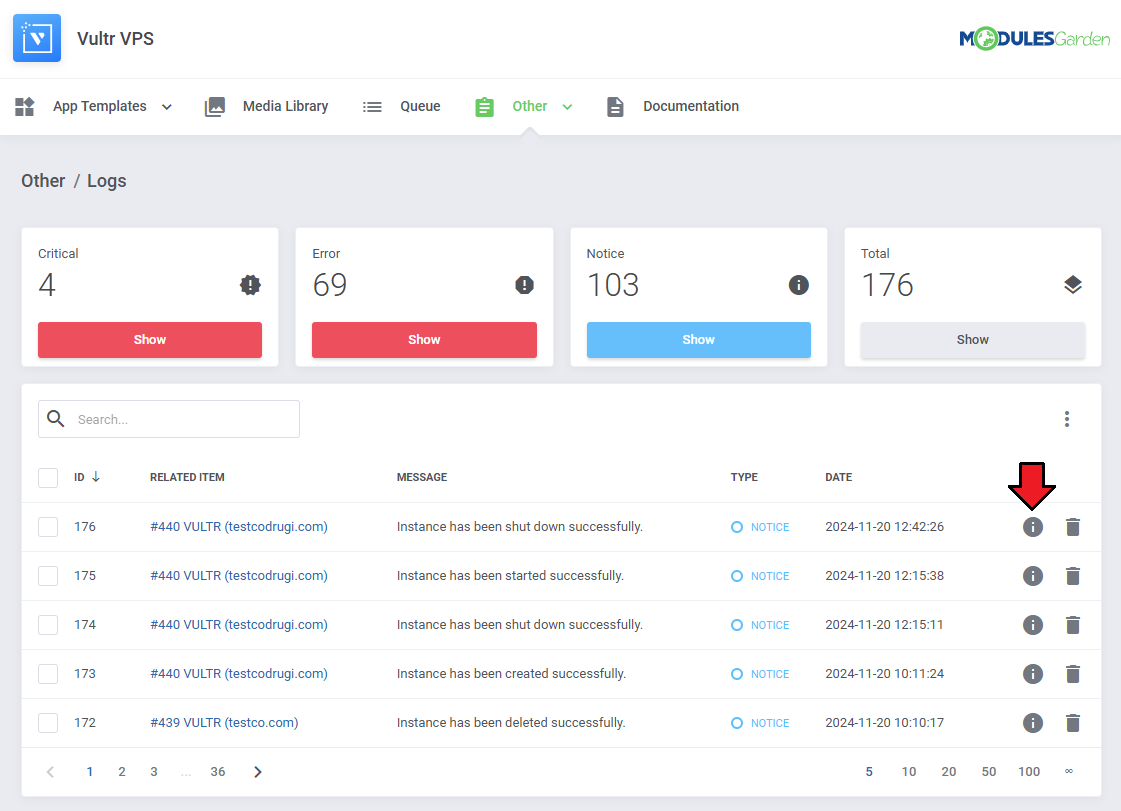
You can see log details by clicking on the 'Details' button.
Some logs might not include details.
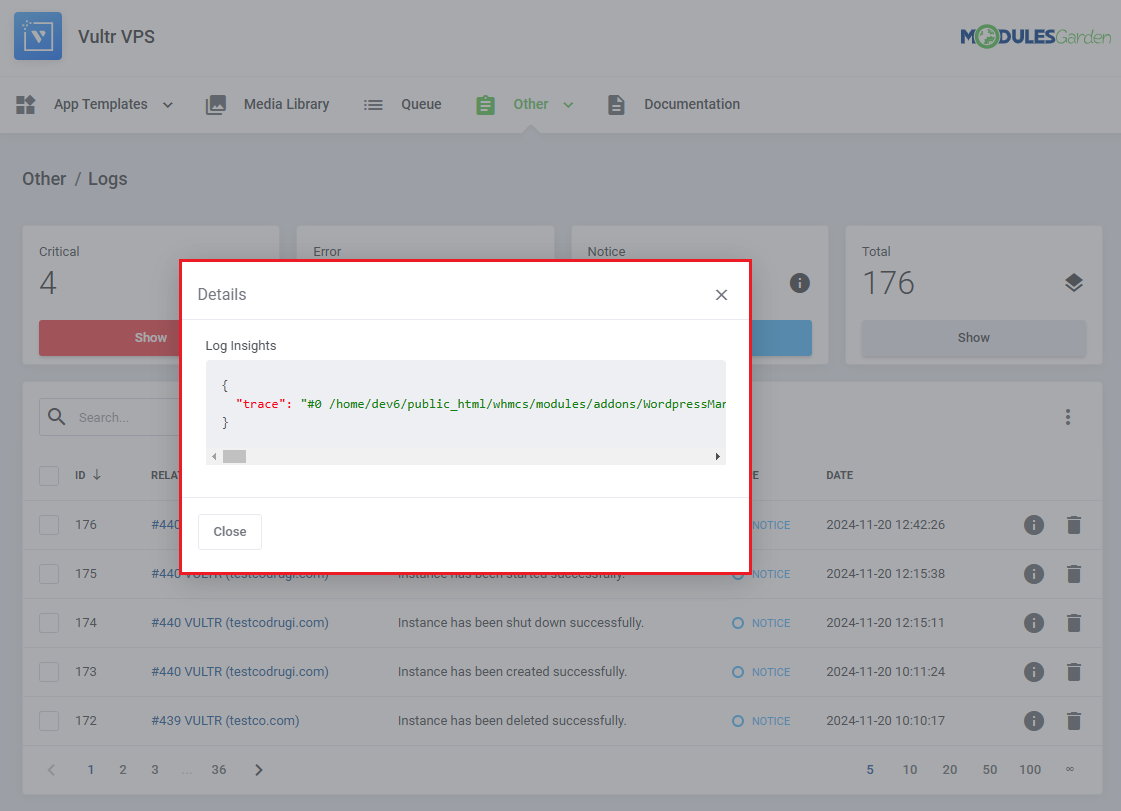
Log details might look like this:
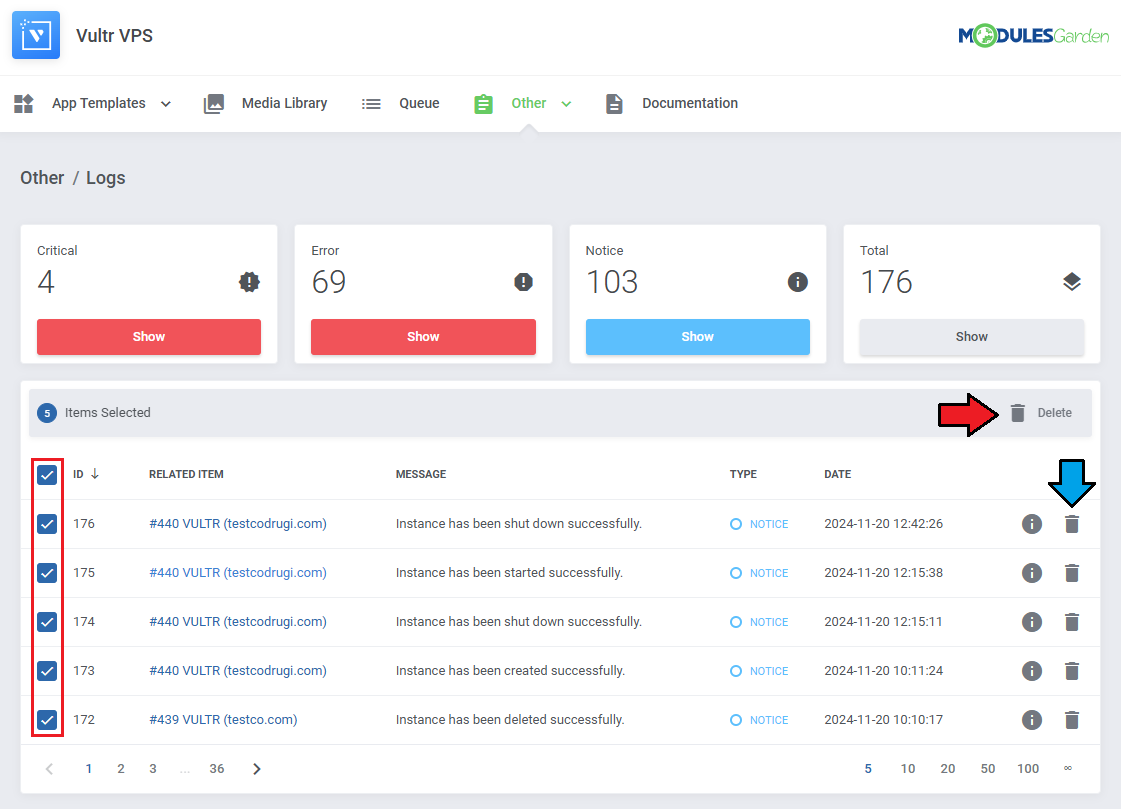
You can delete logs either one by one or with the mass delete function.
# Additional Actions

In the top-right corner, after clicking the burger menu, you will find a list of available additional actions, including:
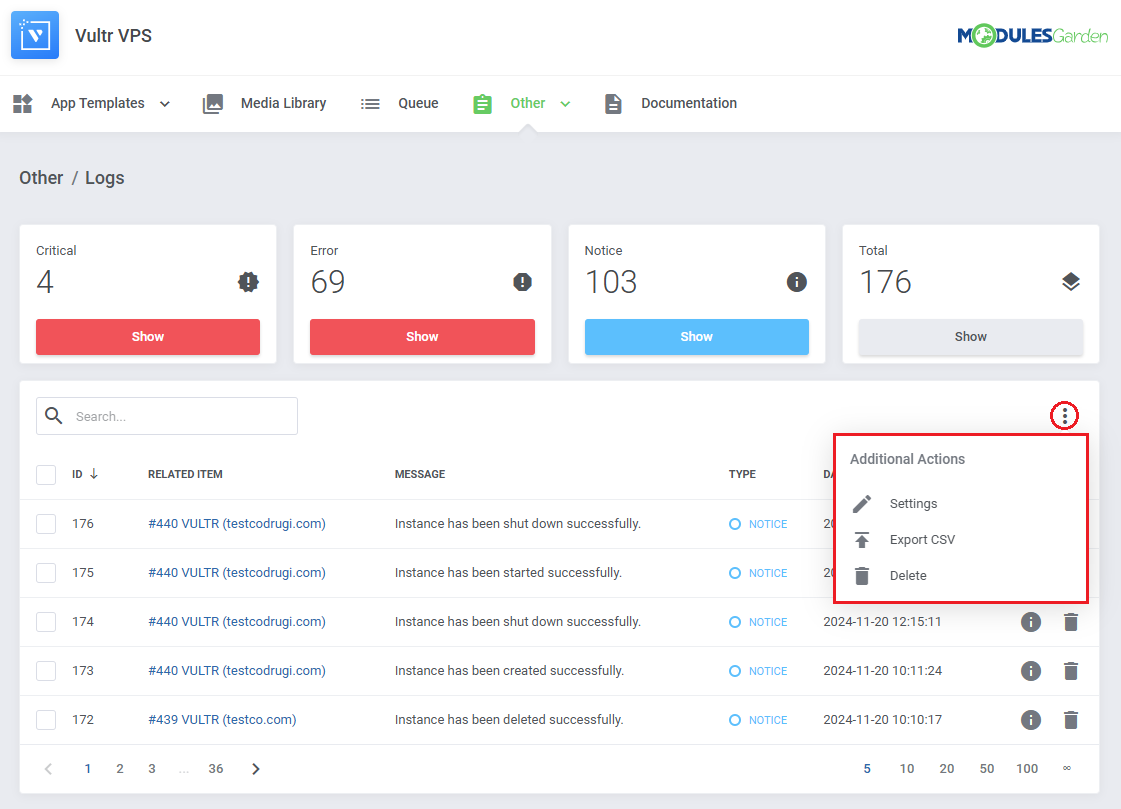
  • Settings
  • Export CSV
  • Delete

# Settings

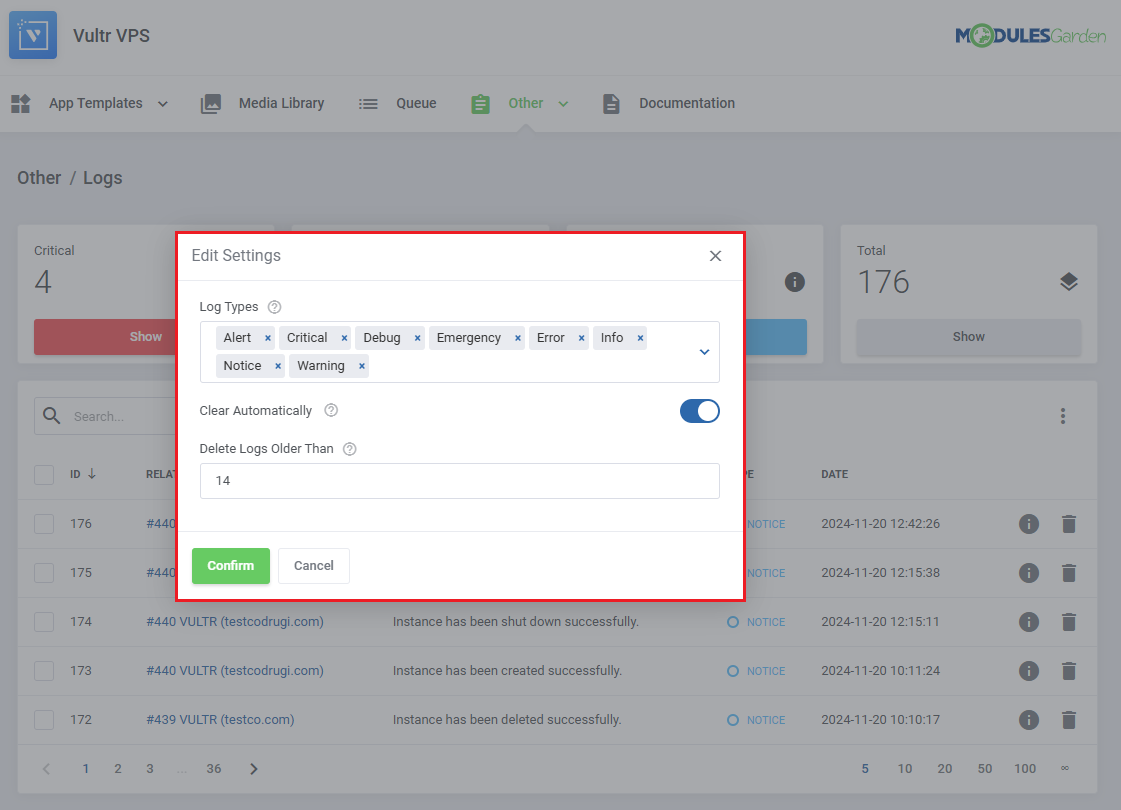
In the settings, you can configure the following options:

  • Log Types - specify which types of logs should be recorded.
  • Clear Automatically - choose whether to automatically delete logs older than a defined number of days.
  • Delete Logs Older Than - define the number of days after which logs will be automatically deleted.
# Exporting Logs

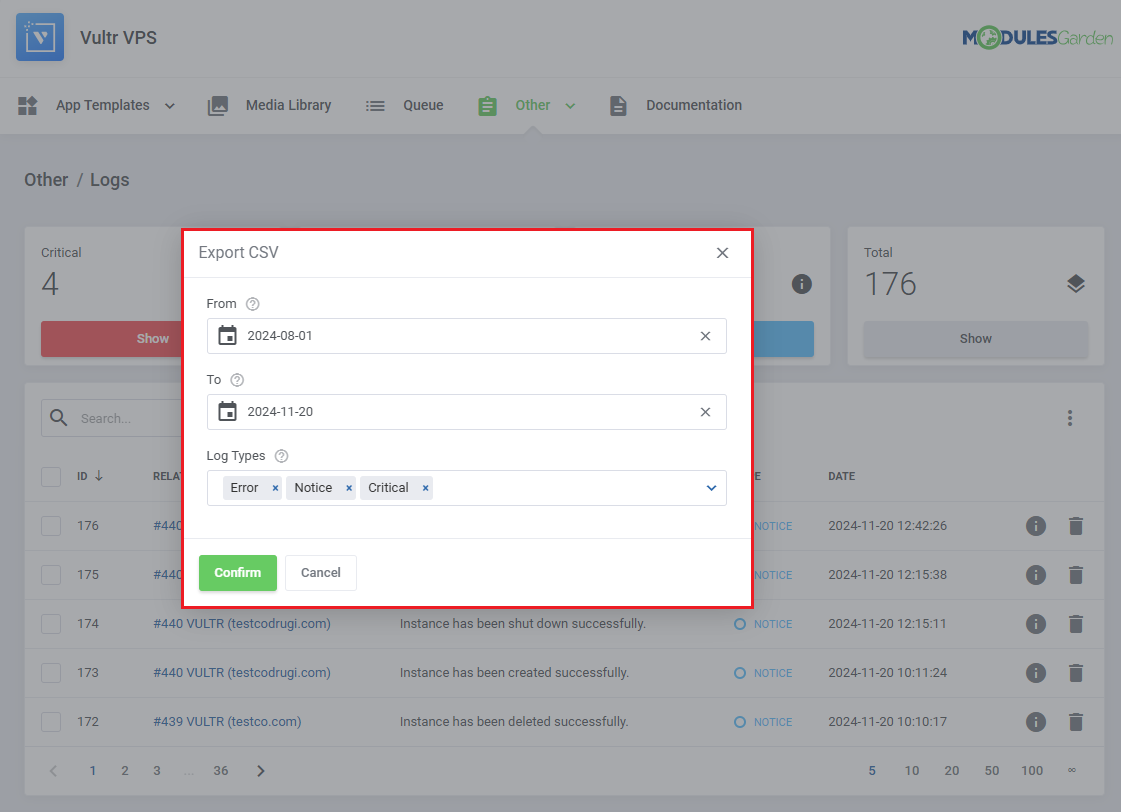
While exporting your logs to a CSV file, you will need to specify the following details:

  • From - define the starting date for the logs you wish to export.
  • To - define the ending datefor the logs you wish to export.
  • Log Types - choose the type of logs to export, which may vary depending on the module.
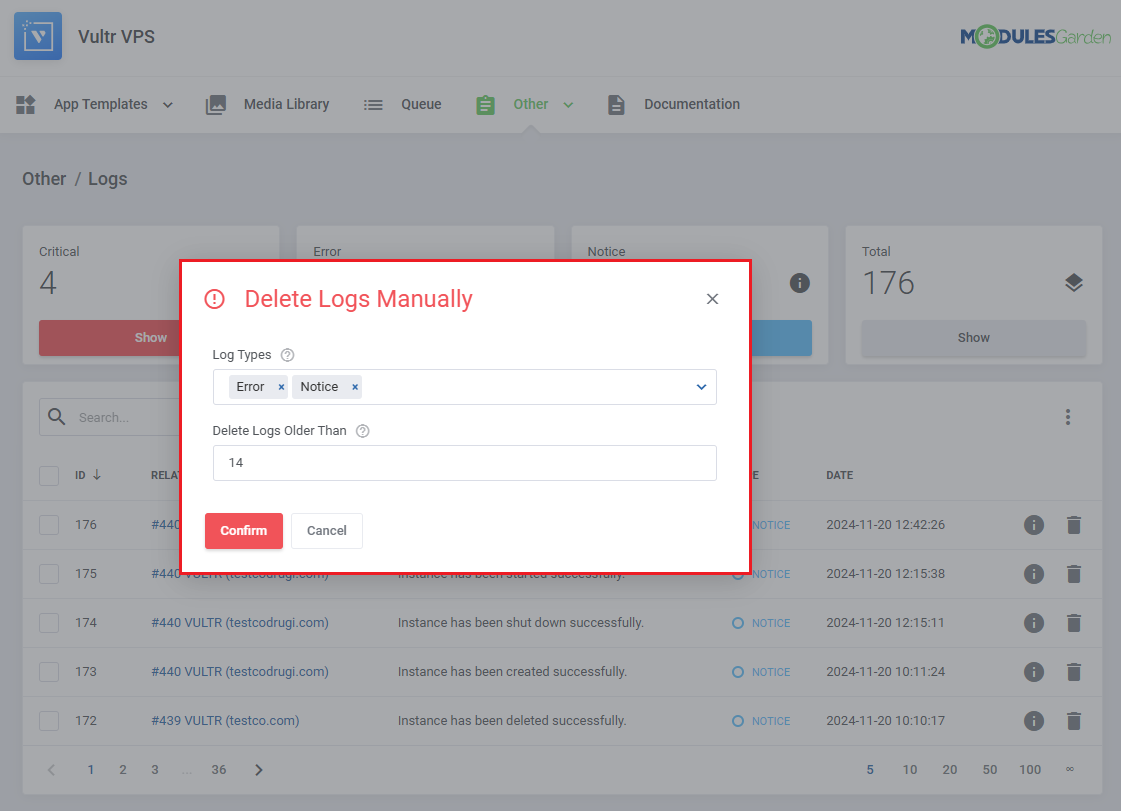
# Rule Based Deletion

You can delete specific logs automatically without having to select them manually. To set this up, define the following:

  • Log Types - choose which types of logs should be considered for deletion.
  • Delete Logs Older Than - set the number of days after the log's occurrence for automatic deletion.