

# Report Generator For WHMCS
# (opens new window) About Report Generator For WHMCS (opens new window)
Report Generator For WHMCS allows you not only to access several dozen predefined reports, but also to generate any required custom ones using two inbuilt creators.
The module lets you adjust reports to your needs through using various filters and even your own PHP code.
It also permits export, printing, and reports comparison, as well as display of results in tables, graphs or charts.
You can also schedule the reports creation and send them to the SFTP/FTP server, chosen staff members, or even any email address.
# Installation
This tutorial will show you how to successfully install and configure Report Generator For WHMCS. (opens new window)
We will guide you step by step through the whole installation and configuration process.
Note: If you are still using any of the module's previous versions prior to v4.x, follow these instructions.
- Log in to our client area and download the module.
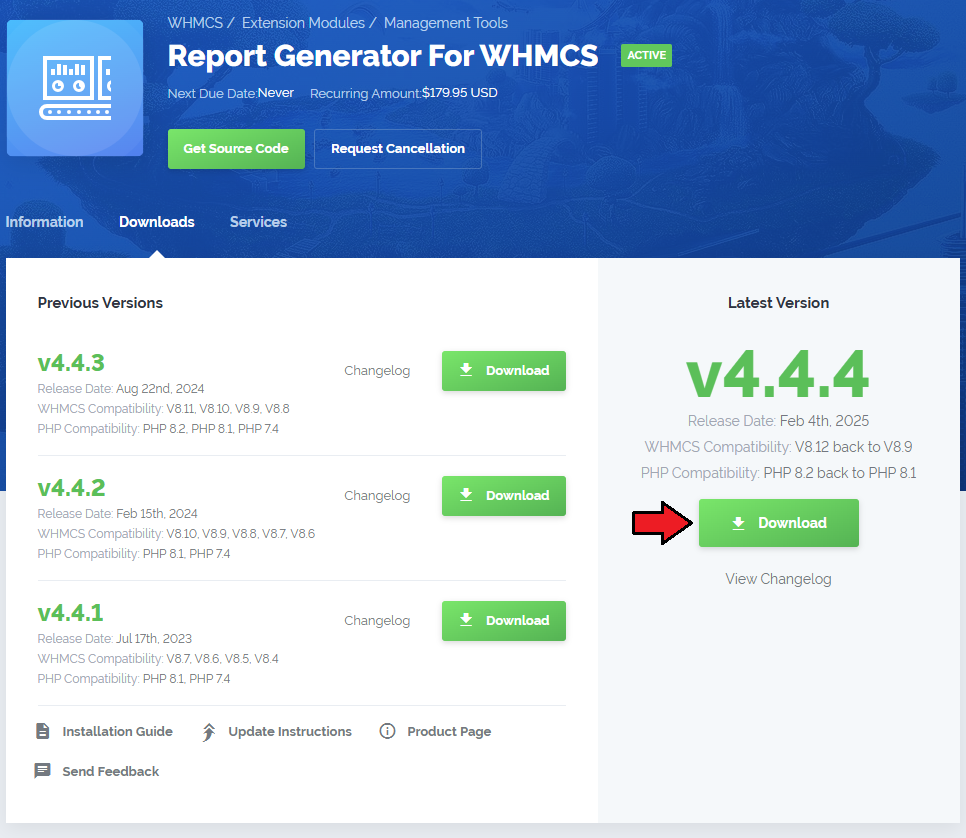
Upload and extract the extension into the main WHMCS directory.
Extracted files in your WHMCS directory should look like this:
When you install Report Generator For WHMCS for the first time you have to rename the 'license_RENAME.php' file.
The file is located in 'modules/addons/reportgenerator/license_RENAME.php'. Rename it from 'license_RENAME.php' to 'license.php'.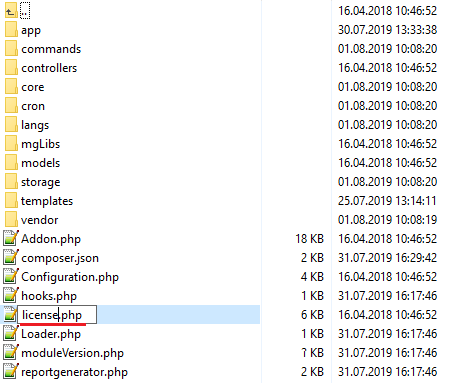
In order to configure your license key, you have to edit the previously renamed 'license.php' file.'
Enter your license key between quotation marks as presented on the following screen. You can find your license key in our client area→ 'My Products'.
Now, set up the 'storage' folder as recusrively writable.
This folder should be available at 'your_whmcs/modules/addons/reportgenerator/'.
In addition, you will also need to set the 'your_whmcs/modules/addons/reportgenerator//vendor/microweber'
directory as writable and 'your_whmcs/modules/addons/reportgenerator/vendor/microweber/screen/bin' as writable and executable.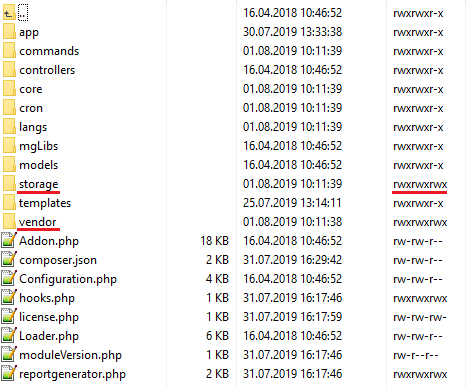
Now you have to activate the module in your WHMCS system.
Log in to your WHMCS admin area. Go to 'Setup' → 'Addon Modules'. Afterwards, find 'Report Generator' and press the 'Activate' button.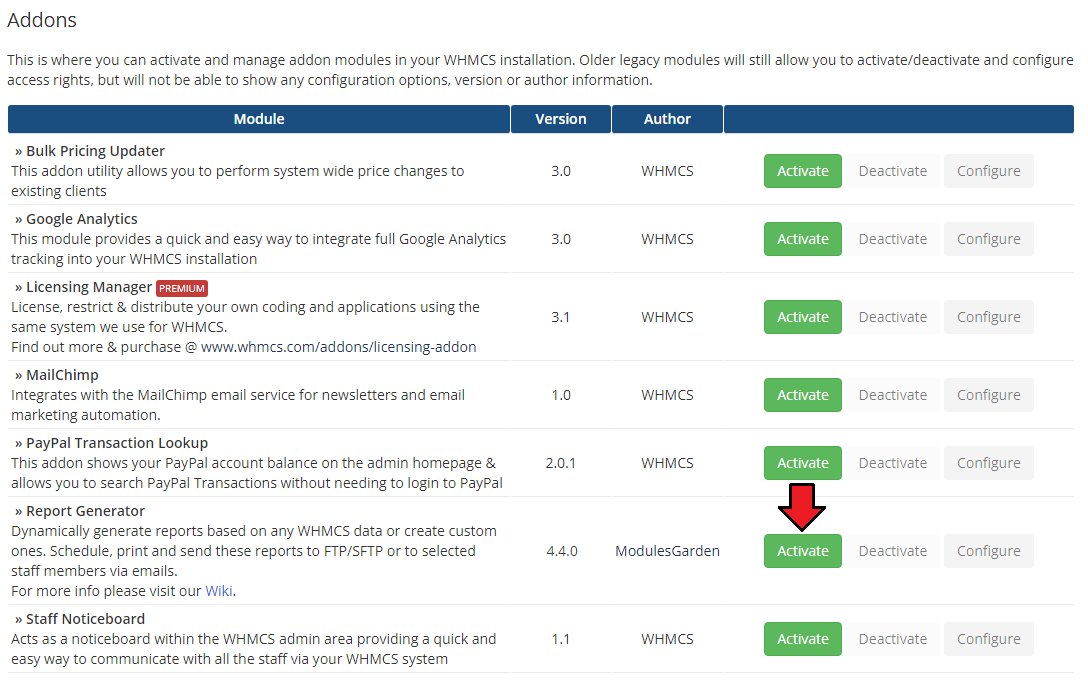
In the next step you need to permit access to this module.
To do so, click on the 'Configure' button, tick 'Full Administrator' and press 'Save Changes'.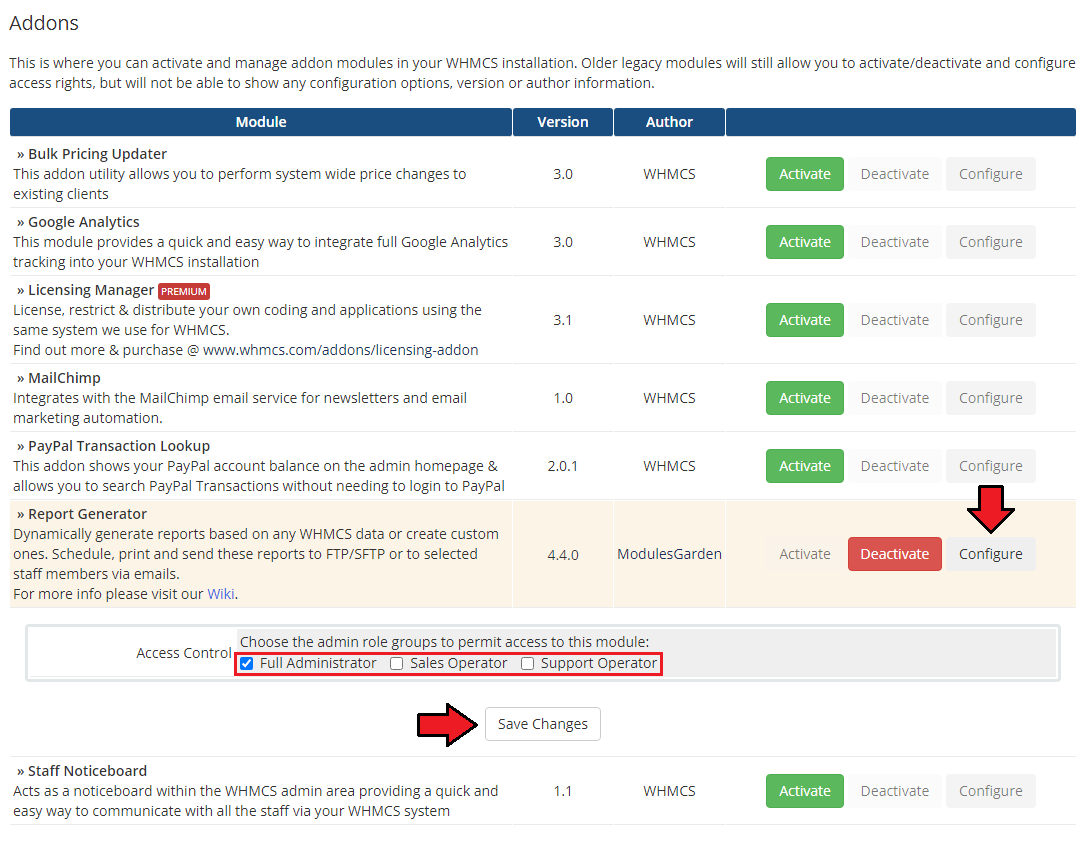
Next, set up two cron jobs
- The first cron job is responsible for sending reports to email or to FTP/SFTP. It is advised to run it every 5 minutes:
php -q your_whmcs/modules/addons/reportgenerator/cron/cron.php queue- The next cron job allows to execute scheduled in the module tasks. It is advised to run it once for 24 hours:
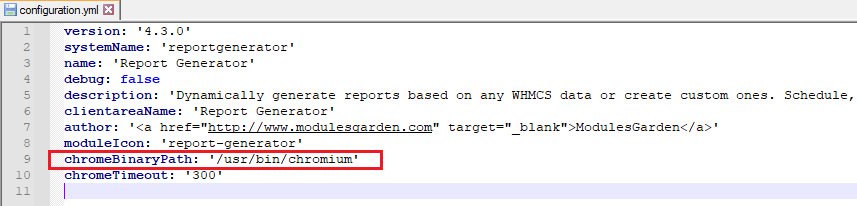
php -q your_whmcs/modules/addons/reportgenerator/cron/cron.php task:scheduledTasksTo assure proper work of the module you will need to install "Chrome browser" or "Chromium" on the server:
Open the configuration.yml file at: (yourWHMCS)//modules/addons/reportgenerator/app/Config and adjust the 'chromeBinaryPath' path.
- You have just successfully installed Report Generator!
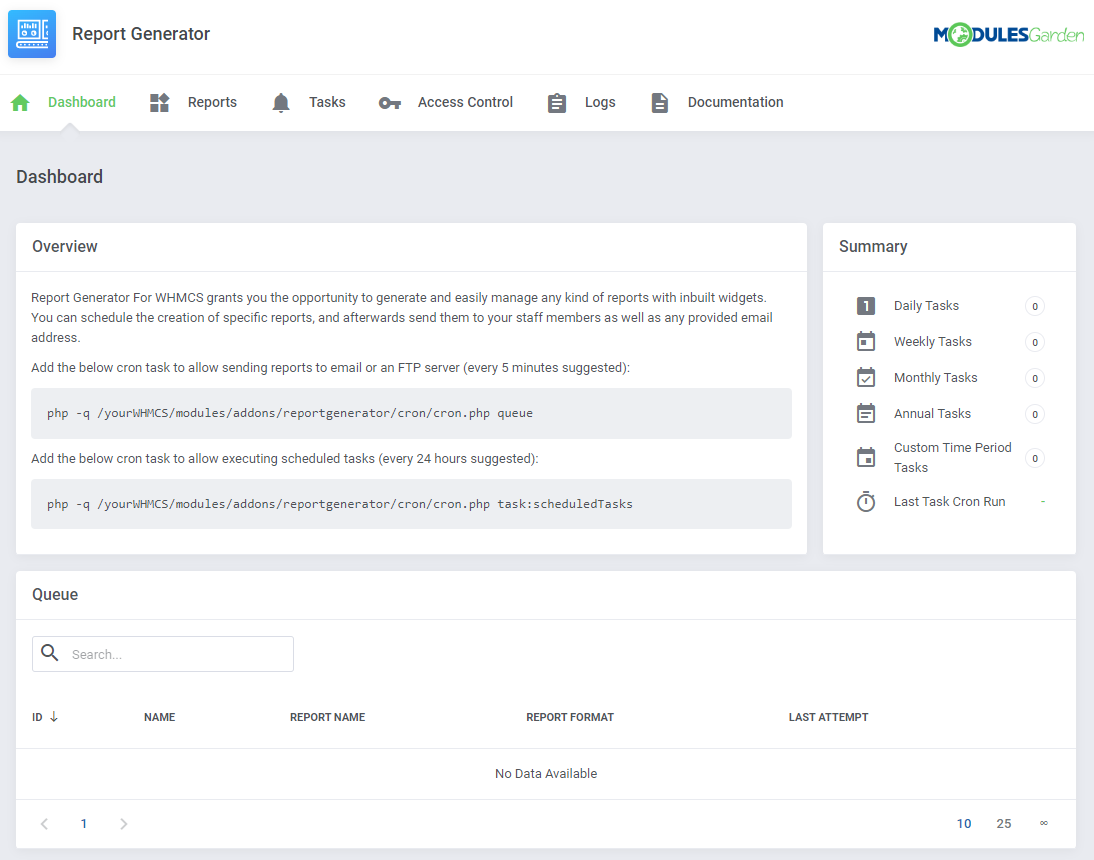
You can access the module at 'Addons' → 'Report Generator'.
# Configuration and Management
Report Generator For WHMCS allows you to create custom reports by adding report widgets either on an advanced or a beginner level.
The module also offers additional useful features like predefined reports, import of the reports, generating reports in PDF and CSV, ability to send them to admins and much more.
# Dashboard
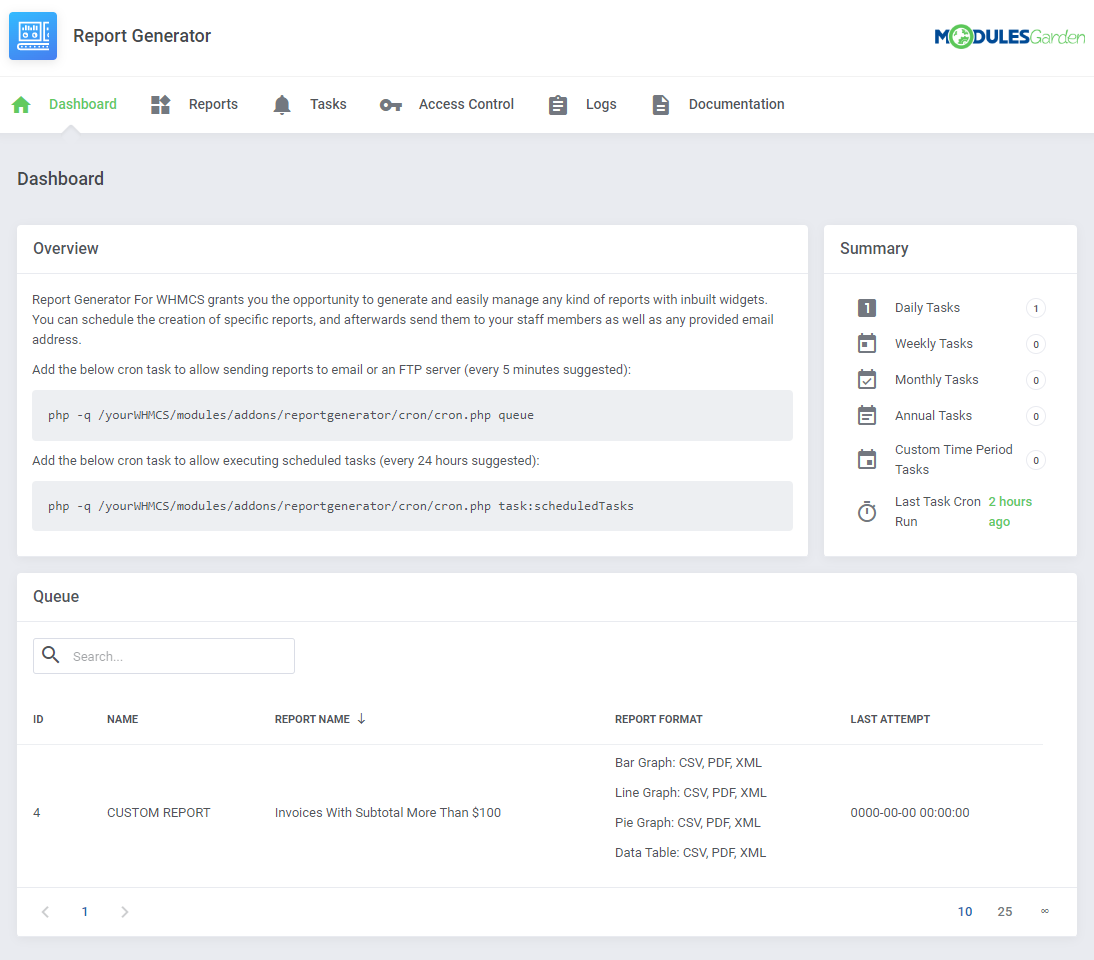
On dashboard you can find a quick summary of scheduled tasks and a queue with the latest tasks.
# Reports
'Reports', the main section of the module, gives a preview of all available reports, those predefined as well as those you create by yourself.
Predefined reports are divided into four categories plus custom reports if you have some.
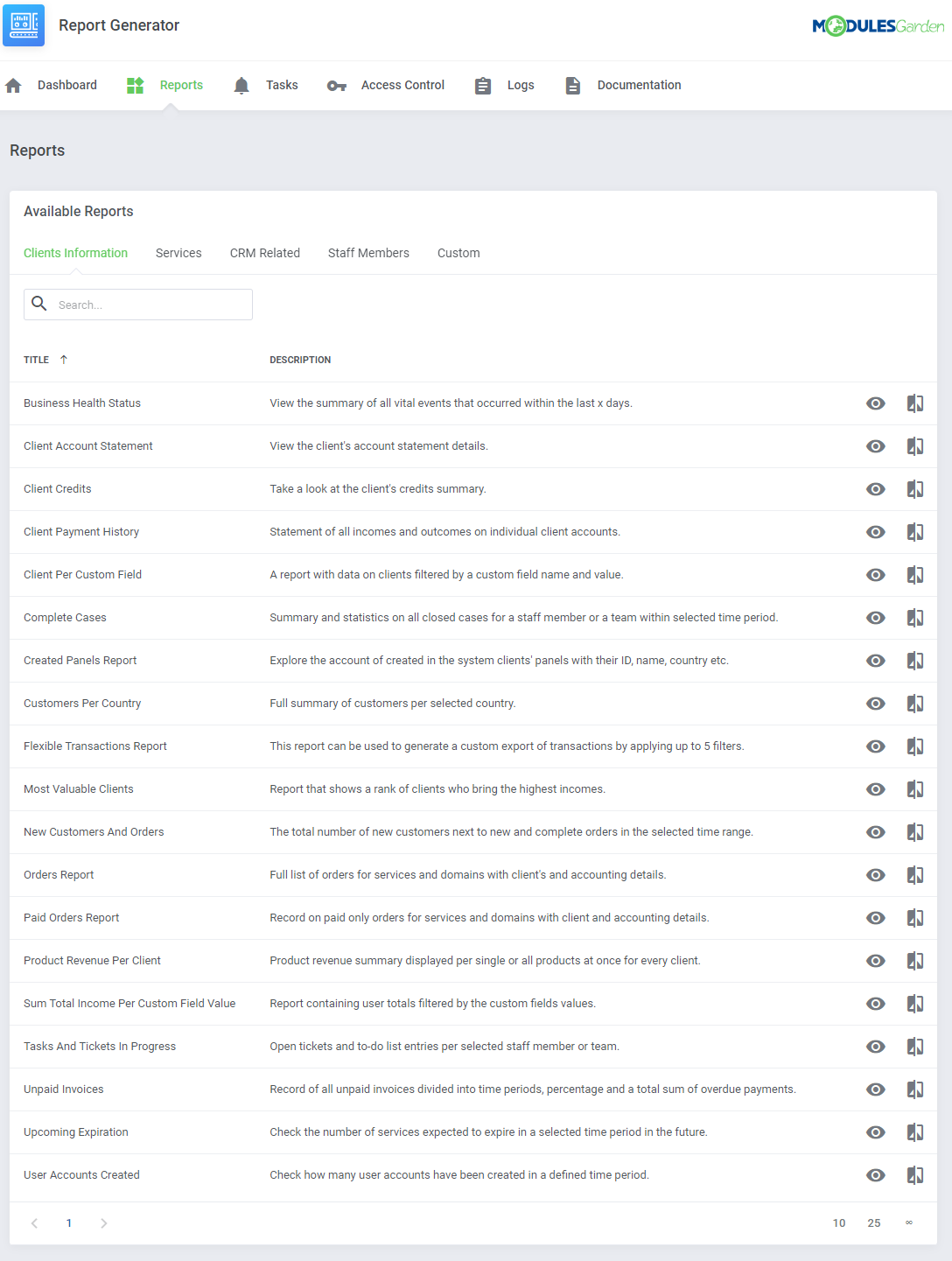
Clients Information - nineteen predefined reports that will show statistics on data related to your clients, for example statistics on placed orders, tasks, etc.
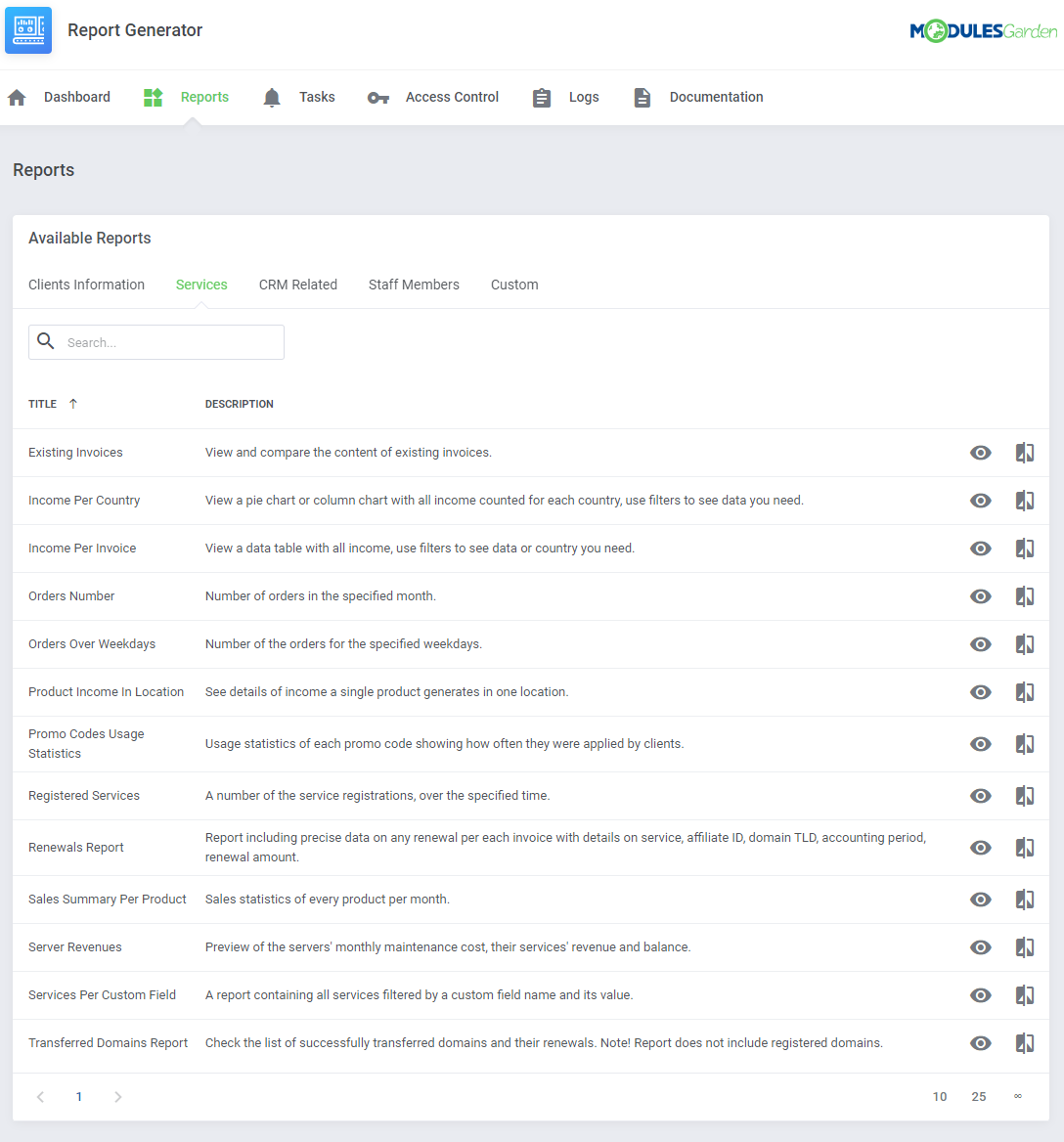
Services - thirteen different reports ready to analyze any services related data like income, renewals or transfers in your system.
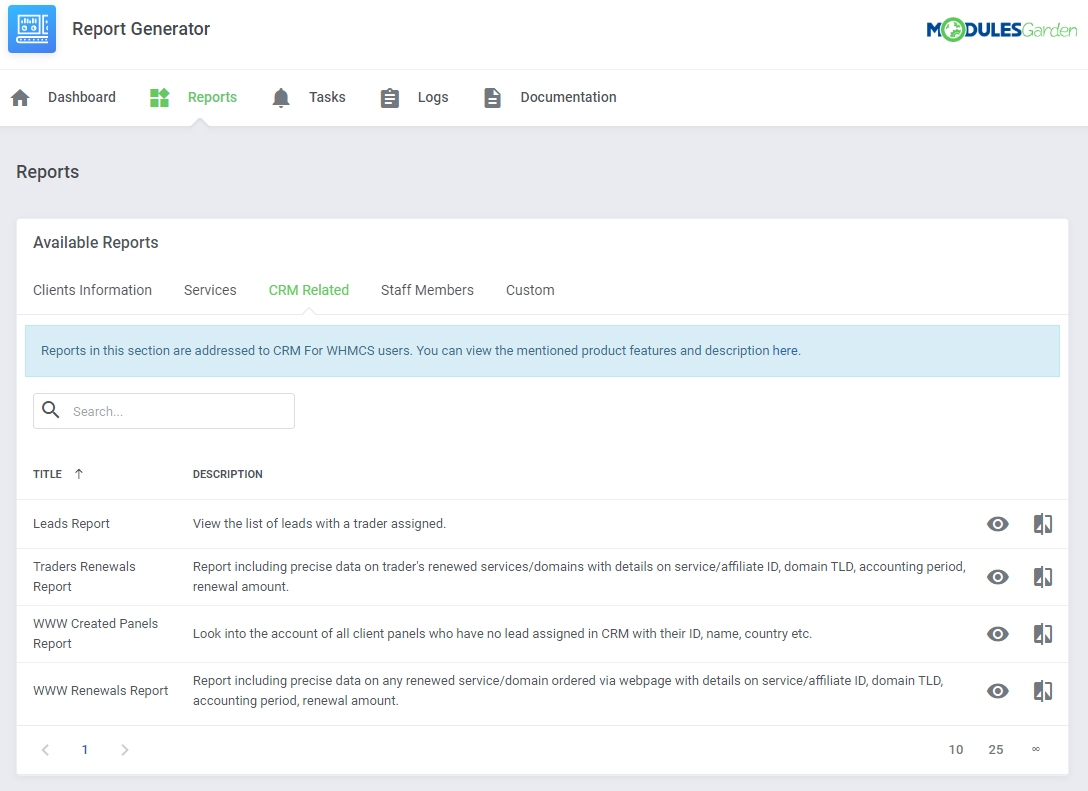
CRM Related - four ground reports based on your CRM data. Please note that you can see them only if you use our CRM For WHMCS module.
More about CRM For WHMCS can be found here (opens new window), instructions how to configure your CRM.
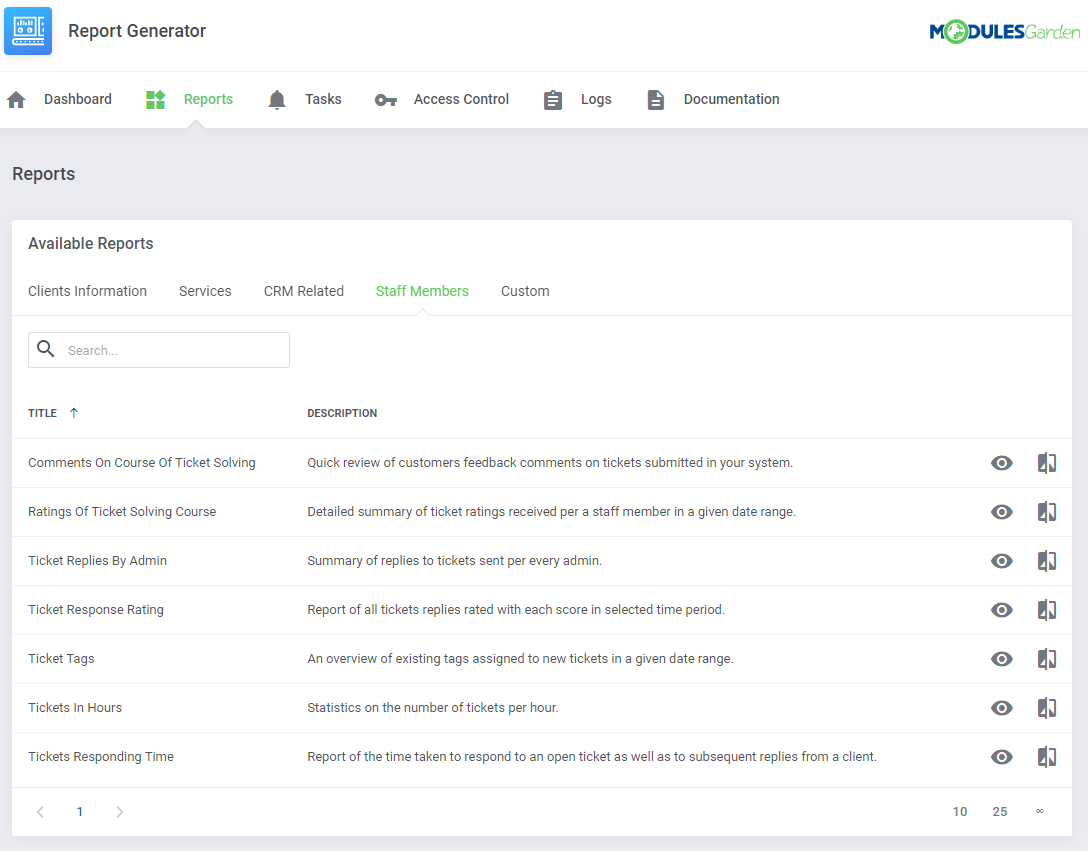
Staff Members - seven predefined reports related to staff members and the tickets department.
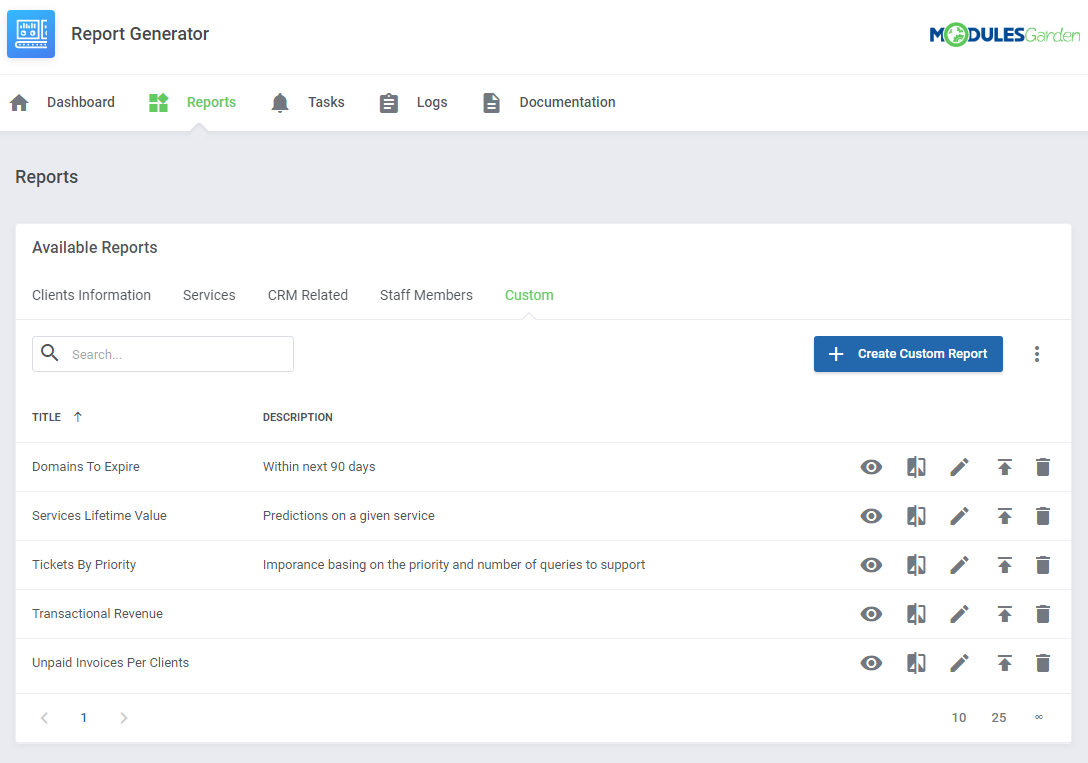
Custom - all reports that you have personally created using our widgets.
# Report View
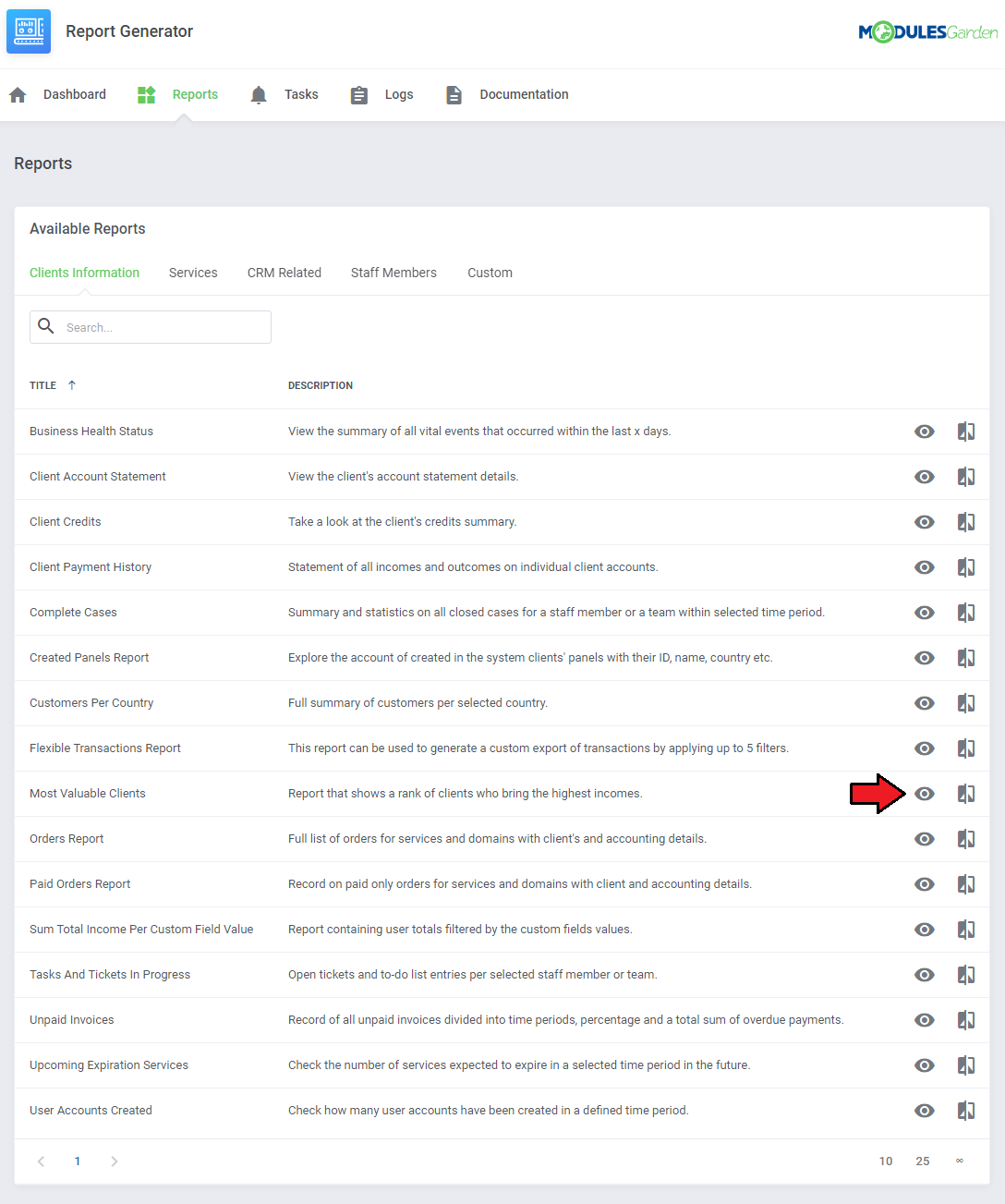
Press the 'View' icon next to a report you are interested in.
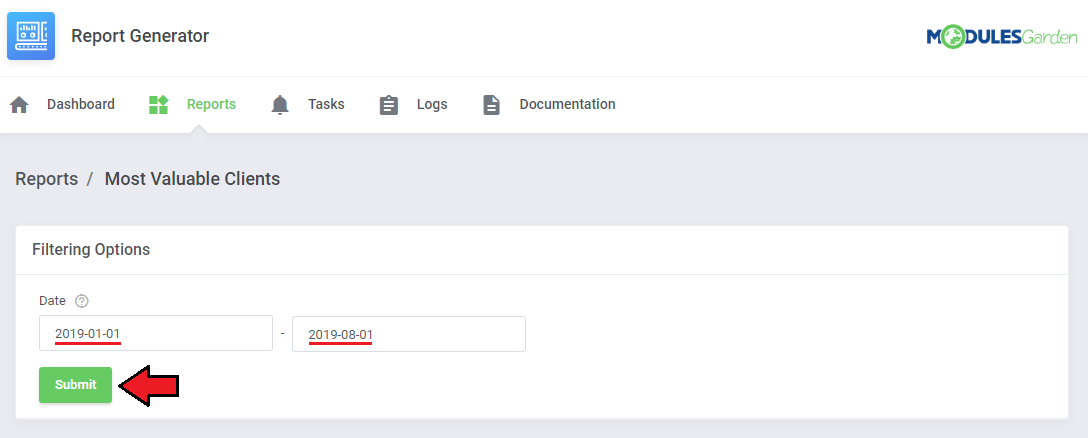
Depending on the type of report you choose, you can set the time frames within which you want to see the statistics.
Provide the beginning and ending dates, then press the 'Submit' button. A brand new report will be generated on the run.
In case of some reports, filtering is impossible due to the stable content of the report.
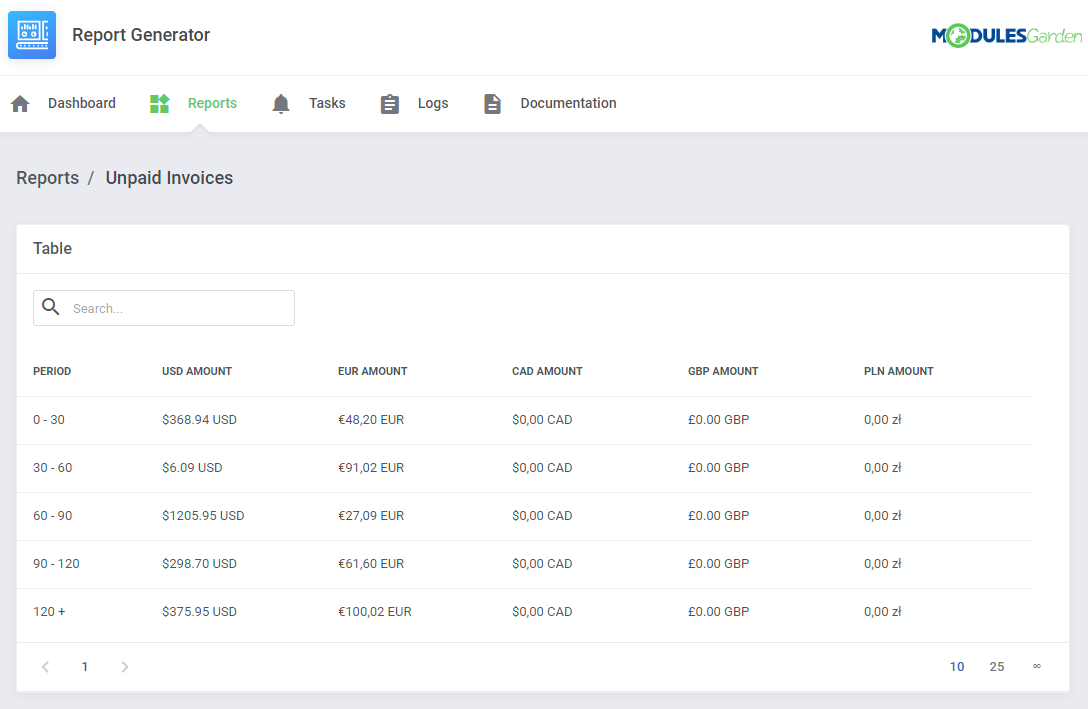
You can always view a printable version of the report or generate a PDF, CSV or XML which can be saved on your disk. The corresponding buttons can be found at the bottom of the report.

Generate task to schedule sending the regularly generated report either to FTP/SFTP server or to selected admin users via email.
Keep in mind that to assure sending these reports, the cron task 'queue' must run every 5 minutes.

# Compare Reports
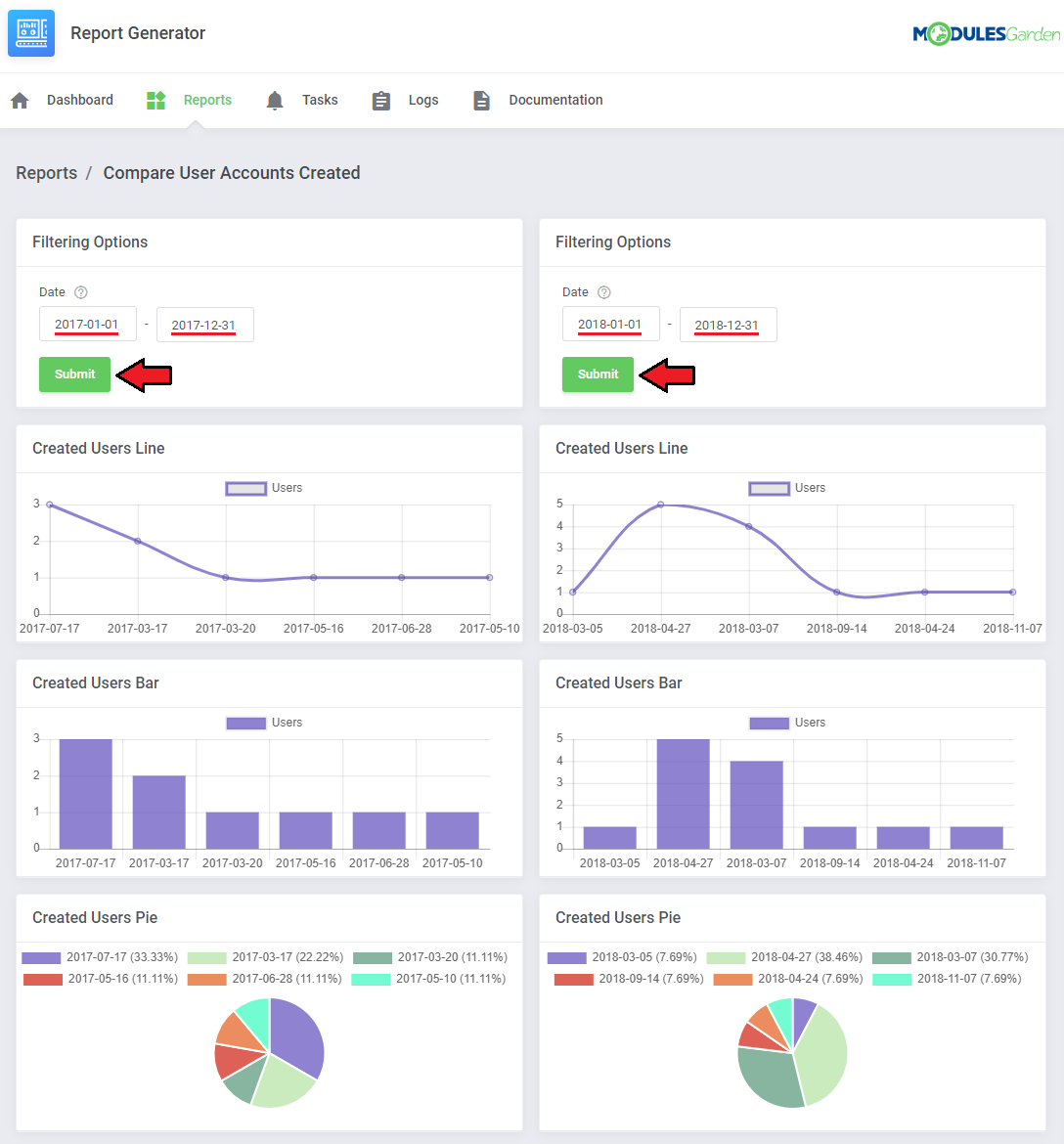
It is a great tool that allows to quickly compare data.
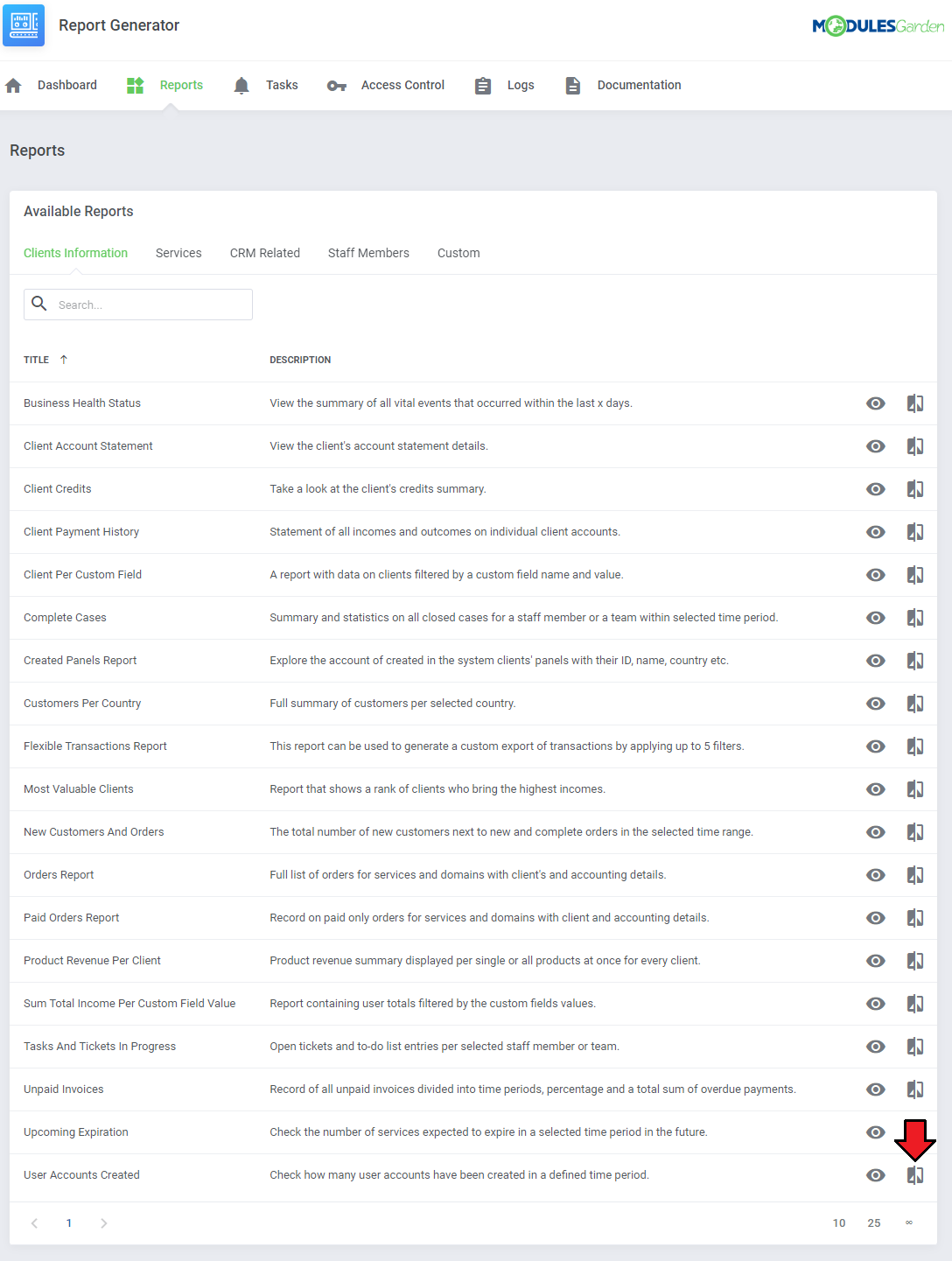
You do not need to search for stored files on your disk, simply set dates which you need to analyze and check instant results.
Two reports will appear next to one another to allow easy examination.
# Creating Report
In this section, we will show you how to prepare a few exemplary reports.
We will now show you how to develop two different reports, each one will be slightly more complicated than the previous one.
The first steps are the same for each advancement level.
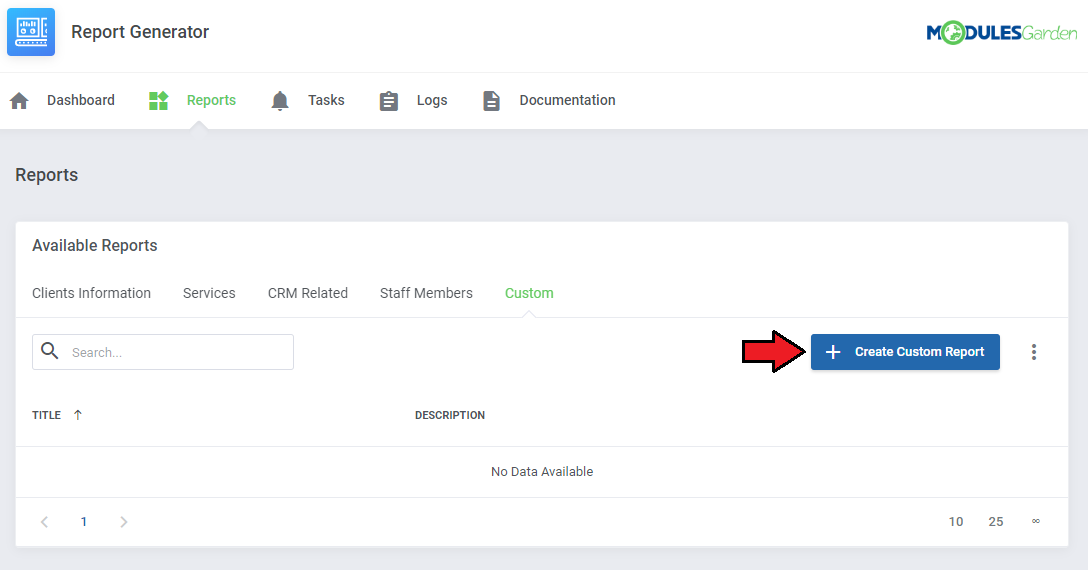
Move to 'Reports' → 'Custom' and press 'Create Custom Report'.
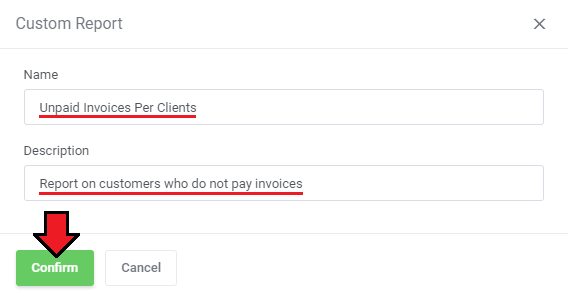
Now, name your report and add a short description. Press 'Confirm'.
You will be automatically moved to the 'Widgets' section where you need to build the newly created report.
Start with the first widget.
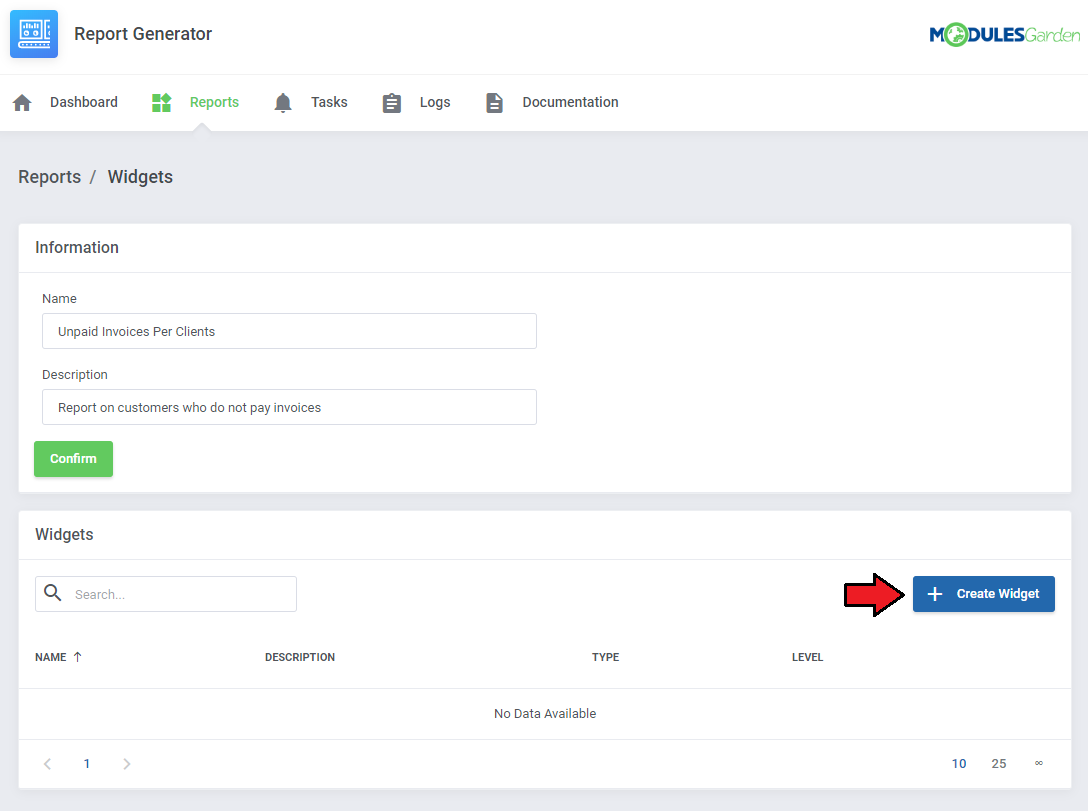
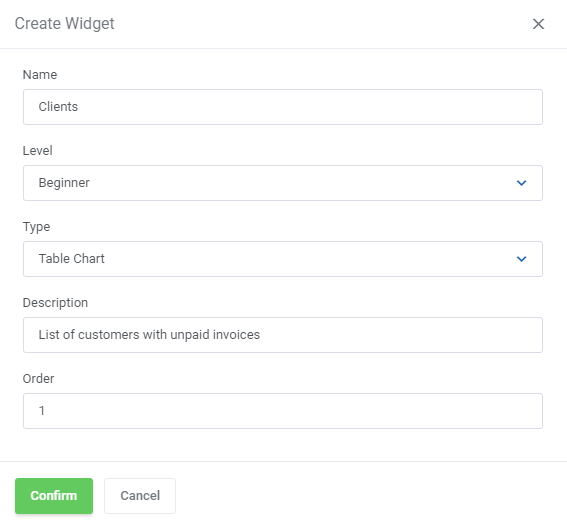
Name the widget to easily note the data type.
Now select the advancement level of the widget creator:
Select the chart type that will be used to view data in this widget.
Add a short description.
Assign the order number to allow easy change of widgets' order in the final report; every widget within a report must have a unique order number assigned
# Beginner
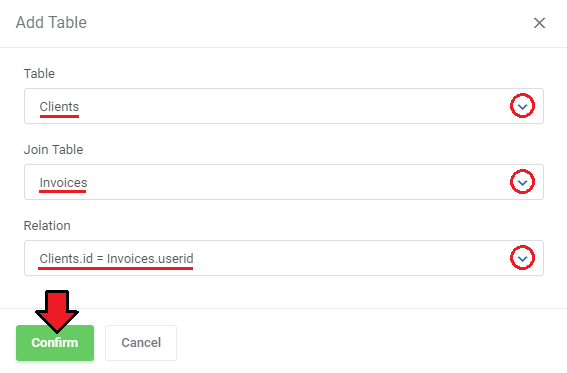
The very first steps of creating a report is defining a base table, only when it is added, you may move to the next steps.
Depending on what your report is going to analyze, you must now find an appropriate table.
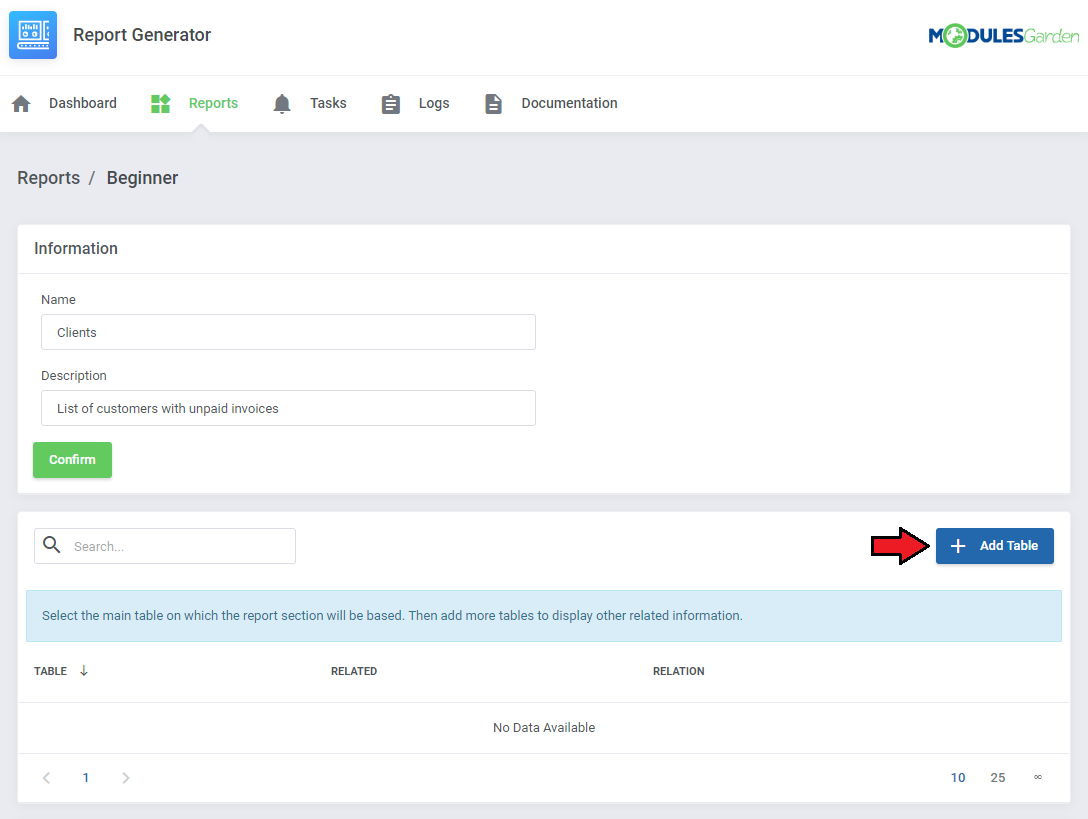
For example, if you want to create a report that will base on clients, then find such WHMCS table.
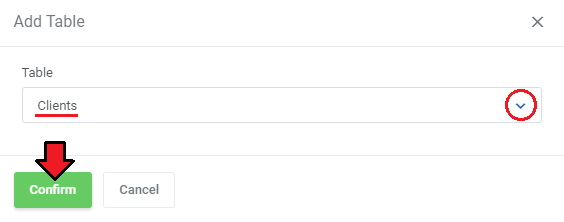
If you want to join it with another table, then press the 'Add Table' button again. Note that now, you may join only tables that are related to each other.
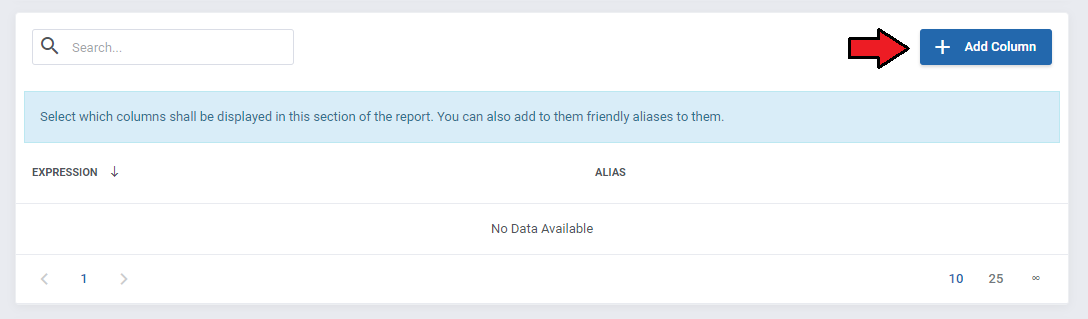
Now, let's 'Add Column'.
From available 'Fields', select the column you wish to see on your report. Optionally, you can also add a friendly alias to it.
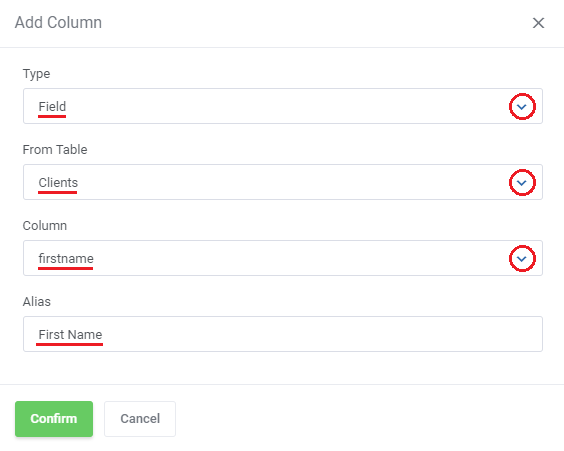
Repeat that step until you get the desired number of columns.
If you want to follow this instruction step by step, please add 'Clients.id' with alias 'ID' and 'CONCAT(tblclients.firstname," ",tblclients.lastname) ' with alias 'Client Name'.
The two colums are used in the next step, that is customization.
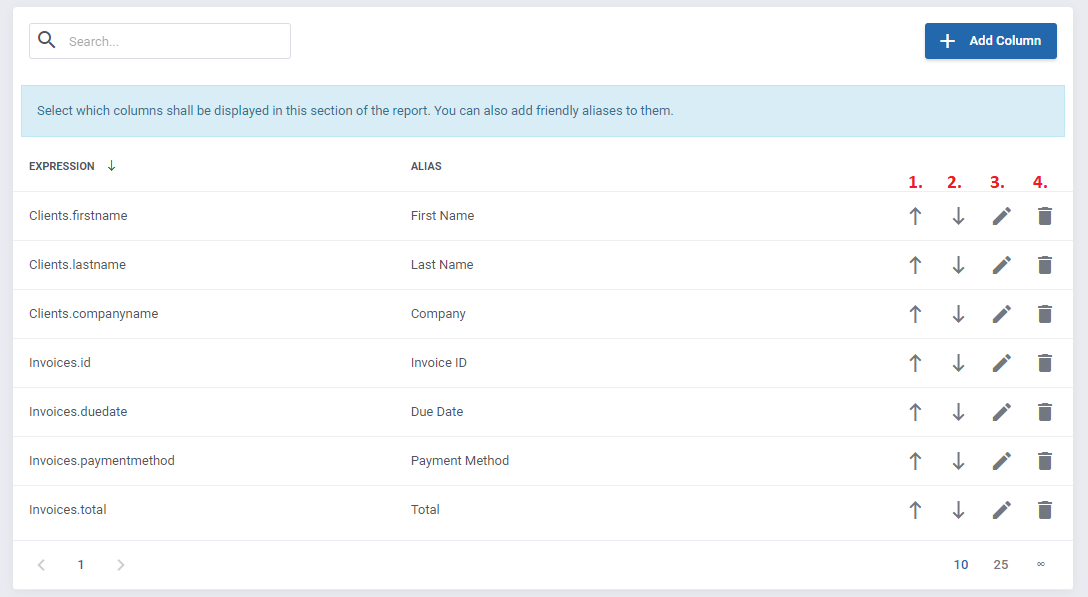
Allowed actions on created columns:
Position Up
Position Down
Edit Column
Delete Column
Next, you may add a column customization or create a new column that will be added into the report.
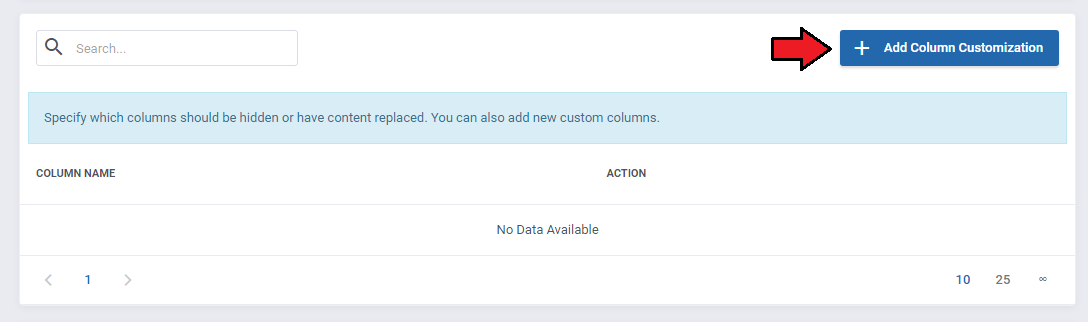
Select a column you wish to customize and choose action:
- Hide
- Replace
If 'Replace' has been selected, you will have to specify the new content, use available merge fields to do so.
Take a look at the screen below to see a correct content example:
<a href=clientssummary.php?userid={ID}">{ClientName}</a>
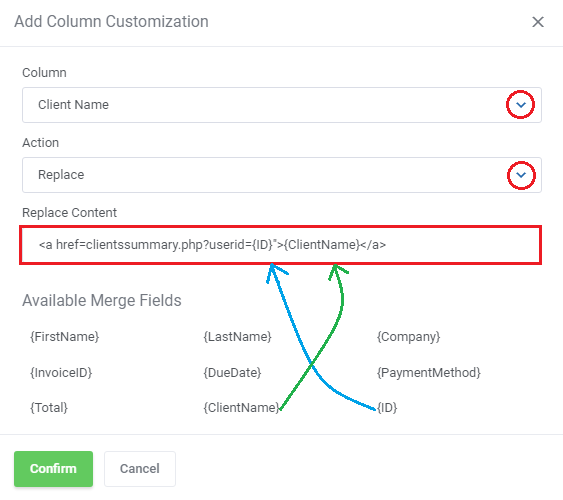
In this situation column 'ID' will link to the client profile.
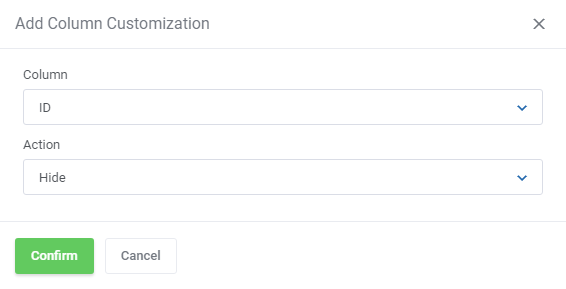
You may leave the 'ID' column unchanged or hide it:
Now let's add a condition, which will determine on the basis of which invoices, the list of clients will be displayed.
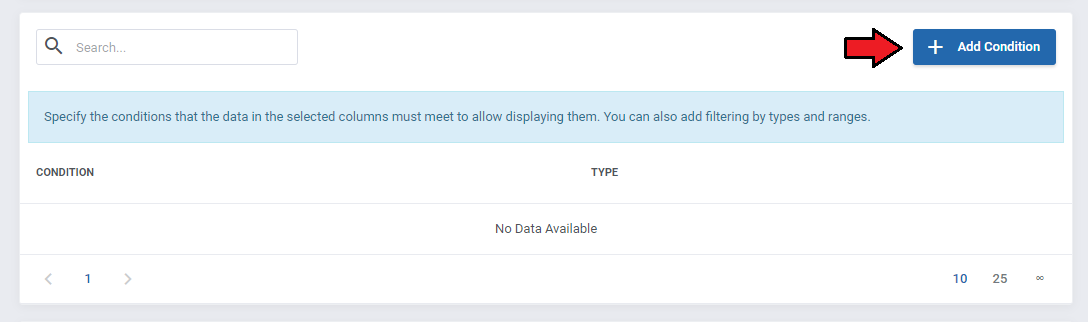
In our example, we decided that it will be a list of customers who have any unpaid invoices.
So let's select 'status' from the 'Invoices' table, and add 'Expression' condition type that is equal to the 'Unpaid' value.
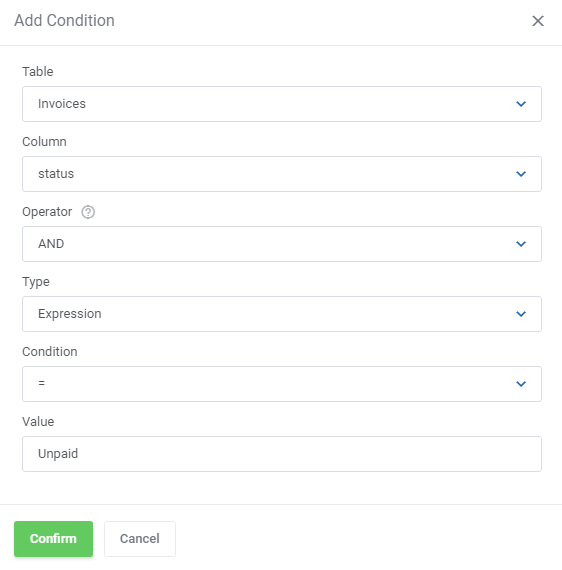
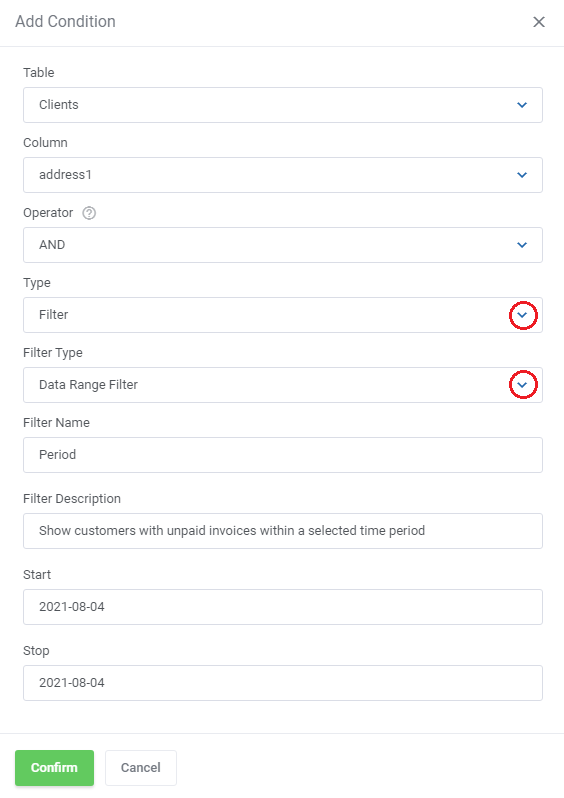
If you want, you can also add a filter here, which will e.g. narrow down the number of results to a selected time interval.
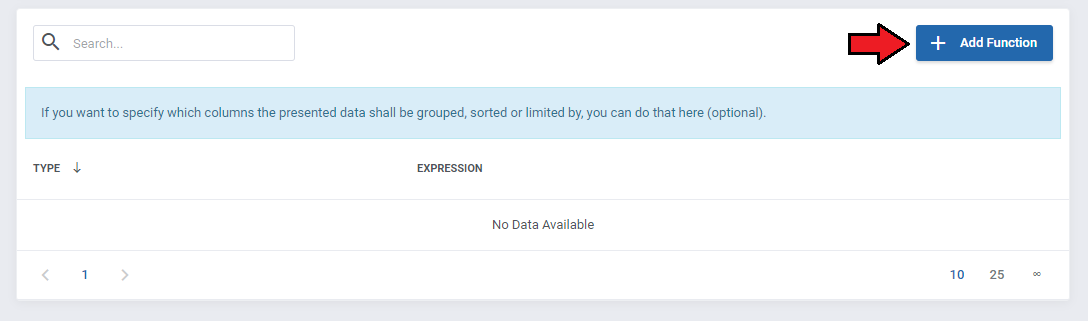
You can also decide the way the entries will be sorted. To do that, press 'Add Function' in the next section.
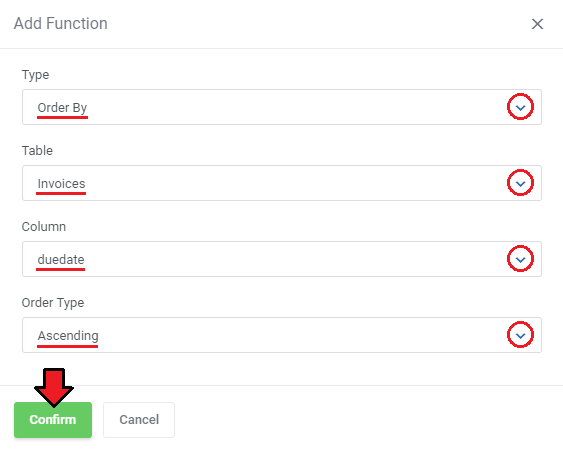
On the screen below you can see, that we choose sorting by invoice's due date in an ascending order.
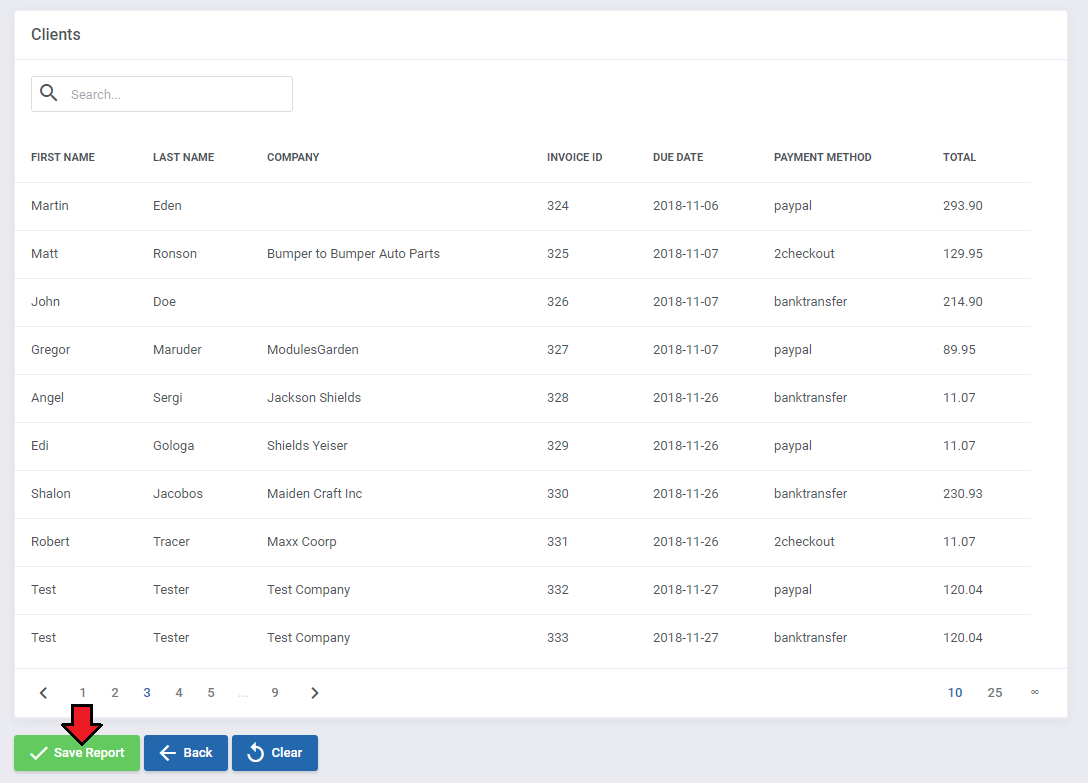
Finally, let's check what our report will look like.
You can see there a list of clients, due date of their unpaid invoices together with the amount to pay and a selected payment method.
Do not forget to save the changes when your report is ready.
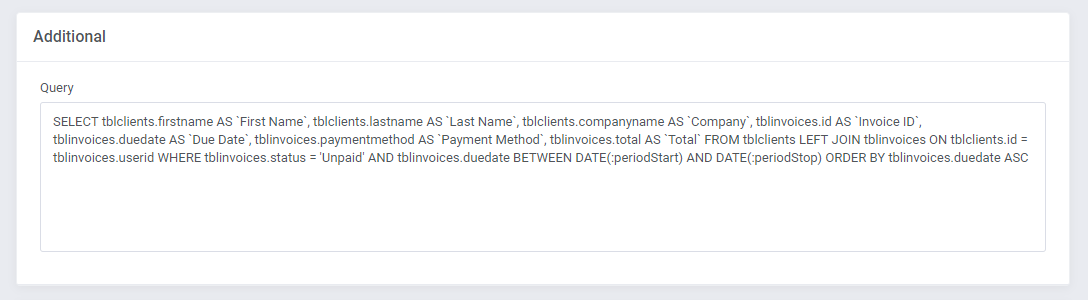
In addition, when creating the report, you will have access to the generated SQL code.
All changes in the report will automatically update the SQL code as well as the preview of the results.
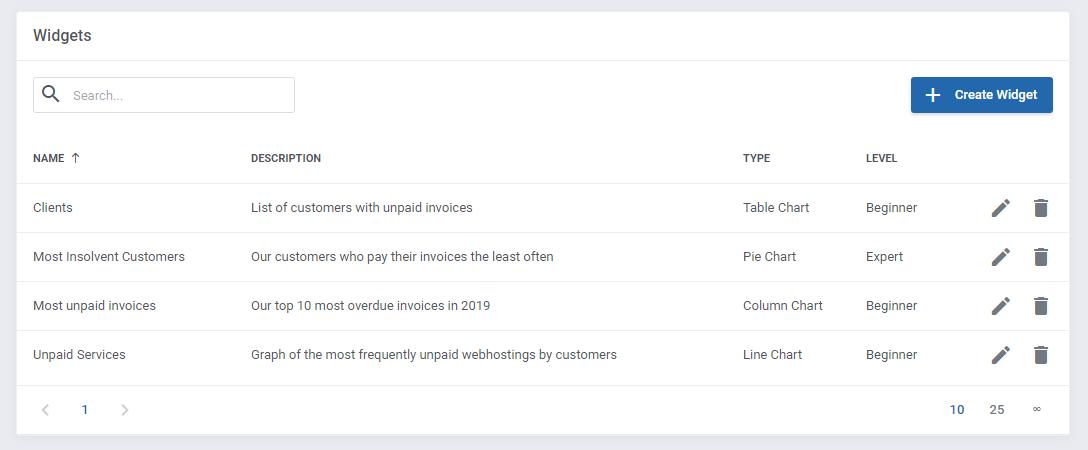
Apart from the options used to generate this report, there are also many more settings that can help you create your ideal report without any specialist knowledge.
Discover them on your own and instantly see the results in the live preview. Try also other types of widgets that you can add to your report, such as pie, column or line graphs.
Of course, if you find this simple report generation mode not sufficient for you, you can always use the expert mode!
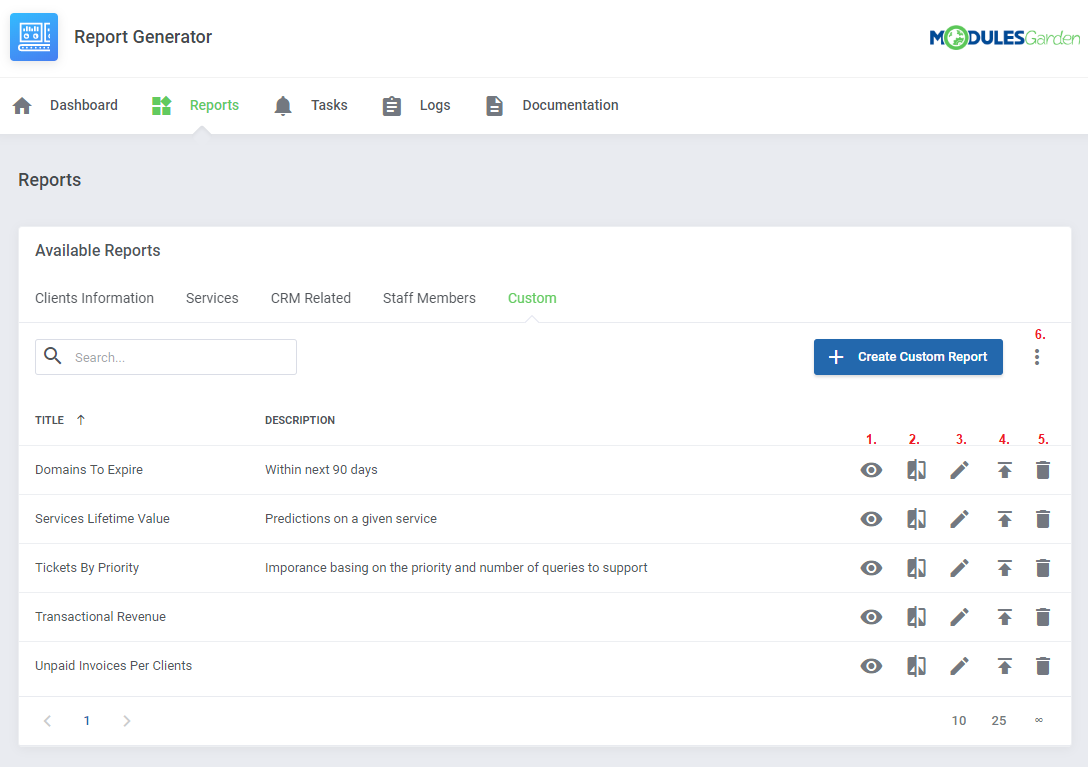
Once your report is ready, you will find it in the 'Custom' tab.
From there you can (1) view report details, (2) compare side-by-side, (3) go back to edition, (4) export its whole structure to a file or (5) delete it.
You can also import exported reports by using (6) import tool from additional actions menu.
# Expert
When you create a new widget for your report, in addition to the beginner mode, you can also select the expert mode as a creator.
This allows you to use advanced options, such as writing an SQL query or using the PHP code.
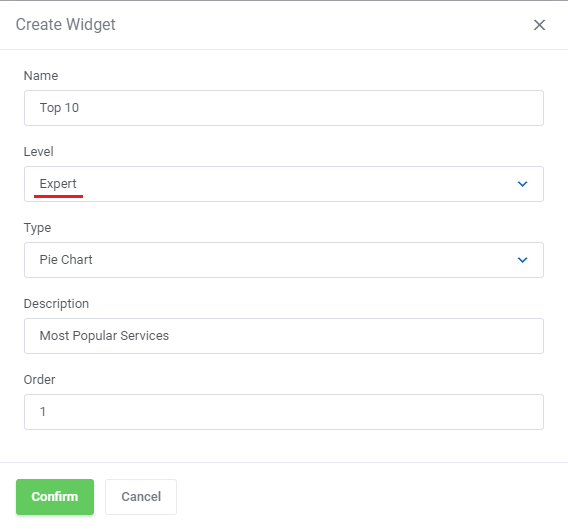
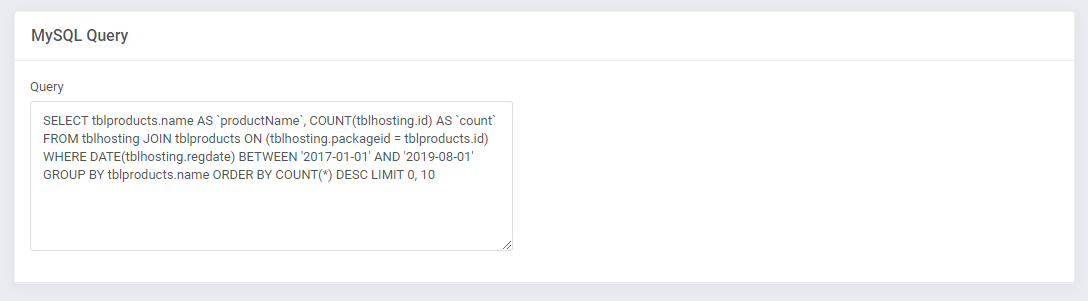
Start by writing your own SQL query. It can be as complex as you need it to be.
Note: For a full list of available tables with an explanation of what they contain please move to the List Of Tables section at the bottom of this article.
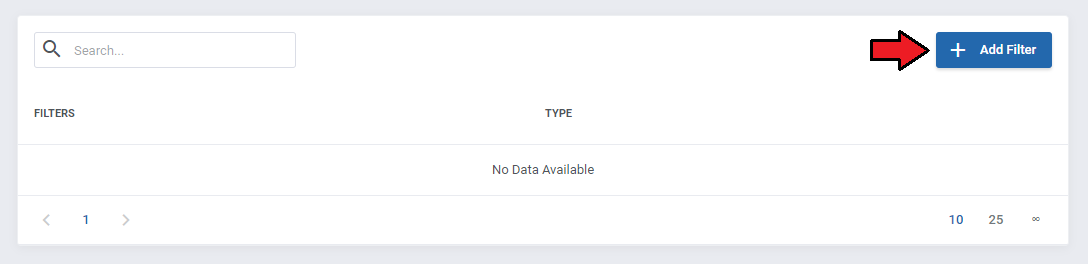
You can still add an optional filter that can be used while searching through the report.
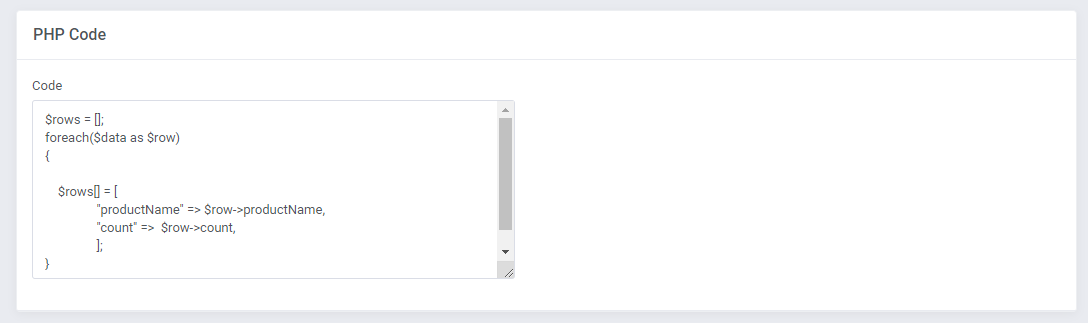
There is also a possibility to make adjustments to your report using the PHP language.
As always, the results of your changes will be automatically updated in the live preview.
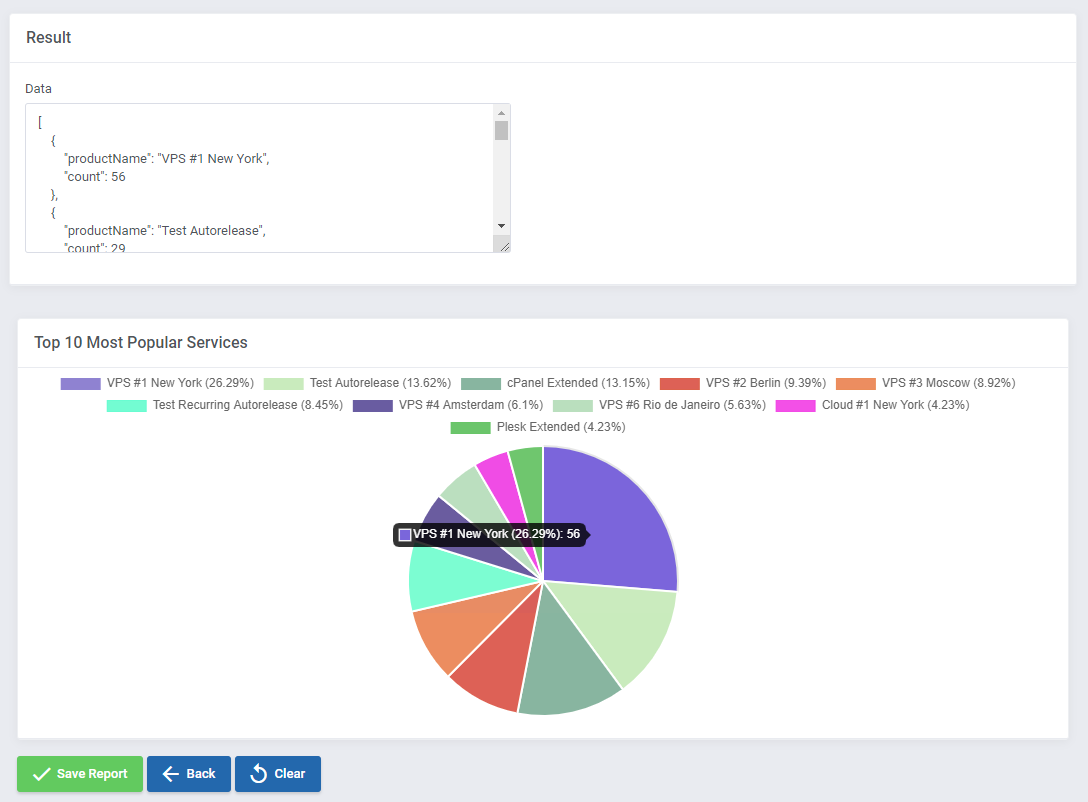
Note:
It is possible to add links to columns in the report now, to do so you must just add an additional code line. Keep in mind that you may use only the HTML tags!
$rows = [];
foreach($data as $row)
{
   $rows[] = [
               "id" => $row->id,
               "firstname" =>  $row->firstname,
               "lastname" =>  $row->lastname,
               "TestLink"=>"<a href=clientssummary.php?userid=$row->id>LinkName</a>",
               ];
}
In the above situation, pressing the input in the 'ID' column in the report will result in redirection to a specified in the link WHMCS site.
Keep in mind that the above exammple cannot be used with the described step by step pie chart.
This is just a simple instance of a code snippet that can be used while adjusting your own report and data included in it.
# Tasks
At 'Tasks' section, you can schedule your reports to be generated in a given time period.
Then, the generated reports can be uploaded to any SFTP/FTP server you provide or be directly sent to your chosen personnel members or any email addresses you provide.
This tool can also be useful when you want to generate on-demand a large report that can take some time to be prepared.
Press 'Create Task' to begin.
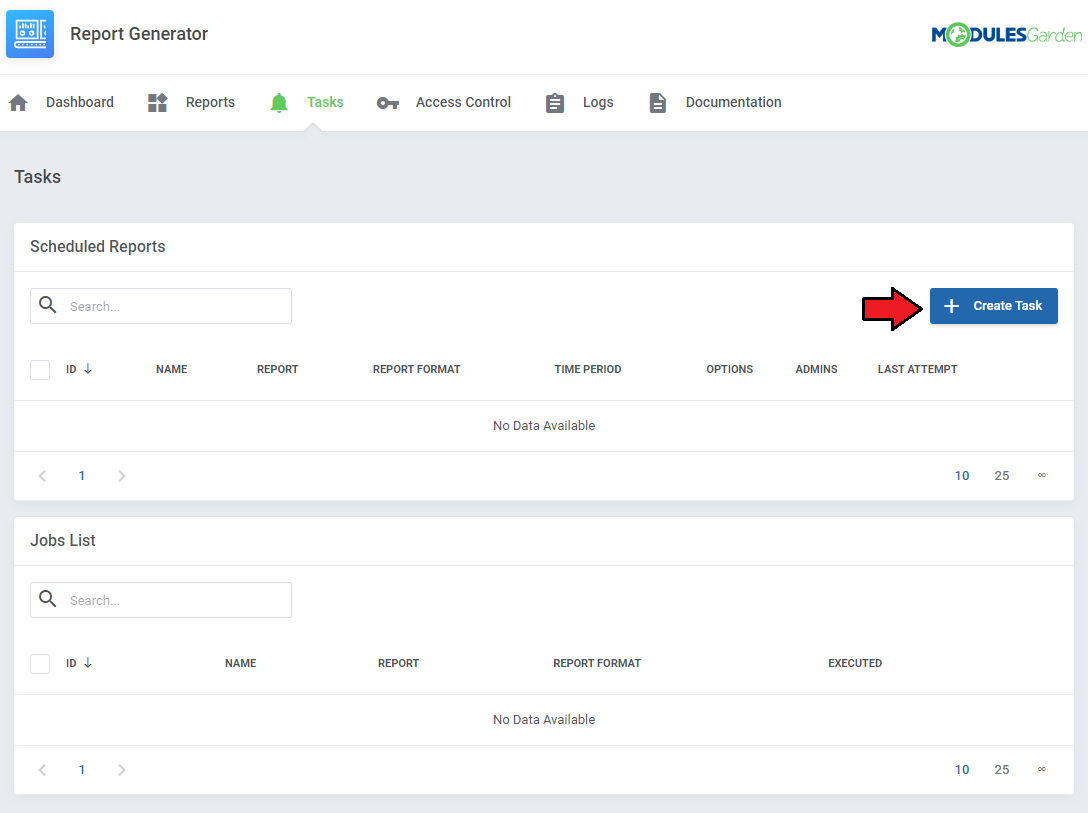
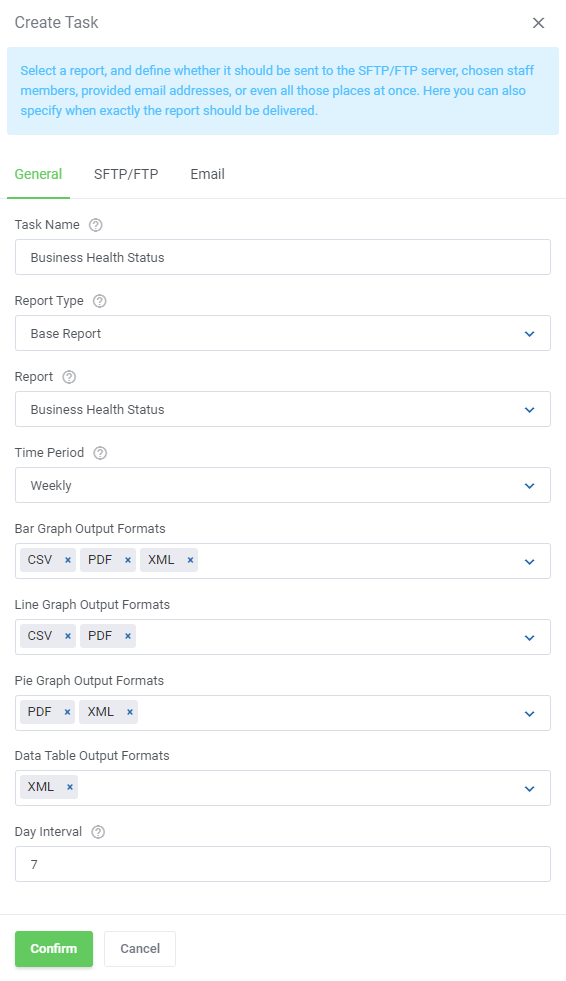
A box with a form to fill in will appear. Start by selecting the report type you want to schedule, either base or a custom one.
In the 'Report' dropdown menu, only the reports of selected type will appear.
Note: The form may slightly differ depending on the selected report type.
Afterwards, specify the conditions: if the report shall be generated right now or how often, as well as the time period for which the report shall be generated etc.
Optionally, you can also change the name of the task to a more friendly.
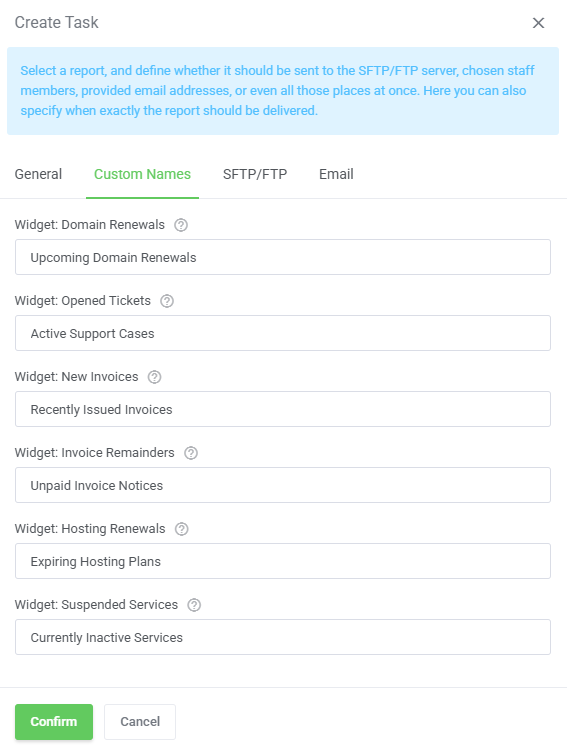
Set custom names for widgets - enter a custom title for available widgets. Leave blank to keep the default names as in the widget placeholder.
Next, decide whether the report should be sent to an SFTP/FTP server.
If so, enable this option and then fill out any server data to successfully connect and allow the task to be completed in a timely manner.
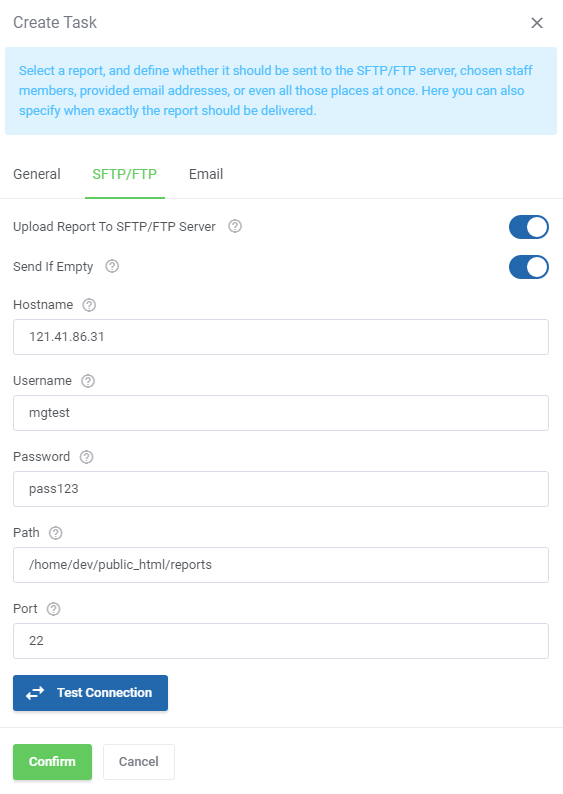
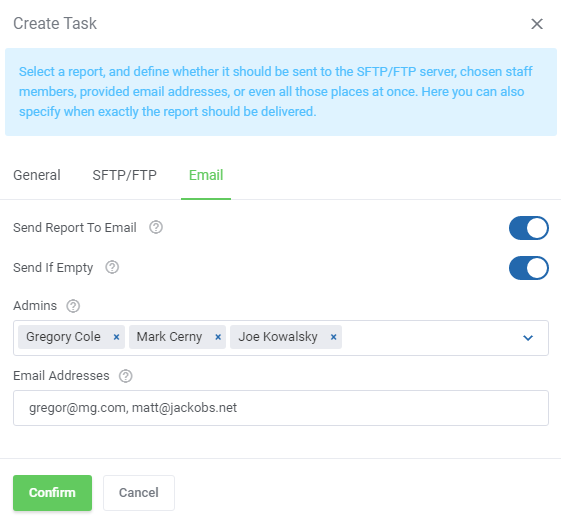
In case you wish the report to be delivered to your personnel members via email, simply enable this option and then select admin users and/or type in email addresses manually.
Press 'Confirm' button when the task is correctly configured.
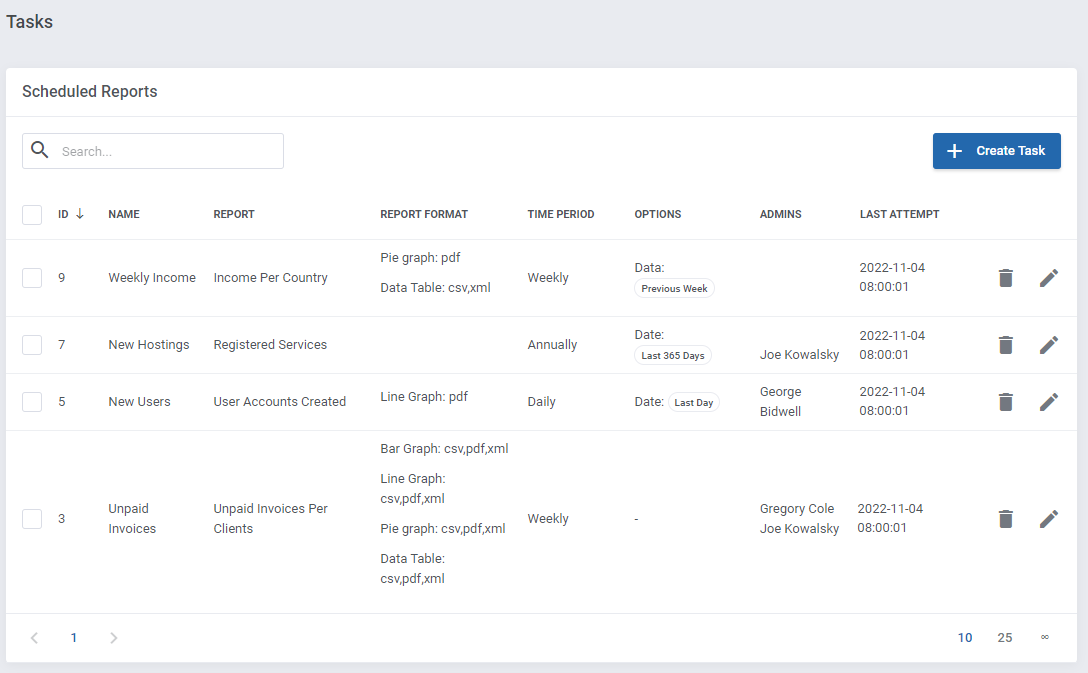
As you can see on the following screen, all scheduled reports are listed in the table with the report name, frequency, assigned admin users etc.
Each of the planned relations can be removed or edited at any time, use action buttons to do so.
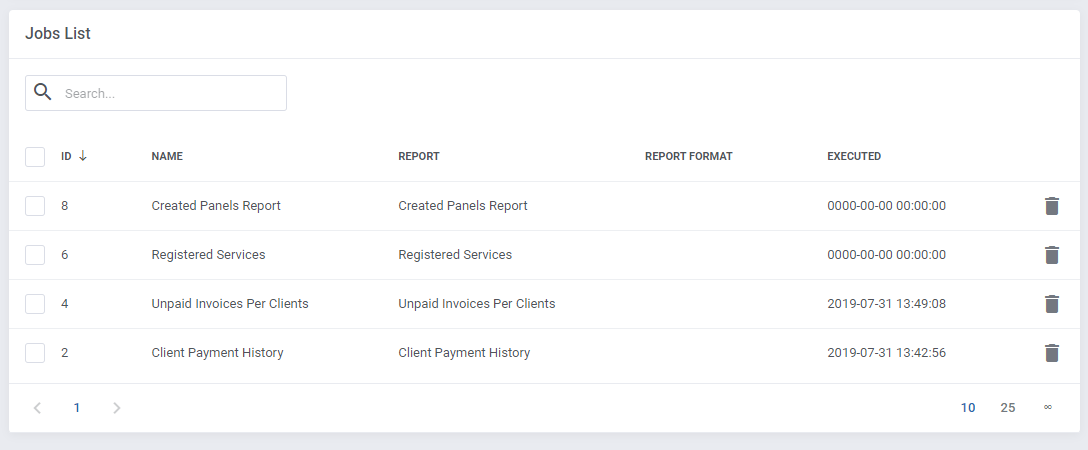
Underneath, you will find a list of current jobs. In case of necessity, you may remove any.
Note, that tasks can also be created straight from the view of any report.

Remember that a cron job is responsible for scheduled tasks, make sure it is set up correctly.
You can find any details in point 8 of this instruction.
# Access Control
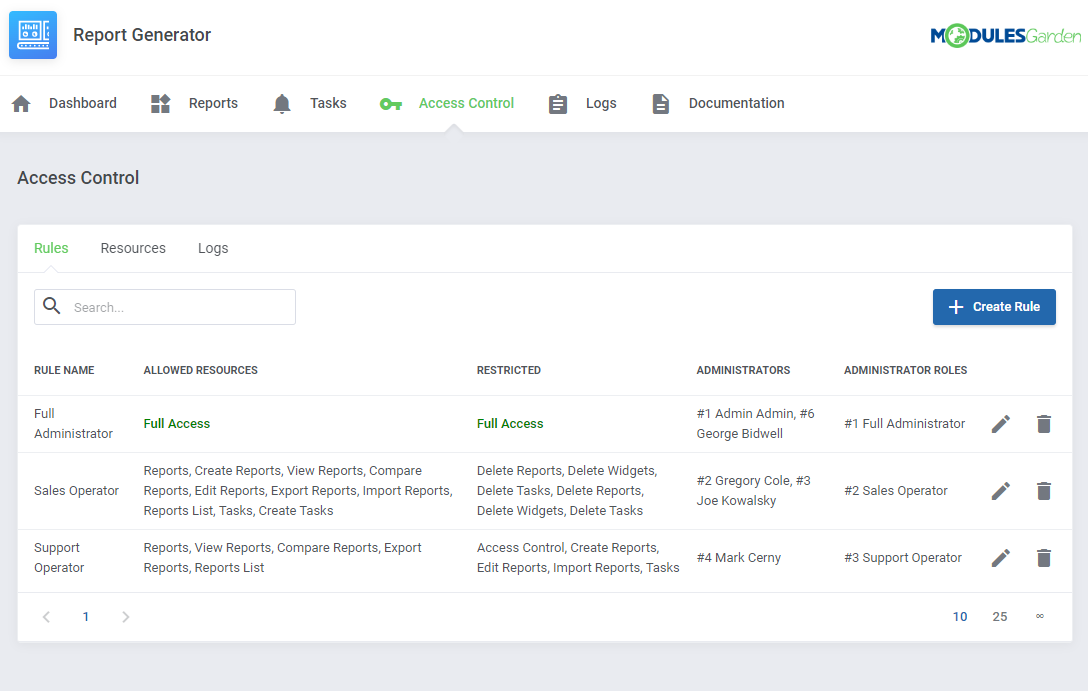
The 'Access Control' tab allows easy management of permissions that will restrict your personnel to view resources and perform specified module actions.
# Resources
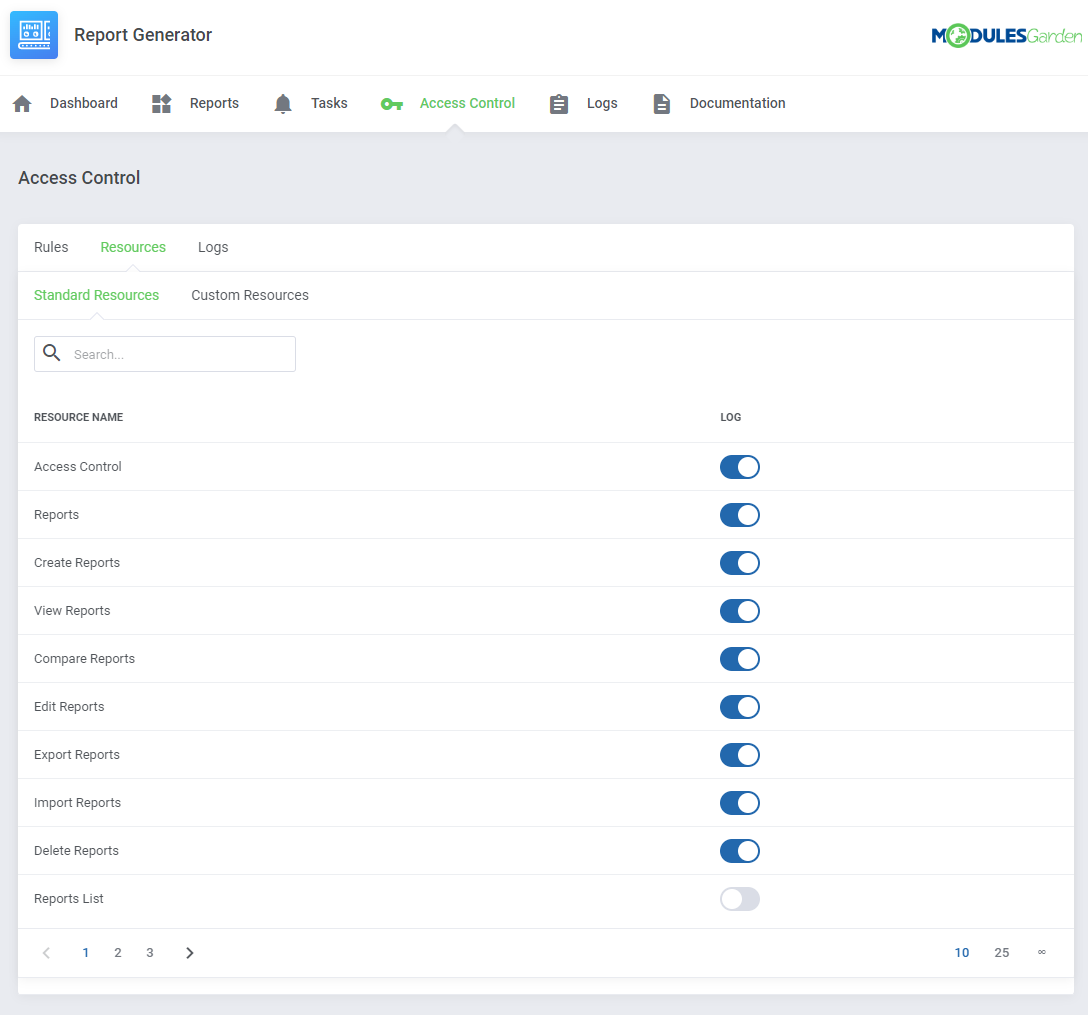
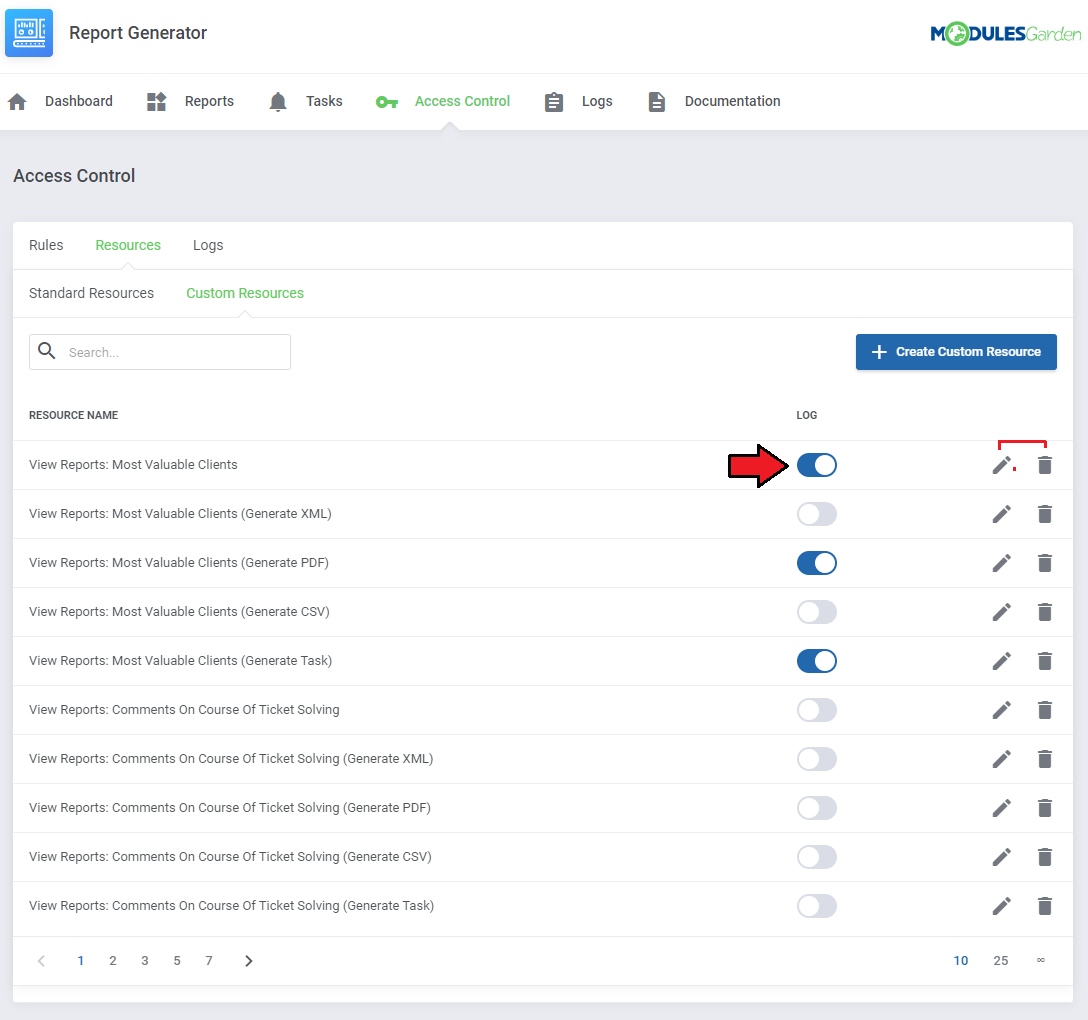
Resources are divided into two separate sections to distinguish between standard WHMCS resources and the one you create for your needs.
Among 'Standard Resources' you will find all resource names from the module. Here you may turn on/off its logging per single resource name.
In the next tab 'Custom Resources', you will find a list of the manually created resources with the option of their complete management.
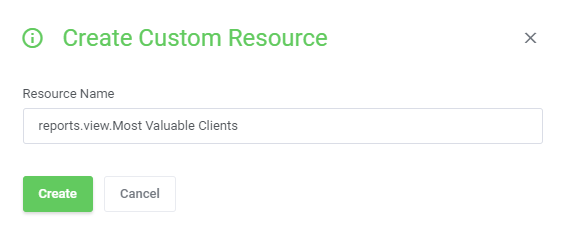
To create new custom resource just press the 'Create Custom Resource' button and then enter its name.
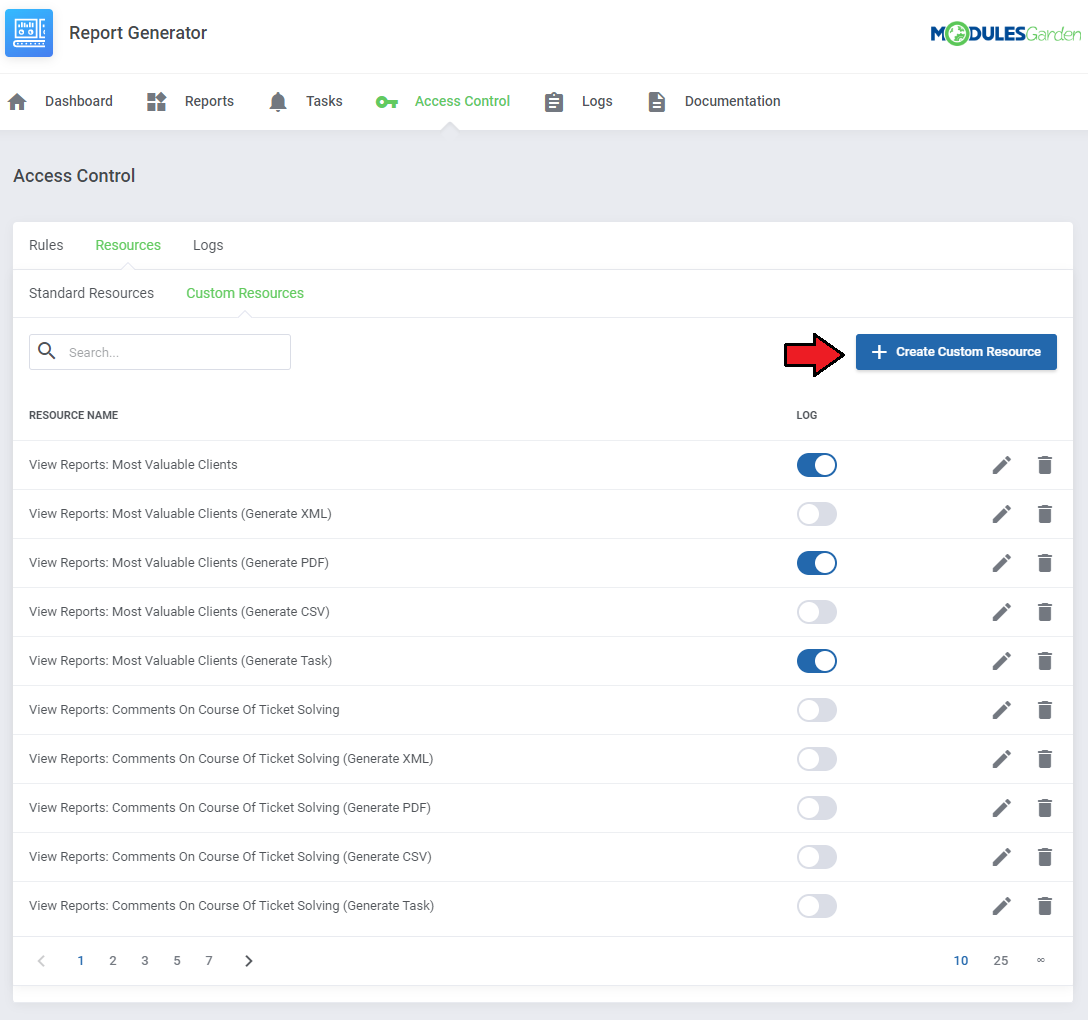
Edit the resource name, delete it and surely turn on/off its logging.
# Rules
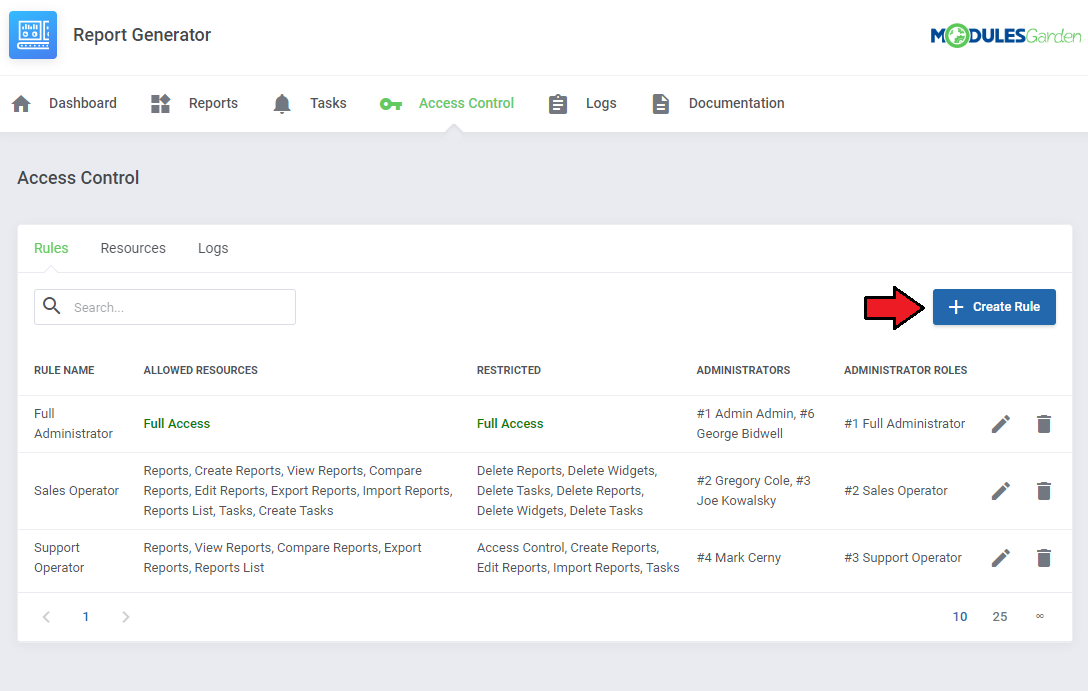
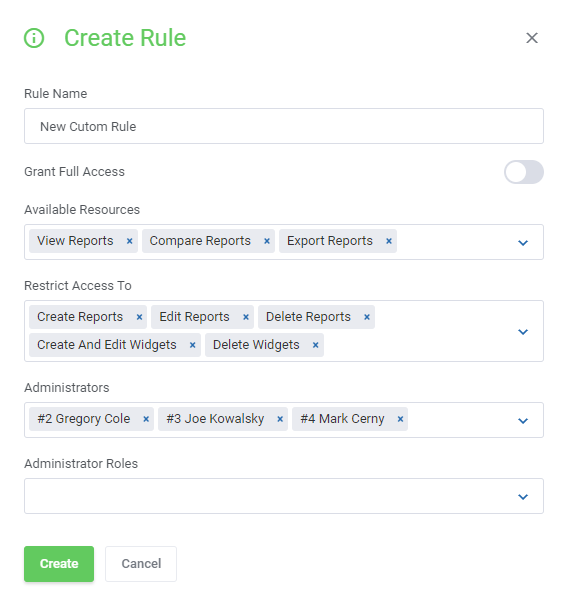
Create rules to control the access of the administrators to single options in the Report Generator module.
Press 'Create Rule' to begin or edit the existing rules to adjust the administrators' permissions.
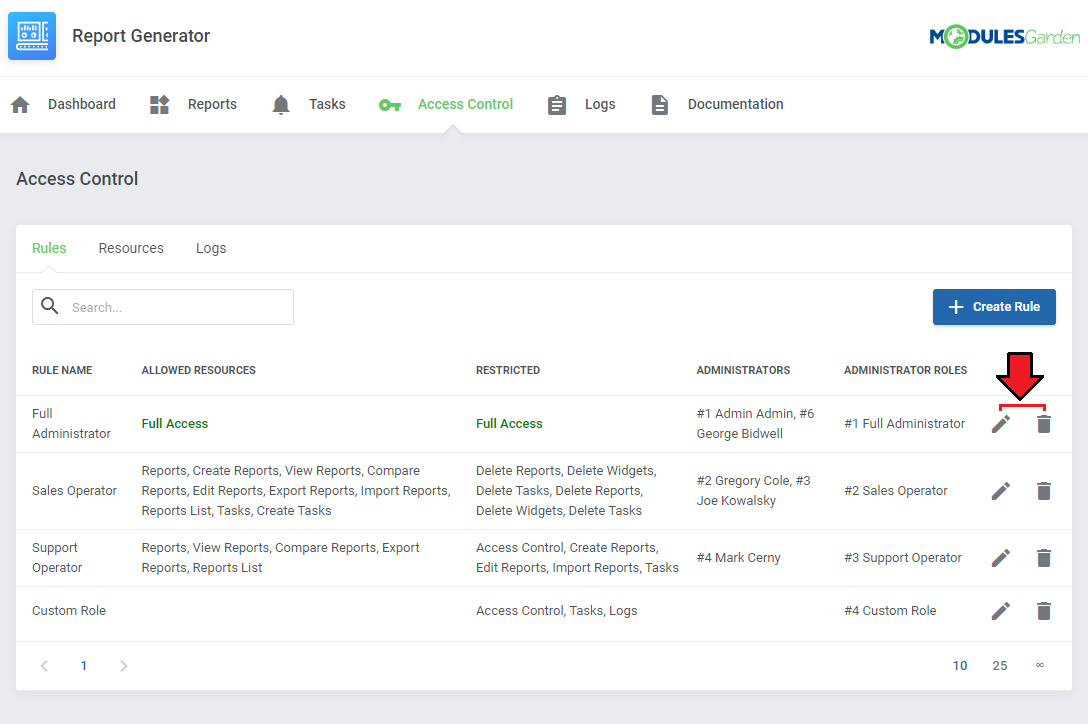
Use the action buttons to edit the existing rules or delete them.
# Access Control: Logs
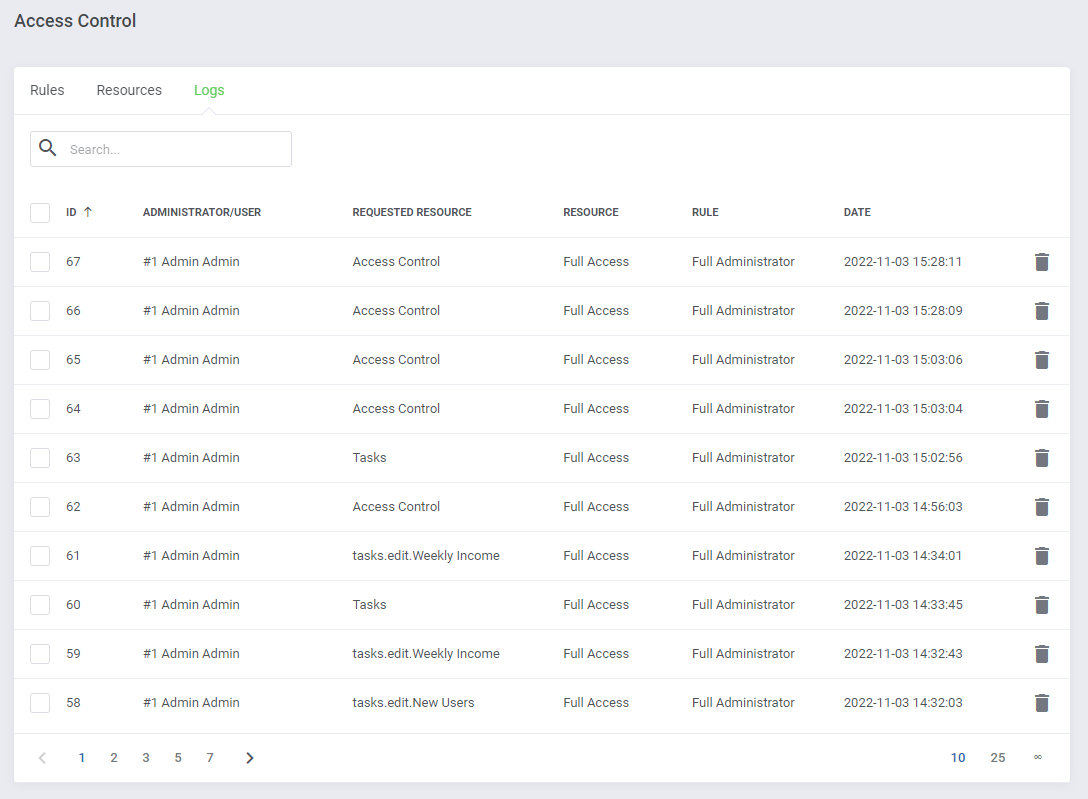
View the logs section with requested resource action details, if its logging has been enabled.
Delete single logs or use mass action button to delete them in bulk.
# Logs
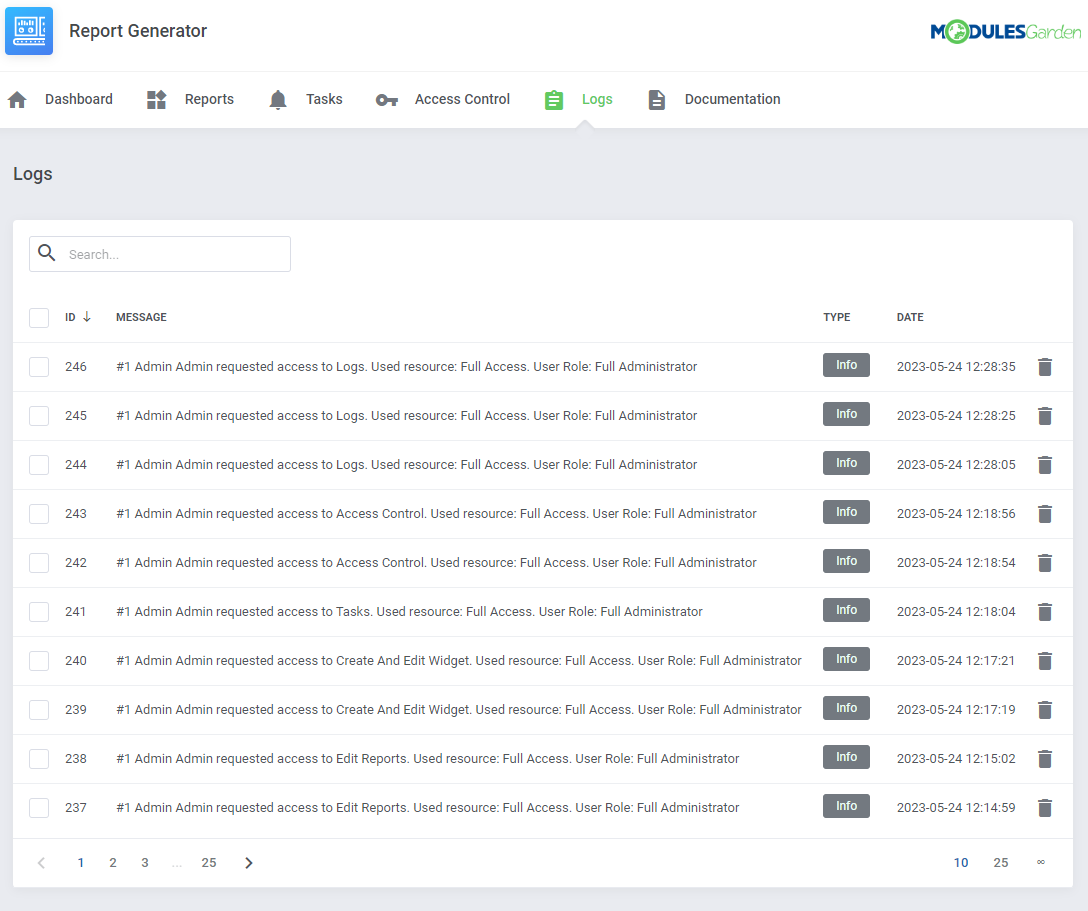
The last section includes logs on any actions performed in the module.
Delete single logs or use the mass action button to delete them in bulk.
# List Of Tables
A complete list of tables with any information on what each table contains. Search for tables you need to generate custom reports perfectly tailored to your needs and reflecting your vision.
| Table Name | Description | Data |
|---|---|---|
| 'tblaccounts' | Payment information: user, currency, payment gateway, etc | id, userid, currency, gateway, date, description, amountin, fees, amountout, rate, transid, invoiceid, refundid |
| 'tblactivitylog' | Log of system activity events | id, date, description, user, userid, user_id, admin_id, ipaddr |
| 'tbladdonmodules' | Active addon modules, module, version, access | id, module, setting, value |
| 'tbladdons' | Product addons, packages with available products | id, packages, name, description, billingcycle, allowqty, tax, showorder, hidden, retired, downloads, autoactivate, suspendproduct, |
| 'tbladminlog' | Admins activity: logins, dates, used IP | id, adminusername, logintime, logouttime, ipaddress, sessionid, lastvisit |
| 'tbladminperms' | Admin permissions; admin role ID, permission ID | id, roleid, permid |
| 'tbladminroles' | Admin roles with specifications of what they have access to | id, name, widgets, reports, systememails, accountemails, supportemails |
| 'tbladmins' | Admins in the system, their data and settings: role, login, email, whether account is active, theme, language, support access, customer ticket notifications | id, uuid, roleid, username, password, passwordhash, authmodule, authdata, firstname, lastname, email, signature, notes, template, language, disabled, loginattempts, supportdepts, ticketnotifications, homewidgets, password_reset_key, password_reset_data, password_reset_expiry, hidden_widgets, widget_order, user_preferencescreated_at, updated_at |
| 'tbladminsecurityquestions' | Security questions | id, question, created_at, updated_at |
| 'tblaffiliates' | Affiliates, clientid → tblclients.id customers who are partners | id, date, clientid, visitors, paytype, payamount, onetime, balance, withdrawn, created_at, updated_at |
| 'tblaffiliatesaccounts' | The relationship/connection of the affiliate with the contract | (id, affiliateid, relid, lastpaid, created_at, updated_at |
| 'tblaffiliateshistory' | Affiliate program entries, registered orders from referrals with the commission | id, affiliateid, date, affaccid, invoice_id, description, amount, created_at, updated_at |
| 'tblaffiliatespending' | Pending commissions | id, affaccid, invoice_id, amount, clearingdate, created_at, updated_at |
| 'tblaffiliateswithdrawals' | Commission withdrawals | id, affiliateid, date, amount, created_at, updated_at |
| 'tblannouncements' | Welcome messages, thanks for purchase, announcements | id, date, title, announcement, published, parentid, language, created_at, updated_at |
| 'tblapplinks' | Name and type of module for which single sign-on has been configured and integrated | id, module_type, module_name, is_enabled, created_at, updated_at |
| 'tblapplinks_links' | Links for tblapplinks | (id, applink_id, scope, display_label, is_enabled, order, created_at, updated_at) |
| 'tblapplinks_log' | Event/login log for tblapplinks | id, applink_id, message, level, created_at, updated_at |
| 'tblbannedemails' | Blocked email domains | id, domain, count |
| 'tblbannedips' | Blocked IP addresses, reason and until when | id, ip, reason, expires |
| 'tblbillableitems' | Items to be billed | id, userid, description, hours, amount, recur, recurcycle, recurfor, invoiceaction, unit, duedate, invoicecount |
| 'tblbrowserlinks' | NO TABLE IN THE BASE | - |
| 'tblbundles' | Product bundles with specifying the number of available bundles, bundle content, promotions, group, price | id, name, validfrom, validuntil, uses, maxuses, itemdata, allowpromo, showgroup, gid, description, displayprice, sortorder, is_featured |
| 'tblcalendar' | Calendar events | id, title, desc, start, end, allday, adminid, recurid |
| 'tblcampaigns' | Advertising campaigns; messages, emails, marketing | id, admin_id, name, configuration, message_data, sending_start_at, draft, started, paused, position, completed, completed_at, queue_completed_at, created_at, updated_at, deleted_at, admin_id, name, configuration, message_data, sending_start_at, draft, started, paused, position, completed, completed_at, queue_completed_at, created_at, updated_at, deleted_at |
| 'tblcancelrequests' | Cancellation requests | id, date, relid, reason, type, created_at, updated_at |
| 'tblclientgroups' | Client groups | id, groupname, groupcolour, discountpercent, susptermexempt, separateinvoices |
| 'tblclients' | Customers, customer details, company, default payment gateway, default currency, account configuration options | id, uuid, firstname, lastname, companyname, email, address1, address2, city, state, postcode, country, phonenumber, tax_id, password, authmodule, authdata, currency, defaultgateway, credit, taxexempt, latefeeoveride, overideduenotices, separateinvoices, disableautocc, datecreated, notes, billingcid, securityqid, securityqans, groupid, cardtype, cardlastfour, cardnum, startdate, expdate, issuenumber, bankname, banktype, bankcode, bankacct, gatewayid, lastlogin, ip, host, status, language, pwresetkey, emailoptout, marketing_emails_opt_in, overrideautoclose, allow_sso, email_verified, email_preferences, created_at, updated_at, pwresetexpiry |
| 'tblclientsfiles' | Clients files | id, userid, title, filename, adminonly, dateadded |
| 'tblconfiguration' | WHMCS configuration | id, setting, value, created_at, updated_at |
| 'tblcontacts' | Contacts: userid → id of the user to who contact belongs, rest of columns self explain | id, userid, firstname, lastname, companyname, email, address1, address2, city, state, postcode, country, phonenumber, tax_id, subaccount, password, permissions, domainemails, generalemails, invoiceemails, productemails, supportemails, affiliateemails, pwresetkey, created_at, updated_at, pwresetexpiry |
| 'tblcredit' | Log: any activity with payments and balances | id, clientid, admin_id, date, description, amount, relid |
| 'tblcurrencies' | Currencies: rate → multiplier against default currency, default → where value "1" default currency | id, code, prefix, suffix, format, rate, default |
| 'tblcustomfields' | Additional fields for configuring products, add-ons, customers, support: fieldname → field_name|displayed name, the rest self explain | id, type, relid, fieldname, fieldtype, description, fieldoptions, regexpr, adminonly, required, showorder, showinvoice, sortorder, created_at, updated_a |
| 'tblcustomfieldsvalues' | Values for additional configuration fields: fieldid → ID of the field from the table, relid → ID of the field to which the configuration field applies: tblclients.id, tbltickets.id, tblhostingaddons.id, tblhosting.id | id, fieldid, relid, value, created_at, updated_a |
| 'tbldomainpricing' | TLD domain settings/configuration options | id, extension, dnsmanagement, emailforwarding, idprotection, eppcode, autoreg, order, group, grace_period, grace_period_fee, redemption_grace_period, redemption_grace_period_fee, created_at, updated_at |
| 'tbldomainreminders' | Domain expiry reminders | id, domain_id, date, recipients, type, days_before_expiry |
| 'tbldomains' | Registered domains, registration date, first payment amount, recurring fee amount, where registered, when expires, current status, payment method | id, userid, orderid, type, registrationdate, domain, firstpaymentamount, recurringamount, registrar, registrationperiod, expirydate, subscriptionid, promoid, status, nextduedate, nextinvoicedate, additionalnotes, paymentmethod, dnsmanagement, emailforwarding, idprotection, is_premium, donotrenew, reminders, synced, created_at, updated_at |
| 'tbldomainsadditionalfields' | Additional domain fields | id, domainid, name, value, created_at, updated_at |
| 'tbldownloadcats' | Categories of downloads | id, parentid, name, description, hidden, created_at, updated_at |
| 'tbldownloads' | Added downloads, download limit, options for downloading a file | id, category, type, title, description, downloads, location, clientsonly, hidden, productdownload, created_at, updated_at |
| 'tbldynamic_translations' | Dynamic translations of individual fields into given languages | id, related_type, related_id, language, translation, input_type, created_at, updated_at |
| 'tblemailmarketer' | Automatic email marketing settings | id, name, type, settings, disable, marketing, created_at, updated_at |
| 'tblemails' | Emails sent to customers | id, userid, subject, message, date, to, cc, bcc, attachments, pending, message_data, failed, failure_reason, retry_count, campaign_id, created_at, updated_at |
| 'tblemailtemplates' | Standard email templates | id, type, name, subject, message, attachments, fromname, fromemail, disabled, custom, language, copyto, blind_copy_to, plaintext, created_at, updated_at |
| 'tblfraud' | Confuguration of fraud protection services | id, fraud, setting, valu |
| 'tblgatewaylog' | Payment log by gateways, when, which gateway, payment details | id, date, gateway, data, transaction_history_id, result |
| 'tblhosting' | Sold products: user, order number, product group, when, domain, payment method, number sold, payment amount, product price, recurring, rest self-explained | id, userid, orderid, packageid, server, regdate, domain, paymentmethod, qty, firstpaymentamount, amount, billingcycle, nextduedate, nextinvoicedate, termination_date, completed_date, domainstatus, username, password, notes, subscriptionid, promoid, promocount, suspendreason, overideautosuspend, overidesuspenduntil, dedicatedip, assignedips, ns1, ns2, diskusage, disklimit, bwusage, bwlimit, lastupdate, created_at, updated_at |
| 'tblhostingaddons' | Sold addons: similar to tblhosting | id, orderid, hostingid, addonid, userid, server, name, qty, firstpaymentamount, setupfee, recurring, billingcycle, tax, status, regdate, nextduedate, nextinvoicedate, termination_date, proratadate, paymentmethod, notes, subscriptionid, created_at, updated_at |
| 'tblhostingconfigoptions' | Configuration options for sold products: relid->product id from tblhosting, configid->tblconfiguration.id | id, relid, configid, optionid, qty |
| 'tblinvoiceitems' | Invoice items: invoiced → invoice ID (tblinvoices.id), userid → for whom, relid → ID of addon, domain or product, the rest self explains | id, invoiceid, userid, type, relid, description, amount, taxed, duedate, paymentmethod, notes |
| 'tblinvoices' | Invoices, userid → user for whom there is an invoice | id, userid, invoicenum, date, duedate, datepaid, last_capture_attempt, date_refunded, date_cancelled, subtotal, credit, tax, tax2, total, taxrate, taxrate2, status, paymentmethod, paymethodid, notes, created_at, updated_at |
| 'tblknowledgebase' | A collection of answers to frequently asked questions | id, title, article, views, useful, votes, private, order, parentid, language |
| 'tblknowledgebasecats' | Categories for tblknowledgebase: parentid → tblknowledgebase.id | id, parentid, name, description, hidden, catid, language |
| 'tblknowledgebaselinks' | Links for frequently asked questions: categoryid → tblknowledgebasecats.id, articleid → tblknowledgebase.id | id, categoryid, articleid |
| 'tblknowledgebasetags' | Tags for frequently asked questions: articleid → tblknowledgebase.id | id, articleid, tag |
| 'tbllinks' | Links/connections/shortcuts to navigate the system | id, name, link, clicks, conversions |
| 'tblmodulelog' | Event log for individual modules: self-explain columns | id, date, module, action, request, response, arrdata |
| 'tblnetworkissues' | Connection problems reports: self-explain columns | id, title, description, type, affecting, server, priority, startdate, enddate, status, lastupdate, created_at, updated_at |
| 'tblnotes' | Admin notes on customers: userid → id of customer, adminid → id of admin | id, userid, adminid, created, modified, note, stick |
| 'tbloauthserver_access_token_scopes' | Scope of token authorization | id, access_token_id, scope_id |
| 'tbloauthserver_access_tokens' | Authorization tokens | id, access_token, client_id, user_id, redirect_uri, expires, created_at, updated_at |
| 'tbloauthserver_auth_codes' | Authorization codes | id, authorization_code, client_id, user_id, redirect_uri, id_token, expires, created_at, updated_at |
| 'tbloauthserver_authcode_scopes' | Scope of code authorization | id, authorization_code_id, scope_id |
| 'tbloauthserver_client_scopes' | Scope of customer authorization | id, client_id, scope_id |
| 'tbloauthserver_clients' | Customer authorizations | id, identifier, secret, redirect_uri, grant_types, user_id, service_id, name, description, logo_uri, rsa_key_pair_id, created_at, updated_at |
| 'tbloauthserver_scopes' | Access scopes for authorization | id, scope, description, is_default, created_at, updated_at |
| 'tbloauthserver_user_authz' | User authorizations | id, user_id, client_id, expires, created_at, updated_at |
| 'tbloauthserver_user_authz_scopes' | Scope of user authorization | id, user_authz_id, scope_id |
| 'tblorders' | Orders, self-explain columns | id, ordernum, userid, contactid, requestor_id, admin_requestor_id, date, nameservers, transfersecret, renewals, promocode, promotype, promovalue, orderdata, amount, paymentmethod, invoiceid, status, ipaddress, fraudmodule, fraudoutput, notes |
| 'tblorderstatuses' | Order statuses, their order and display options | id, title, color, showpending, showactive, showcancelled, sortorder |
| 'tblpaymentgateways' | Payment gateways with settings | id, gateway, setting, value, order |
| 'tblpaymethods' | Payment log, self-explain columns | id, userid, description, contact_id, contact_type, payment_id, payment_type, gateway_name, order_preference, created_at, updated_at, deleted_at |
| 'tblpricing' | Prices of given products with currencies | id, type, currency, relid, msetupfee, qsetupfee, ssetupfee, asetupfee, bsetupfee, tsetupfee, monthly, quarterly, semiannually, annually, biennially, triennially |
| 'tblproduct_downloads' | Downloaded products | id, product_id, download_id, created_at, updated_at |
| 'tblproduct_group_features' | Product group functions | id, product_group_id, feature, order, created_at, updated_at |
| 'tblproduct_upgrade_products' | Products upgraded to higher versions | id, product_id, upgrade_product_id, created_at, updated_at |
| 'tblproductconfiggroups' | Product configuration options groups | id, name, description |
| 'tblproductconfiglinks' | Product group links | id, gid, pid |
| 'tblproductconfigoptions' | Product configuration options | id, gid, optionname, optiontype, qtyminimum, qtymaximum, order, hidden |
| 'tblproductconfigoptionssub' | Suboptions for product configuration | id, configid, optionname, sortorder, hidden |
| 'tblproductgroups' | Product groups | id, name, slug, headline, tagline, orderfrmtpl, disabledgateways, hidden, order, created_at, updated_at |
| 'tblproducts' | Products: type, product group | id, type, gid, name, slug, description, hidden, showdomainoptions, welcomeemail, stockcontrol, qty, proratabilling, proratadate, proratachargenextmonth, paytype, allowqty, subdomain, autosetup, servertype, servergroup, configoption1,..., configoption24, freedomain, freedomainpaymentterms, freedomaintlds, recurringcycles, autoterminatedays, autoterminateemail, configoptionsupgrade, billingcycleupgrade, upgradeemail, overagesenabled, overagesdisklimit, overagesbwlimit, overagesdiskprice, overagesbwprice, tax, affiliateonetime, affiliatepaytype, affiliatepayamount, order, retired, is_featured, created_at, updated_at |
| 'tblpromotions' | Promotions | id, code, type, recurring, value, cycles, appliesto, requires, requiresexisting, startdate, expirationdate, maxuses, uses, lifetimepromo, applyonce, newsignups, existingclient, onceperclient, recurfor, upgrades, upgradeconfig, notes |
| 'tblquoteitems' | Offers of individual quotes | id, quoteid, description, quantity, unitprice, discount, taxable, created_at, updated_at |
| 'tblquotes' | Individual pricing | id, subject, stage, validuntil, userid, firstname, lastname, companyname, email, address1, address2, city, state, postcode, country, phonenumber, tax_id, currency, subtotal, tax1, tax2, total, proposal, customernotes, adminnotes, datecreated, lastmodified, datesent, dateaccepted |
| 'tblregistrars' | Domain services | id, registrar, setting, value |
| 'tblrsakeypairs' | RSA key pairs | id, identifier, private_key, public_key, algorithm, name, description, created_at, updated_at |
| 'tblservergroups' | Server product groups | id, name, filltype |
| 'tblservergroupsrel' | Relationships/links of the server product with the group | id, groupid, serverid |
| 'tblservers' | Server products with configuration | id, name, ipaddress, assignedips, hostname, monthlycost, noc, statusaddress, nameserver1, nameserver1ip, nameserver2, nameserver2ip, nameserver3, nameserver3ip, nameserver4, nameserver4ip, nameserver5, nameserver5ip, maxaccounts, type, username, password, accesshash, secure, port, active, disabled |
| 'tblserversssoperms' | Server product links with single sign-on roles | id, server_id, role_id |
| 'tblsslorders' | SSL certificate orders | id, userid, serviceid, addon_id, remoteid, module, certtype, configdata, authdata, completiondate, status |
| 'tbltax' | Tax amounts | id, level, name, state, country, taxrate |
| 'tblticket_watchers' | Links to observe the data of applications by admins | id, ticket_id, admin_id, created_at, updated_at |
| 'tblticketbreaklines' | Line separating responses in tickets | id, breakline |
| 'tblticketdepartments' | Ticket departments | id, name, description, email, clientsonly, piperepliesonly, noautoresponder, hidden, order, host, port, login, password, mail_auth_config, feedback_request |
| 'tblticketescalations' | Automatic actions/responses for specific ticket statuses | id, name, departments, statuses, priorities, timeelapsed, newdepartment, newpriority, newstatus, flagto, notify, addreply, editor |
| 'tblticketfeedback' | Customer evaluations/feedback on tickets | id, ticketid, adminid, rating, comments, datetime, ip |
| 'tblticketlog' | Tickets logs | id, date, tid, action |
| 'tblticketmaillog' | Ticket mai llog | id, date, to, cc, name, email, subject, message, status, attachment |
| 'tblticketnotes' | Ticket notes (staff-only) | id, ticketid, admin, date, message, attachments, attachments_removed, editor |
| 'tblticketpredefinedcats' | Predefined categories of tickets | id, parentid, name |
| 'tblticketpredefinedreplies' | Predefined responses to tickets | id, catid, name, reply |
| 'tblticketreplies' | Single responses to tickets | id, tid, userid, contactid, requestor_id, name, email, date, message, admin, attachment, attachments_removed, rating, editor |
| 'tbltickets' | Tickets with information about them: number, department, user, contact | id, tid, did, userid, contactid, requestor_id, name, email, cc, c, ipaddress, date, title, message, status, urgency, admin, attachment, attachments_removed, lastreply, flag, clientunread, adminunread, replyingadmin, replyingtime, service, merged_ticket_id, editor, updated_at |
| 'tblticketspamfilters' | Spam filter type | id, type, content |
| 'tblticketstatuses' | Defined statuses for notifications | id, title, color, sortorder, showactive, showawaiting, autoclose |
| 'tbltickettags' | Assigned designations to individual applications | id, ticketid, tag |
| 'tbltld_categories' | NO TABLE IN THE BASE | - |
| 'tbltld_category_pivot' | NO TABLE IN THE BASE | - |
| 'tbltlds' | NO TABLE IN THE BASE | - |
| 'tbltodolist' | To-Do list | id, date, title, description, admin, status, duedate |
| 'tbltransientdata' | Transient data | id, name, data, expires |
| 'tblupdatehistory' | WHMCS system update history | id, admin_id, original_version, new_version, success, message, created_at, updated_at |
| 'tblupgrades' | Package/product/option upgrades to higher/newer versions | id, userid, orderid, type, date, relid, originalvalue, newvalue, new_cycle, amount, credit_amount, days_remaining, total_days_in_cycle, new_recurring_amount, recurringchange, status, paid |
| 'tblwhoislog' | Log of IP address logins for domains | id, date, domain, ip |
# Tips
If you want to edit your custom report and make it more complicated, you may do it with a more advanced creator.
When you are editing a report you may choose from the beginning which creator type you are going to use.Report Generator For WHMCS requires the ZipArchive PHP library installed on your server.
If you wish to change the font type for generated reports, you can easily do this in the following file
modules\addons\reportgenerator\app\Config\settings.json
# Update Instructions
Essential guidance through the process of updating the module is offered here.
Reports migration from 3.x to 4.x
In order to successfully migrate your reports from the 3.x.x module version to the latest one, please execute the cron task:
yourWHMCS/modules/addons/reportgenerator/cron php cron.php migration:reports
Important: Reports created with PHP code are not migrated, only the ones in SQL.
Report Generator For WHMCS module, since version 4.3.0, requires Chrome browser or Chromium installed on the server.
Install Headless Chrome/Chromium
Open the configuration.yml file at: (yourWHMCS)/reportgenerator/app/Config and adjust the 'chromeBinaryPath' path.
# Upgrade Guide
Seeking a solution that offers greater flexibility, customization tailored to your precise needs, and unrestricted availability?
There is an option that not only proves to be cost-effective in the long run but also includes prioritized support services, making it a truly valuable investment.
Opt for the Open Source version (opens new window) of your Report Generator For WHMCS module to unlock these benefits.
Simply click on either the Get Source Code or Upgrade To Lifetime button found on the product's page in our client area to complete the one-step upgrade process, with a dedicated discount already applied.
Follow a comprehensive guide covering the transition process, the advantages it brings, and step-by-step instructions on what to do next after the order has been successfully finalized.
# Common Problems
When you have problems with connection, check whether your SELinux or firewall does not block ports.
If you are using the module in version 4.2 or previous, the module requires PhantomJS library installed.
In case of difficulties with installing the library, such as 'Unable to find the wrapper "phar"' error, please try the following steps:Download the appropriate package depending on the operating system used on the server:
- Windows: https://bitbucket.org/ariya/phantomjs/downloads/phantomjs-2.1.1-windows.zip
- Linux: https://bitbucket.org/ariya/phantomjs/downloads/phantomjs-2.1.1-linux-x86_64.tar.bz2
Extract the downloaded package and copy the 'phantomjs' file from the 'bin' folder to the following directory: 'yourWHMCS/modules/addons/reportgenerator/vendor/microweber/screen/bin/'
Set the permissions of the file to recursively writeable (777)
Go back to to the installation steps and check if you can now process them successfully