
ModulesGarden Documentation
Back Home Home

On-Premises VPS And Cloud Provisioning WHMCS Module Bundle

  • Navigation
    • Main Page
    • ModulesGarden Website
    • Help
  • WHMCS Modules
    • Abandoned Cart
    • Account Synchronization
    • AdminBolt Licenses
    • Advanced Billing
    • Alibaba Cloud Virtual Machines
    • Amazon EC2
    • Amazon Lightsail
    • Anti-Fraud And Email Verification
    • Client Area Designer
    • Client Area Popup
    • Client Profile Viewer
    • Cloud Billing
    • cPanel Extended
    • cPanel Manage2
    • CRM
    • DigitalOcean Droplets
    • DirectAdmin Extended
    • DirectAdmin Licenses
    • Discount Center
    • DNS Manager
    • Domain Allocator
    • Domain & Email Forwarding
    • Domain Orders Extended
    • Domains Reseller
    • EasyDCIM Colocation
    • EasyDCIM Dedicated Servers
    • Email Notifications Organizer
    • Emoji Picker
    • EURid Registrar
    • Expense Tracker
    • Freshdesk
    • Freshservice
    • Geolocation Hook
    • GoDaddy Domain Registrar
    • GoGetSSL
    • Google Analytics
    • Google Cloud Virtual Machines
    • Google Workspace
    • Hetzner Cloud Servers
    • Hosting Quota Notifications
    • Hosting Renewals
    • IBM Cloud Virtual Servers
    • IP Manager
    • Lagom Smart Order Form
    • Login-Free Payments
    • Marketing Triggers Automation
    • MetricsCube Business Analytics
    • MikroTik WireGuard VPN
    • Multibrand
    • NIC IT Registrar
    • Office 365
    • OpenStack Projects
    • OpenStack VPS & Cloud
    • OVHcloud VPS & Dedicated Servers
    • Password Manager
    • Payment Gateway Allocator
    • Payment Gateway Charges
    • Plesk Extended
    • Plesk Key Administrator
    • Portainer Docker Containers
    • Premium Support Tickets
    • Product Cross-Selling
    • Product Feedback Center
    • Product Free Trial Manager
    • Product Linker
    • Products Reseller
    • Proxmox Mail Gateway
    • Proxmox VE Cloud VPS (Legacy)
    • Proxmox VE VPS & Cloud
    • QuickBooks Desktop
    • QuickBooks Online
    • QuickBooks Online Survey
    • Quotes Automation
    • R1Soft Backups
    • Rackspace Email Extended
    • Recurring Contract Billing
    • Report Generator
    • Resellers Center
    • Server Allocator
    • Secure Support Messages
    • Server Monitoring
    • SMS Center
    • Social Media Login
    • SolusVM 2 VPS & Cloud
    • SolusVM Extended VPS
    • SolusVM Extended Cloud
    • SolusVM Extended Reseller
    • Stripe SEPA Payments
    • Support PIN
    • Support Tickets Allocator
    • Time & Task Manager
    • Unban Center
    • Virtuozzo Hybrid Infrastructure S3
    • Virtuozzo Hybrid Server
    • Vultr VPS
    • WithoutDNS
    • WordPress Manager
    • Zendesk
    • Zimbra & Carbonio Email
  • Legacy Versions
    • Advanced Billing 3.X
    • Domain Orders Extended 2.X
    • Domains Reseller 1.X
    • EasyDCIM Colocation V1.X
    • EasyDCIM Dedicated Servers V1.X
    • EasyDCIM Dedicated Servers V2.X
    • Hosting Quota Notifications 1.X
    • Hosting Renewals 2.X
    • IP Manager 2.5.X
    • Lagom One Step Order Form 1.2.X
    • Multibrand 1.X
    • Office 365 1.0.0
    • Payment Gateway Charges 1.X
    • Proxmox Cloud 2.X
    • Proxmox VPS 2.X
    • Quotes Automation 1.X
    • Recurring Contract Billing 1.5.X
    • Report Generator 3.X
    • Resellers Center 2.X
    • SMS Center 2.X
    • Unban Center 1.X
    • Zimbra Email For WHMCS
    • Zimbra Email 1.X
  • WHMCS Module Bundles
    • Accounting
    • Commerce
    • CRM
    • Customer Experience
    • Domain Reseller
    • Hosting Accounts Provisioning
    • IaaS VPS And Cloud Provisioning
    • On-Premises VPS And Cloud Provisioning
  • WHMCS Widgets
    • Freshdesk Customer Widget
    • ModulesGarden Widget
    • WHMCS Widget For Zendesk
  • Tools And Applications
    • Access Control Tool
    • App Templates Tool
    • Automations Tool
    • Logs
    • Proxmox Proxy Application
    • Task Queue Tool
    • Theme Management Tool
  • Translations
    • Translations Tool
    • Translations
    • Polish Language Translation
    • Polska Wersja JÄ™zykowa (PL)
  • General
    • 7-Day Free Access
    • How To Change WHMCS Module Language
    • How To Debug Module
    • How To Solve Problems With Module License
    • How To Change WHMCS Module Design
    • How To Update WHMCS Module
    • How To Upgrade WHMCS Module
    • How To Use Configurable Options
  • FAQ
    • Common Questions
    • WHMCS Module Bundles
  • Community
    • Forums
    • Blog
    • Facebook
    • X
    • LinkedIn
    • Instagram
    • Reddit
    About On-Premises VPS & Cloud Provisioning Bundle

# On-Premises VPS And Cloud Provisioning WHMCS Module Bundle

  • About On-Premises VPS & Cloud Provisioning Bundle
    • What You Can Achieve
    • Supported Virtualization Platforms
    • Included Modules
    • Quick Start Guide
    • Practical Notes
    • Use Case: Self-Hosted Virtualization Management
    • Useful Links

# (opens new window) About On-Premises VPS & Cloud Provisioning Bundle (opens new window)

The On-Premises VPS & Cloud Provisioning bundle is built for hosting providers who operate their own infrastructure and want to automate VPS and cloud service delivery directly from WHMCS.
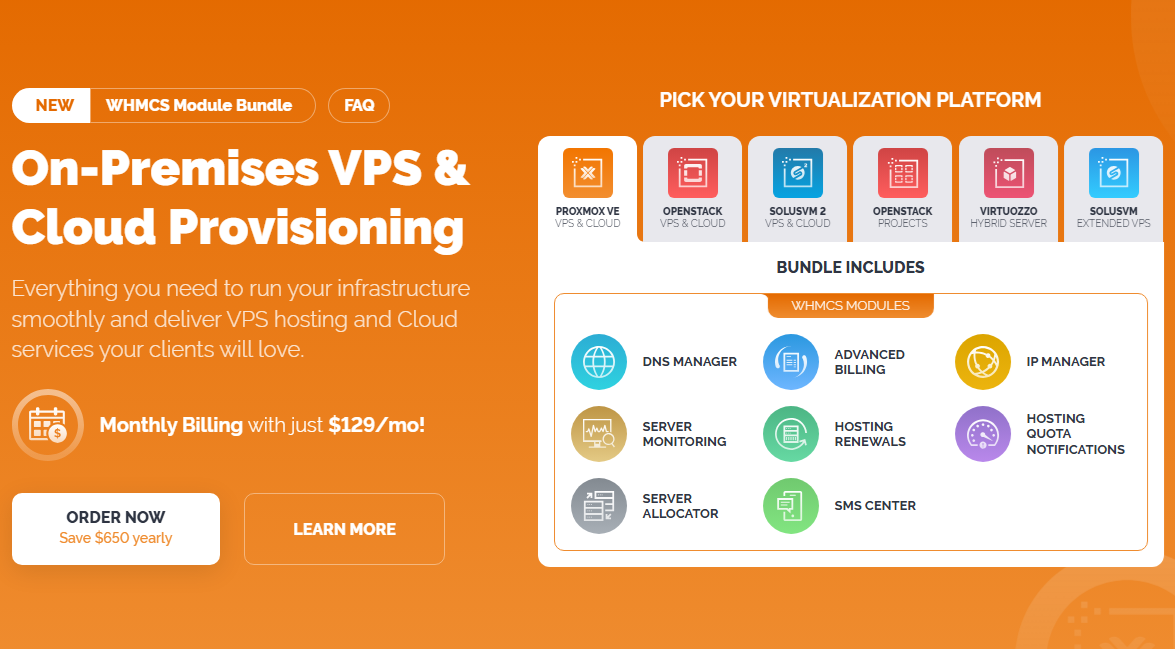
With ten powerful WHMCS modules working in harmony under a single monthly subscription, it supports multiple infrastructure platforms, such as Proxmox VE, OpenStack or SolusVM 2.
Clients are free to choose their preferred virtualization system; regardless of the platform, the same set of modules is included in the bundle. This setup eliminates repetitive tasks, reduces provisioning errors, and improves customer experience from day one. Not sure how monthly module bundles work? See our FAQ - WHMCS Module Bundles for answers to common questions about subscriptions, updates, and usage.

# What You Can Achieve

This bundle empowers you to:

  • Provision virtual machines with full control over resources, locations, and templates
  • Allow clients to manage their VPS instances directly from the WHMCS client area
  • Automate billing based on server usage or custom pricing rules
  • Handle IP assignments and subnet management with ease
  • Keep clients informed with real-time service alerts and quota usage updates
  • Support multiple virtualization platforms, including Proxmox, OpenStack, SolusVM, or Virtuozzo
  • Track and allocate server resources more effectively
    Whether you manage a single cluster or a distributed cloud infrastructure, this bundle equips you with the tools to scale confidently and efficiently.
# Supported Virtualization Platforms

Pick one of the modules supporting your virtualization platform to deliver and manage virtual servers with full user self-service:

  • Proxmox VE VPS For WHMCS (opens new window)
  • OpenStack VPS & Cloud For WHMCS (opens new window)
  • SolusVM 2 VPS & Cloud For WHMCS (opens new window)
  • OpenStack Projects For WHMCS (opens new window)
  • Virtuozzo Hybrid Server For WHMCS (opens new window)
  • SolusVM Extended VPS For WHMCS (opens new window)

# Included Modules

This bundle includes the following WHMCS modules:

  • Advanced Billing For WHMCS (opens new window) - Bill clients based on usage metrics, billing cycles, or custom triggers
  • IP Manager For WHMCS (opens new window) - Manage IP subnets and automate assignments for each instance
  • Server Monitoring For WHMCS (opens new window) - Monitor server uptime and performance with automated notifications
  • DNS Manager For WHMCS (opens new window) - Provision and control DNS zones tied to each VPS or cloud service
  • Hosting Quota Notifications For WHMCS (opens new window) - Warn clients about nearing bandwidth or disk usage limits
  • SMS Center For WHMCS (opens new window) - Send real-time alerts, status updates, and renewal notices via SMS
  • Server Allocator For WHMCS (opens new window) - Automatically assign new services to available servers based on defined criteria.
  • Hosting Renewals For WHMCS (opens new window) - Let clients manage their service renewals and billing cycles from the client area.
    All modules are included under a single monthly subscription. You can install only the ones that fit your current setup and add others as your needs grow.

# Quick Start Guide

Each module included in the bundle operates independently but is fully compatible with the others.
You can install them in any order, and configure them based on your infrastructure stack. Modules can also be added or removed at any time without affecting the performance of the others.

  1. Order the bundle from the ModulesGarden Marketplace (opens new window)
  2. Download the packages from our client area (opens new window)
  3. Install only the module selected for your virtualization environment (the one you picked at the order):
    • Proxmox VE VPS & Cloud For WHMCS (opens new window)
    • OpenStack VPS & Cloud For WHMCS (opens new window)
    • SolusVM 2 VPS & Cloud For WHMCS (opens new window)
    • OpenStack Projects For WHMCS (opens new window)
    • Virtuozzo Hybrid Server For WHMCS (opens new window)
    • SolusVM Extended VPS For WHMCS (opens new window)
  4. Then install any of the complementary modules as needed:
    • DNS Manager For WHMCS (opens new window)
    • Advanced Billing For WHMCS (opens new window)
    • IP Manager For WHMCS (opens new window)
    • Server Monitoring For WHMCS (opens new window)
    • Hosting Quota Notifications For WHMCS (opens new window)
    • Hosting Renewals For WHMCS (opens new window)
    • SMS Center For WHMCS (opens new window)
    • Server Allocator For WHMCS (opens new window)
  5. Activate each module in your WHMCS admin area
  6. Assign modules to VPS/Cloud products and configure automation settings like IP pools, usage thresholds, or notifications

# Practical Notes

  • All modules are compatible and tested to work together in a production environment
  • You can mix and match hypervisor integrations depending on your infrastructure
  • Modules support both KVM, LXC and VZ virtualization, where applicable
  • One subscription covers all products included in the bundle

# Use Case: Self-Hosted Virtualization Management

Scenario Overview:
A hosting provider runs its own data center and offers KVM-based VPS hosting using Proxmox VE.
The business goal is to automate provisioning, IP assignments, and customer communications via modules integrated directly into WHMCS.

  • Example Setup

    • The provider installs the Proxmox VE VPS For WHMCS module to allow clients to create and manage virtual machines via WHMCS.
  • Server Allocator For WHMCS is configured to distribute new services evenly across available nodes based on current CPU load.

  • Each provisioned VM automatically receives an IP address from a predefined subnet using IP Manager For WHMCS.

  • DNS zones are created and managed through DNS Manager For WHMCS, eliminating manual DNS configuration for each new VPS.

  • Advanced Billing For WHMCS applies hourly billing based on actual CPU and bandwidth usage.

  • Clients are notified about nearing usage limits via Hosting Quota Notifications For WHMCS and receive renewal reminders using Hosting Renewals For WHMCS.

  • Server Monitoring For WHMCS tracks uptime for each VM and alerts the provider in case of outages.

  • SMS alerts configured in SMS Center For WHMCS keep both admins and clients informed about key events such as provisioning, suspension, or expiration.

  • Key Benefits

    • Centralized provisioning, monitoring, and billing through a single WHMCS interface
    • Better resource distribution and reduced risk of server overload
    • Fully automated DNS and IP management with no manual steps
    • Greater transparency and fewer support tickets thanks to automated quota alerts and self-managed renewals

# Useful Links

  • WHMCS Module Bundles Overview (opens new window)
  • On-Premises VPS & Cloud Provisioning Module Bundle Page (opens new window)
  • Blog Article - On-Premises VPS & Cloud Provisioning Bundle Spotlight (opens new window)
  • FAQ - WHMCS Module Bundles (opens new window)