

# Secure Support Messages For WHMCS
# (opens new window) About Secure Support Messages For WHMCS (opens new window)
Secure Support Messages For WHMCS allows clients and support staff to exchange sensitive information securely through WHMCS support tickets.
Passwords, access credentials, API keys, and other confidential details can be submitted separately from regular ticket messages and stored in encrypted form.
Authorized staff members can reveal the submitted content directly from the related ticket, while configurable deletion rules help limit how long sensitive information remains available.
# Installation
This tutorial will show you how to successfully install and configure Secure Messages For WHMCS.
We will guide you step by step through the installation and configuration process.
Log in to our client area (opens new window) and download the module.
Extract the downloaded package and upload its contents into the main WHMCS directory.
The package contents should be uploaded without changing the provided directory structure.
Rename the module license file from 'license_RENAME.php' to 'license.php'.
Next, open the renamed file and enter your license key. The license key is available in our client area under 'My Products'.

Log in to your WHMCS admin area and navigate to 'System Settings' → 'Addon Modules'.
Find 'Secure Messages' on the list and press 'Activate'.
Press 'Configure', select the administrator role groups that should have access to the module, and save the changes.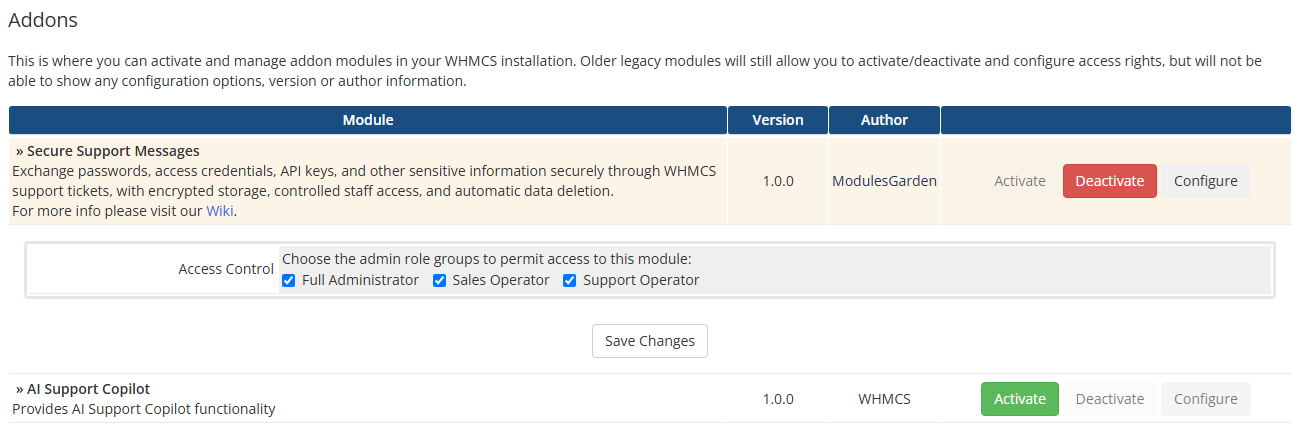
You have successfully installed Secure Messages For WHMCS.
The module is now available under 'Addons' → 'Secure Messages'.
# Management
Secure Messages For WHMCS integrates secure data sharing directly with the WHMCS support ticket system.
In this guide, we will walk you through the module configuration and explain how clients and support staff can manage secure messages.
# Secure Data
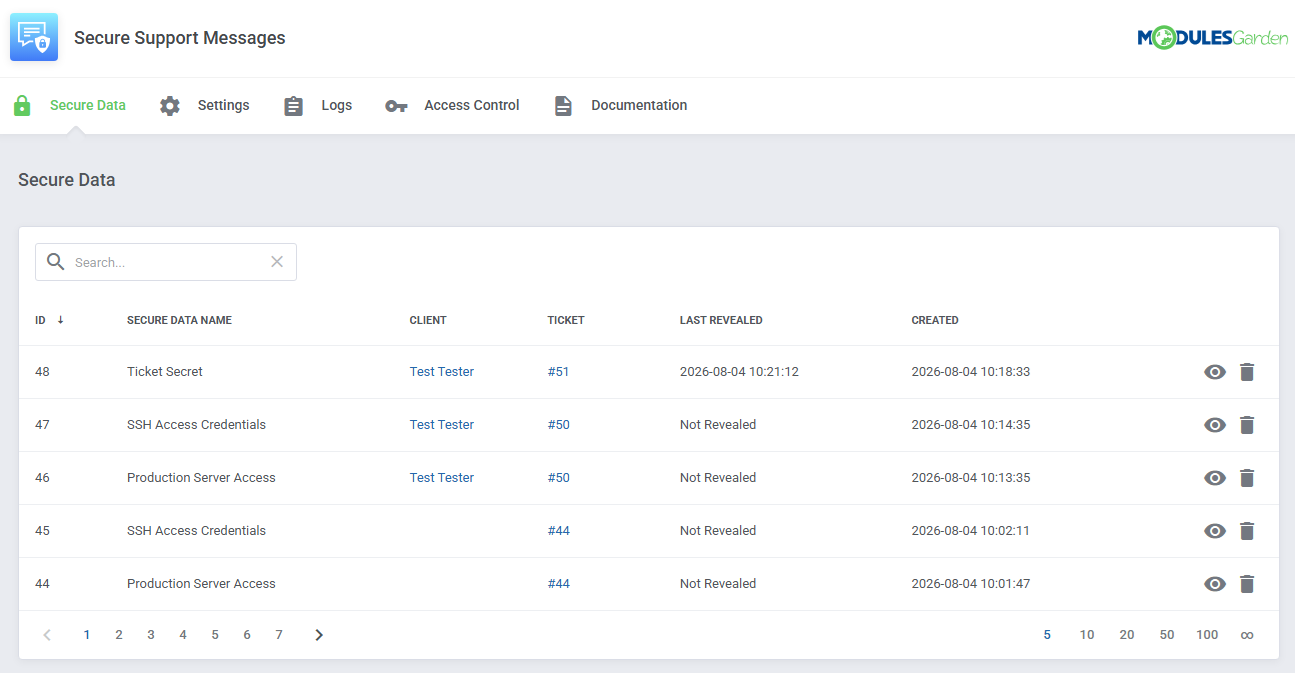
The 'Secure Data' section contains all secure messages stored by the module.
The table includes the following information:
- ID – the unique identifier of the secure message.
- Secure Data Name – the name assigned to the entry.
- Client – the client who submitted the secure message.
- Ticket – the related WHMCS support ticket.
- Last Revealed – the date and time when the secure message was revealed by admin staff.
- Created – the date and time when the secure message was added.
Use the eye icon in the last column to view the selected entry.
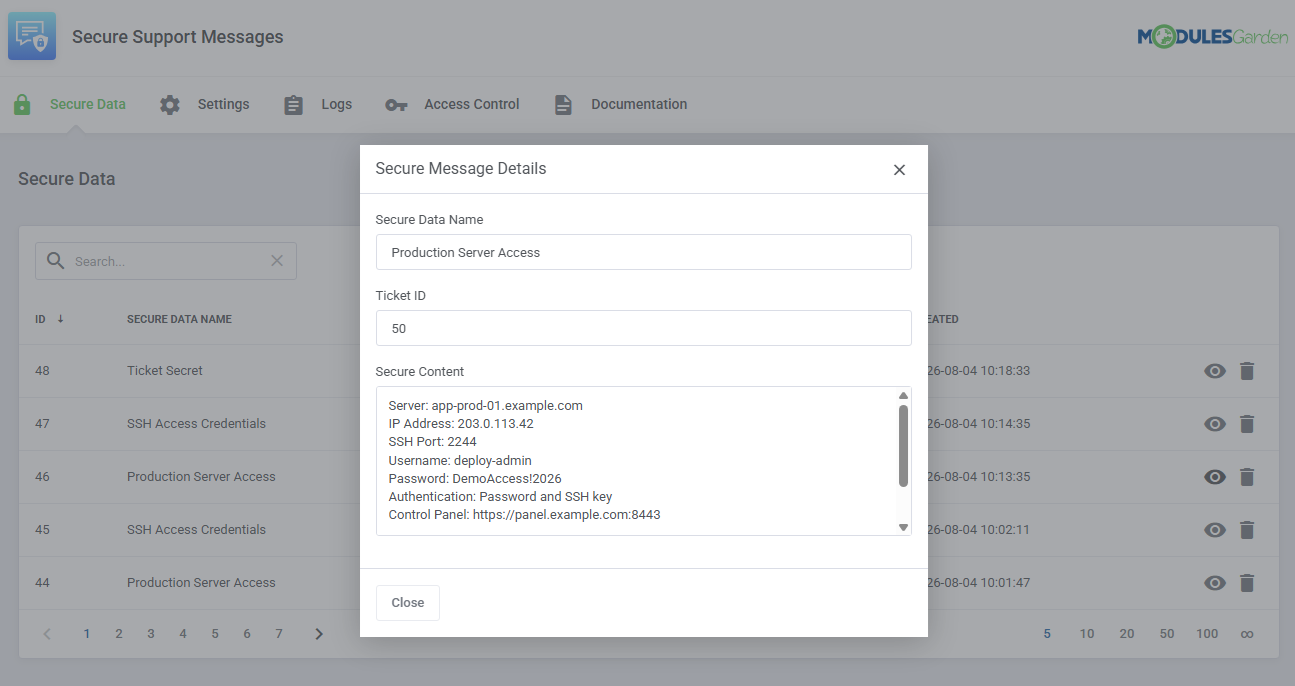
The 'Secure Message Details' window displays the entry name, related ticket, and decrypted content.
The secure content is revealed only after an authorized administrator opens the entry.
# Settings
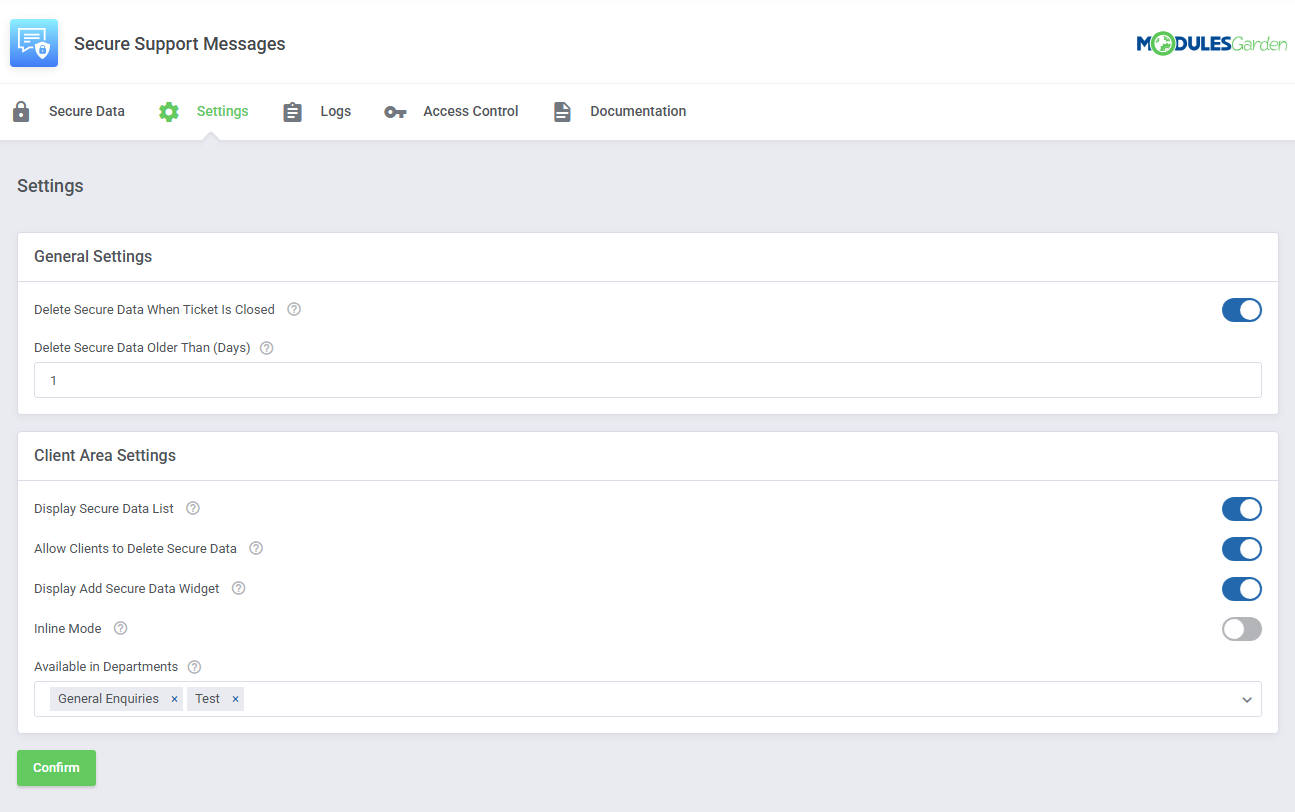
The 'Settings' section contains options controlling the module's availability in the client area and the automatic deletion of secure messages.
# General Settings
Delete Secure Data When Ticket Is Closed – automatically delete all secure messages attached to a ticket when the ticket is closed.
Delete Secure Data Older Than (Days) – automatically delete secure messages older than the specified number of days. Enter 0 to disable automatic deletion based on age.
# Client Area Settings
- Display Secure Data List – show secure messages attached to a ticket in the client ticket view.
- Allow Clients to Delete Secure Data – allow clients to delete secure messages they have added to tickets.
- Display Add Secure Data Widget – display a separate panel that clients can use to add secure information from the ticket view.
- Inline Mode – add a secure data field directly to the standard WHMCS ticket reply form instead of displaying a separate panel.
- Available in Departments – select the support departments in which secure messaging will be available in the client area. Leave the field empty to enable it for all departments.
# Admin Area Ticket Integration
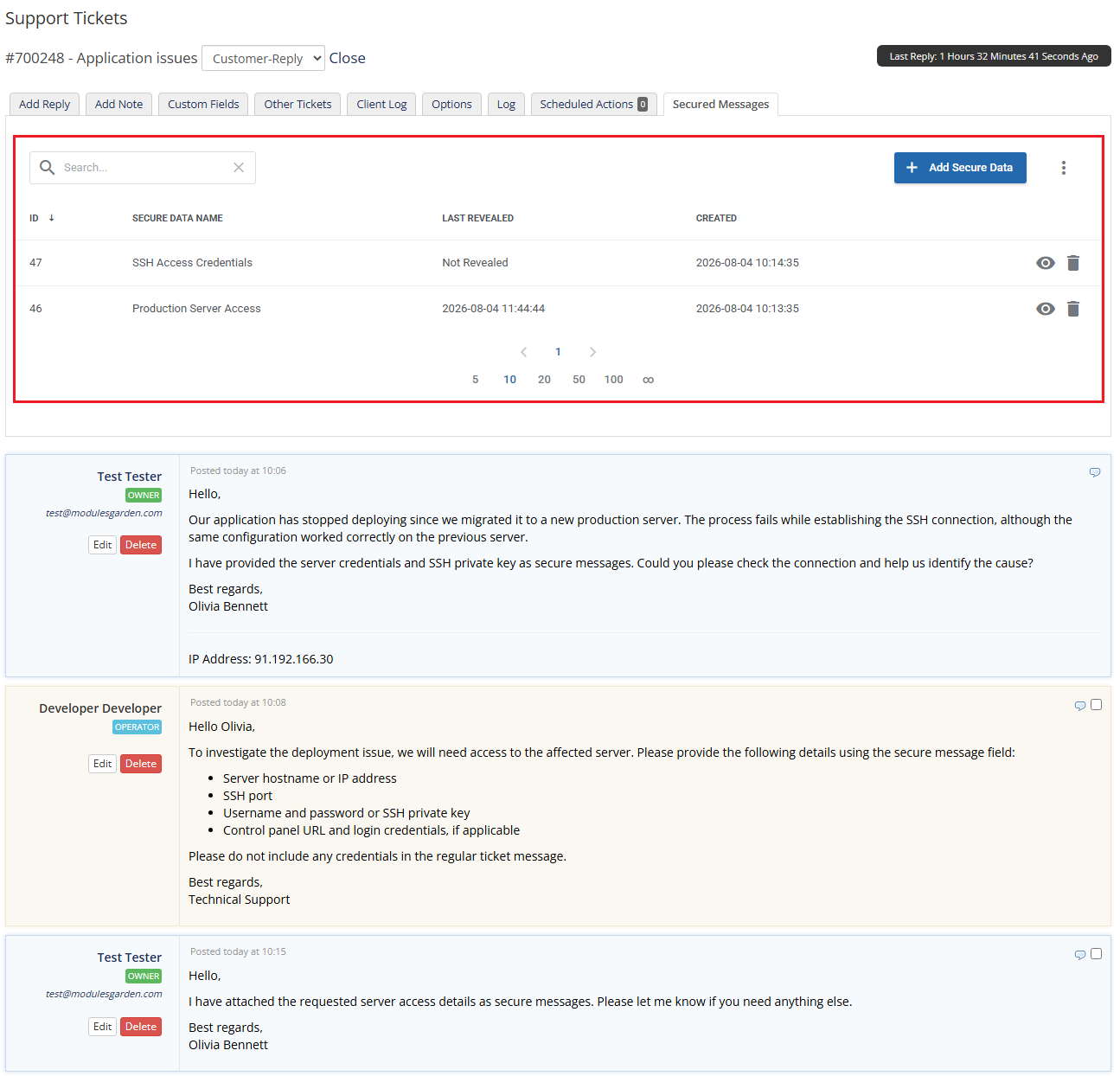
After the module is activated, a new 'Secure Messages' tab becomes available in the WHMCS admin area when viewing a support ticket.
The tab lists all secure messages attached to the currently opened ticket.
The table includes:
- ID – the unique identifier of the secure message.
- Secure Data Name – the name assigned to the entry.
- Last Revealed - information if the content has been revealed and when
- Created – the date and time when the entry was added.
Use the eye icon to reveal the selected secure message.
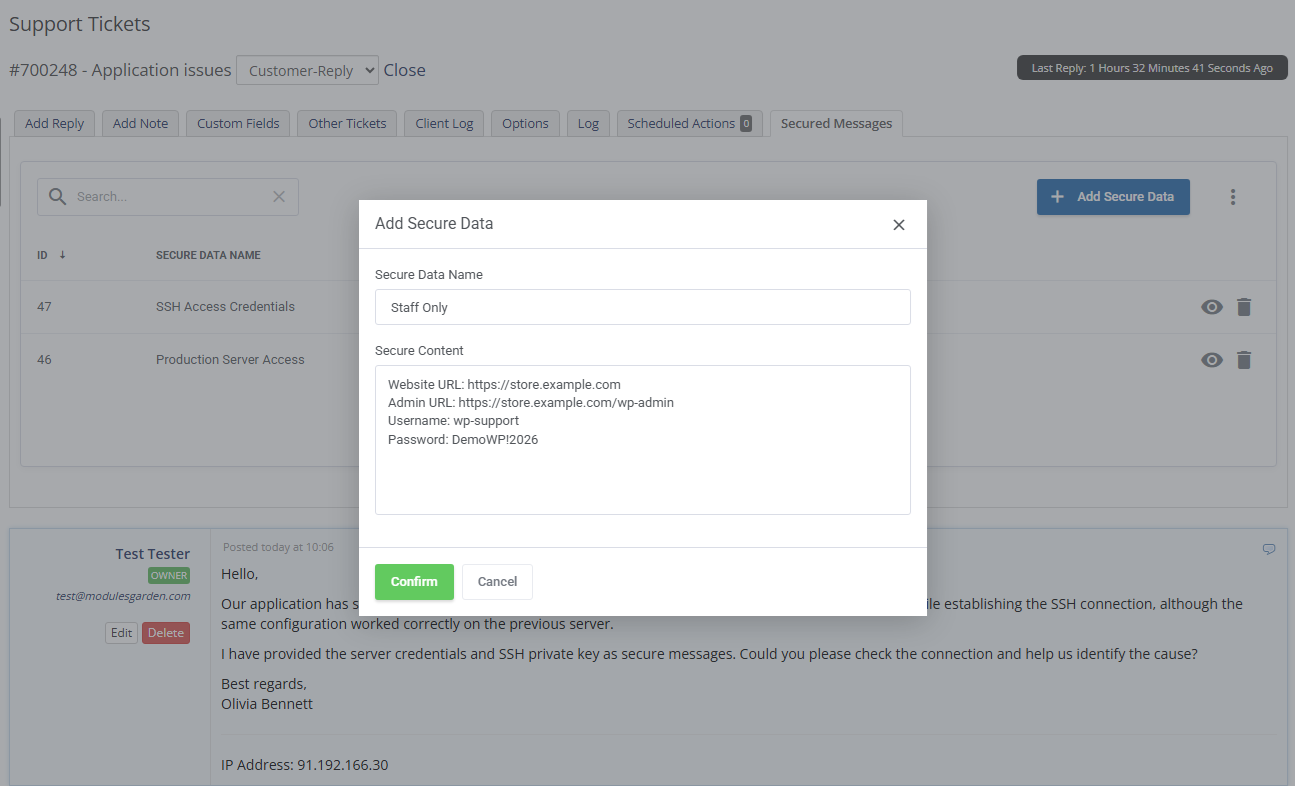
To attach a new secure message to the ticket, press 'Add Secure Data'.
Enter a name for the entry and provide the sensitive content, then confirm the action.
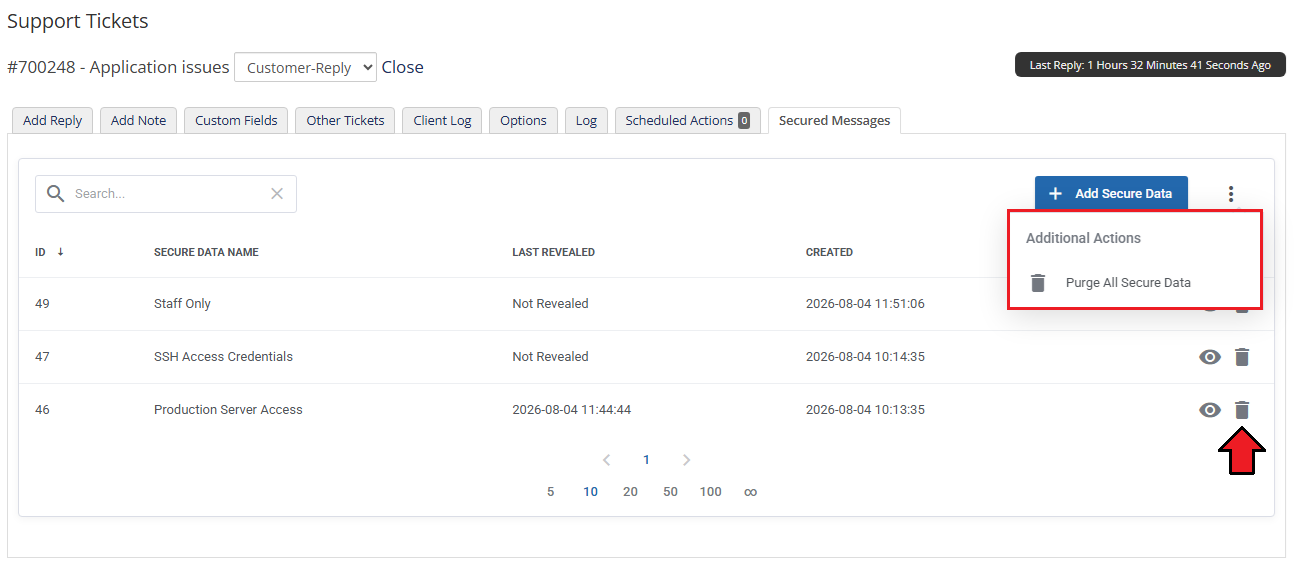
Use the additional actions menu to delete all secure messages attached to the ticket.
Please note that deleted secure messages cannot be restored.
# Client Area
Clients can submit passwords, access credentials, API keys, or other sensitive information without including it in the regular ticket message.
Depending on the module configuration, secure messages may be added through a separate panel or through fields integrated directly with the standard WHMCS ticket forms.
# Inline Mode
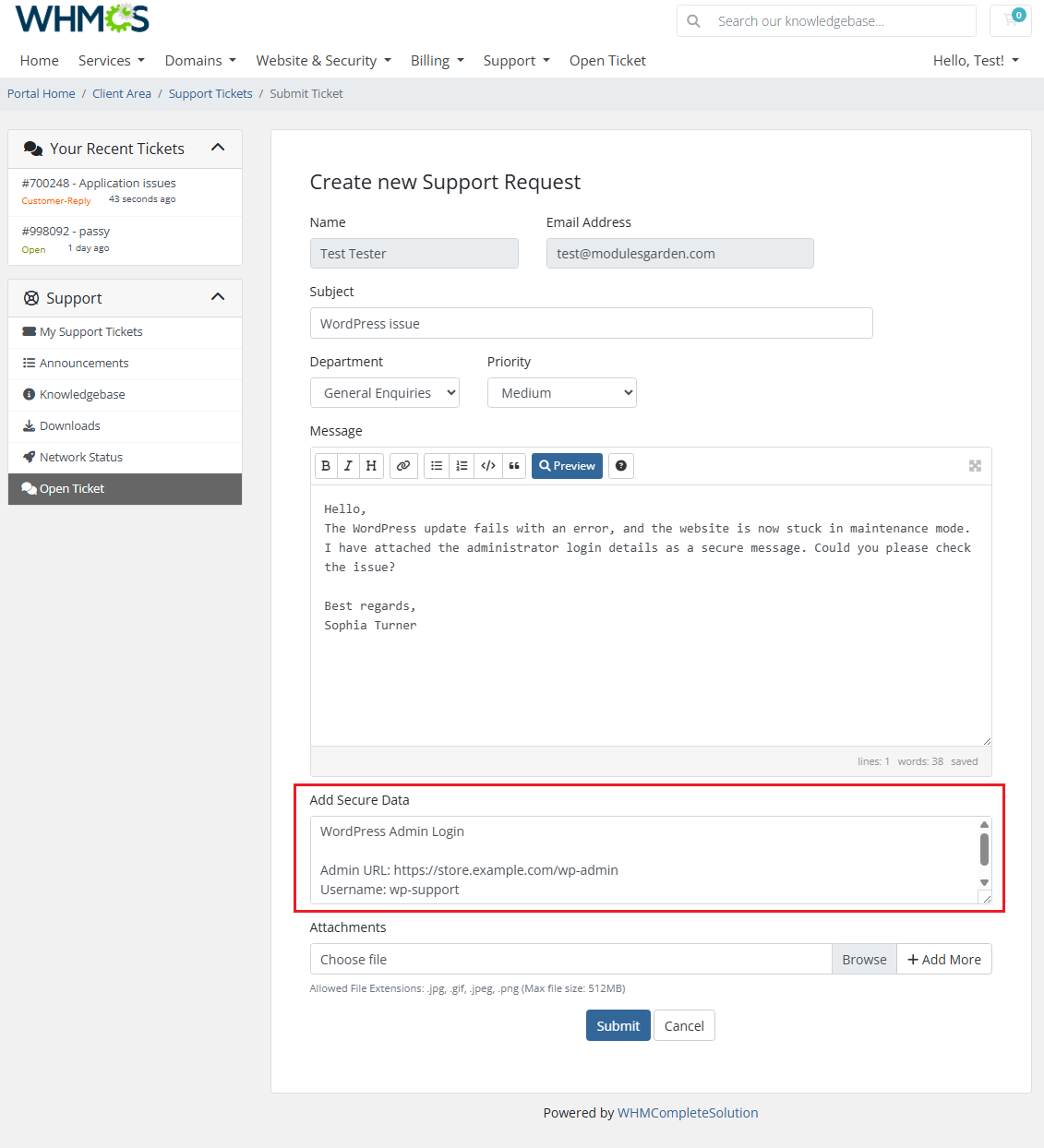
When 'Inline Mode' is enabled, an 'Add Secure Data' field is added directly below the standard message editor.
The field is available when clients reply to an existing ticket only.
The client can enter passwords, access credentials, API keys, or other sensitive information in this field.
The provided content is submitted together with the ticket form but stored separately from the regular ticket message.
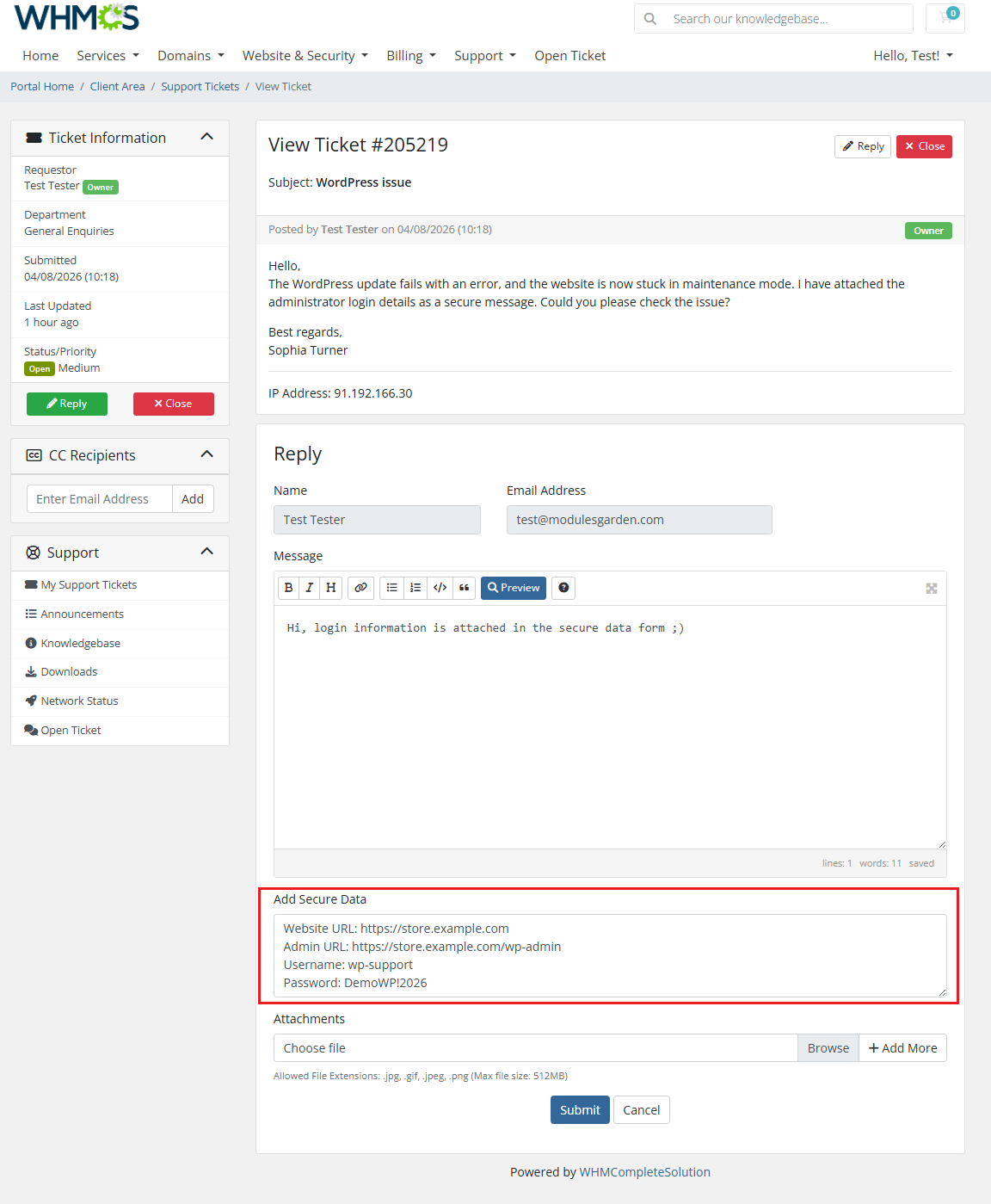
Note that in this mode there is no option to view the list of securely added messages in the ticket view.
# Separate Secure Data Panel
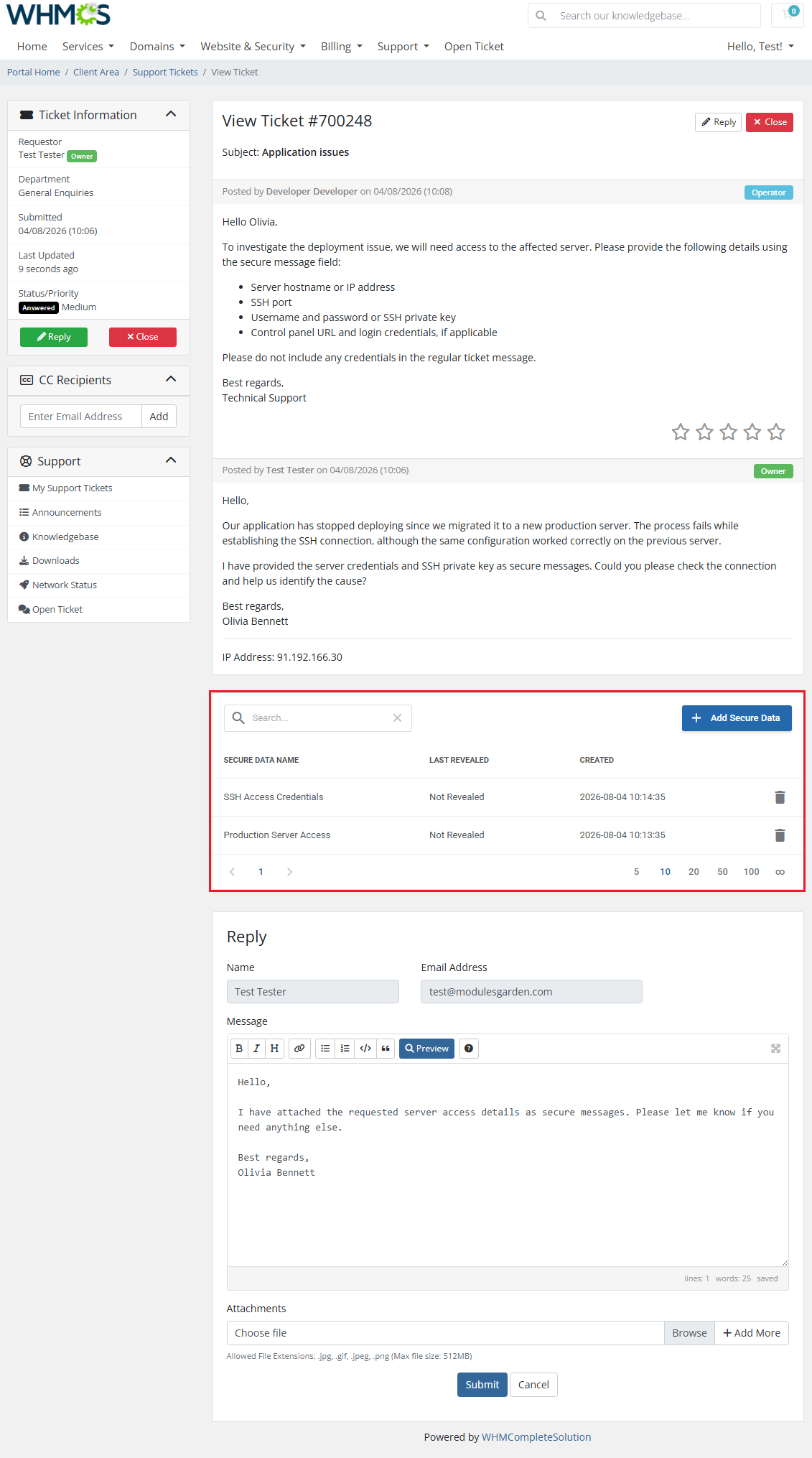
When 'Inline Mode' is disabled and the 'Display Add Secure Data Widget' option is enabled, clients can add secure messages through a separate panel displayed in the ticket view.
This allows sensitive information to be submitted independently of a regular ticket reply.
Opening a new ticket view:
Depending on the module settings, clients may also see the list of secure messages attached to the ticket and delete entries they have submitted.
Only the message metadata is displayed in the list. The encrypted content is not included in the regular ticket conversation.
Access Control
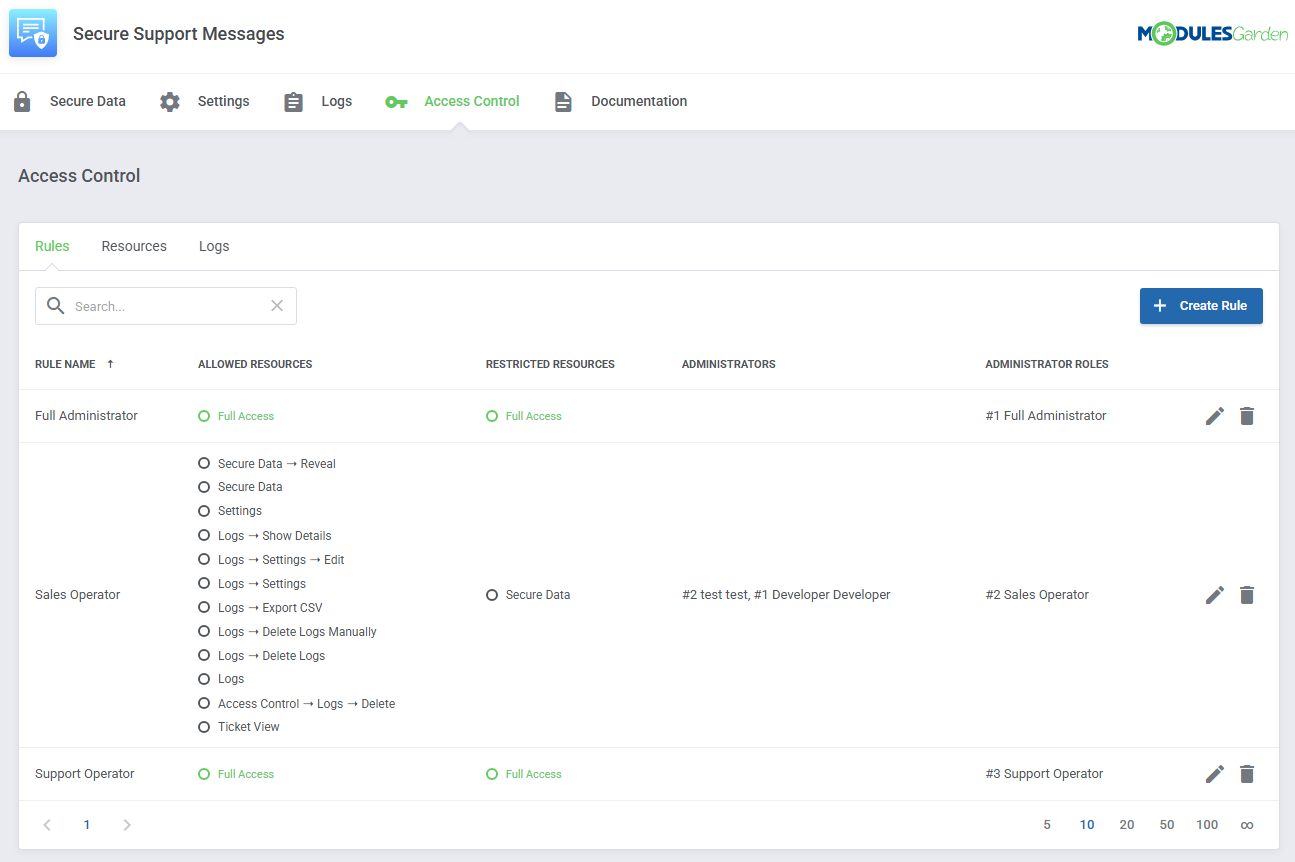
Ensure secure and tailored access to your module with the "Access Control" tool available in ModulesGarden addons.
This feature allows you to assign permissions, define resource access for administrators, and track activities with detailed logs.
Customize access settings to fit your team’s structure and maintain transparency with ease. For comprehensive guidance, refer to the tool's dedicated article.
Logs
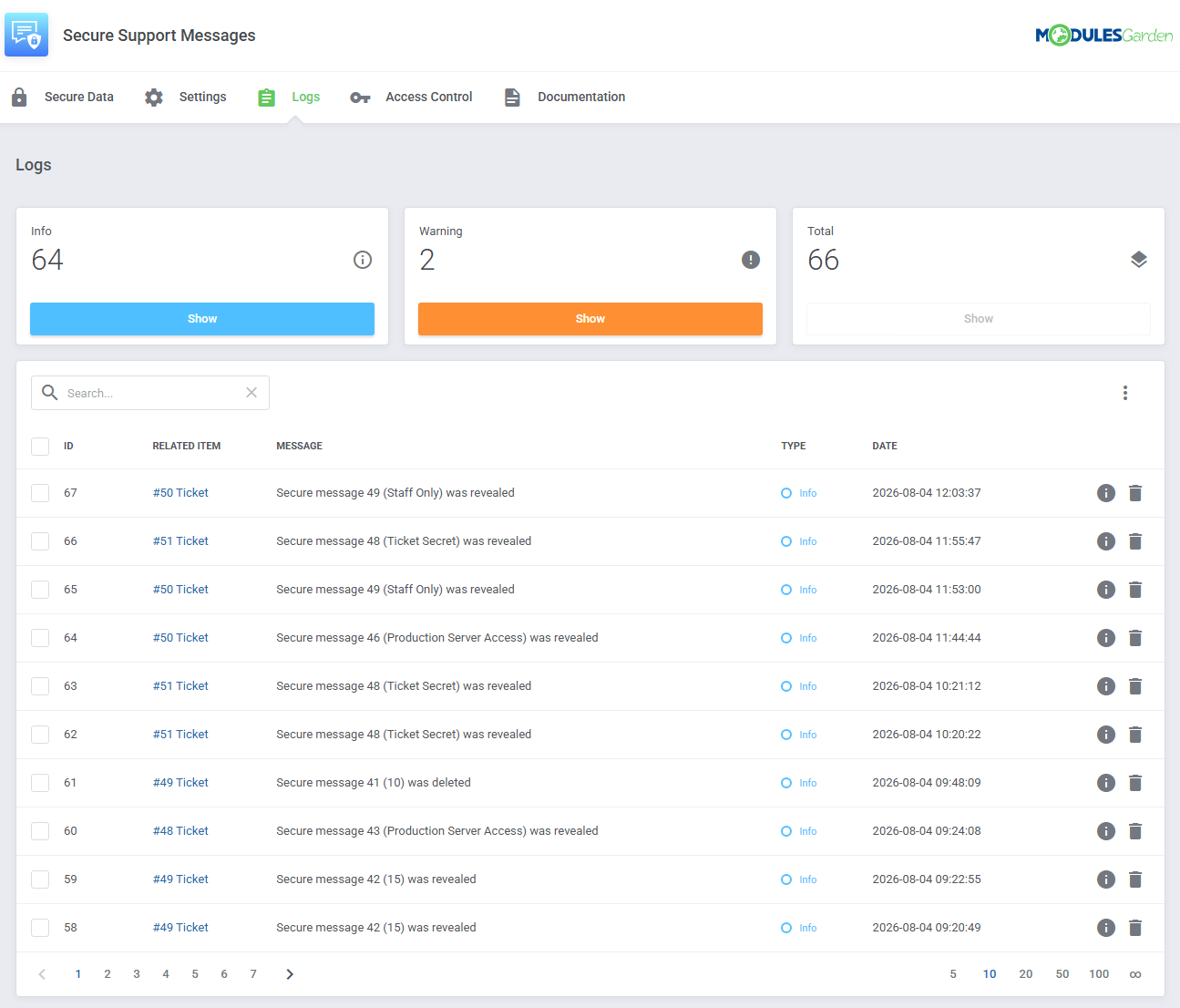
The 'Logs' section is where the module logs are stored. You can filter the module logs by type with the 'Show' buttons.
For precise details on Logs, please refer to our dedicated documentation article, which you may find here.
# Tips
Use the secure data field only for confidential information.
Regular questions and descriptions should still be entered in the standard ticket message field.
Enable automatic deletion of secure messages.
Keeping sensitive information only as long as necessary reduces the amount of confidential data stored in WHMCS.
Limit the "Reveal Secure Data" permission to authorized staff.
Only administrator roles that require access to client credentials should be allowed to reveal encrypted content.
# Update Instructions
An essential guide to updating the module is available here.
Follow each step carefully to complete the update successfully and prevent data loss or other unexpected issues.
# Upgrade Guide
Seeking a solution that offers greater flexibility, customization tailored to your precise needs, and unrestricted availability?
There is an option that not only proves to be cost-effective in the long run but also includes prioritized support services, making it a truly valuable investment.
Opt for the Open Source version (opens new window) of your Secure Support Messages For WHMCS module to unlock these benefits.
Simply click on either the Get Source Code or Upgrade To Lifetime button found on the product's page in our client area to complete the one-step upgrade process, with a dedicated discount already applied.
Follow a comprehensive guide covering the transition process, the advantages it brings, and step-by-step instructions on what to do next after the order has been successfully finalized.
# Common Problems
The secure data field is not visible in the client area.
Make sure that 'Ticket Form Integration' or 'Display Add Secure Data Widget' is enabled. Also check whether the relevant support department has been selected under 'Available in Departments'.
A client cannot see the list of secure messages attached to a ticket.
Check whether 'Display Secure Data List' is enabled in the module's client area settings.
A client cannot delete a secure message.
Make sure that 'Allow Clients to Delete Secure Data' is enabled. Clients can delete only secure messages they have submitted themselves.
Secure messages disappear after a ticket is closed.
This is expected when 'Delete Secure Data When Ticket Is Closed' is enabled. Deleted secure messages cannot be restored.